



Gain Reduction Deluxe is a vocal compressor VST2, VST3, AU, AAX, RTAS plugin developed by JST. It promises to be simple to use, great sounding, yet highly affordable.
Joey Sturgis is a successful metal producer, part of the team behind the URM Academy, and of course the man behind the Joey Sturgis Tones, his plugin development arm. My previous review of JST Soar was recently published on Bedroom Producers Blog.
JST Gain Reduction Deluxe (on sale for $35.40) is a vocal compressor, but could equally be applied to other instruments for a gritty compression effect. The overarching theme with this effect is that it gives you results quickly. The plugin comes with a streamlined control scheme in order to get you to a mix-ready vocal with as little messing about as possible.
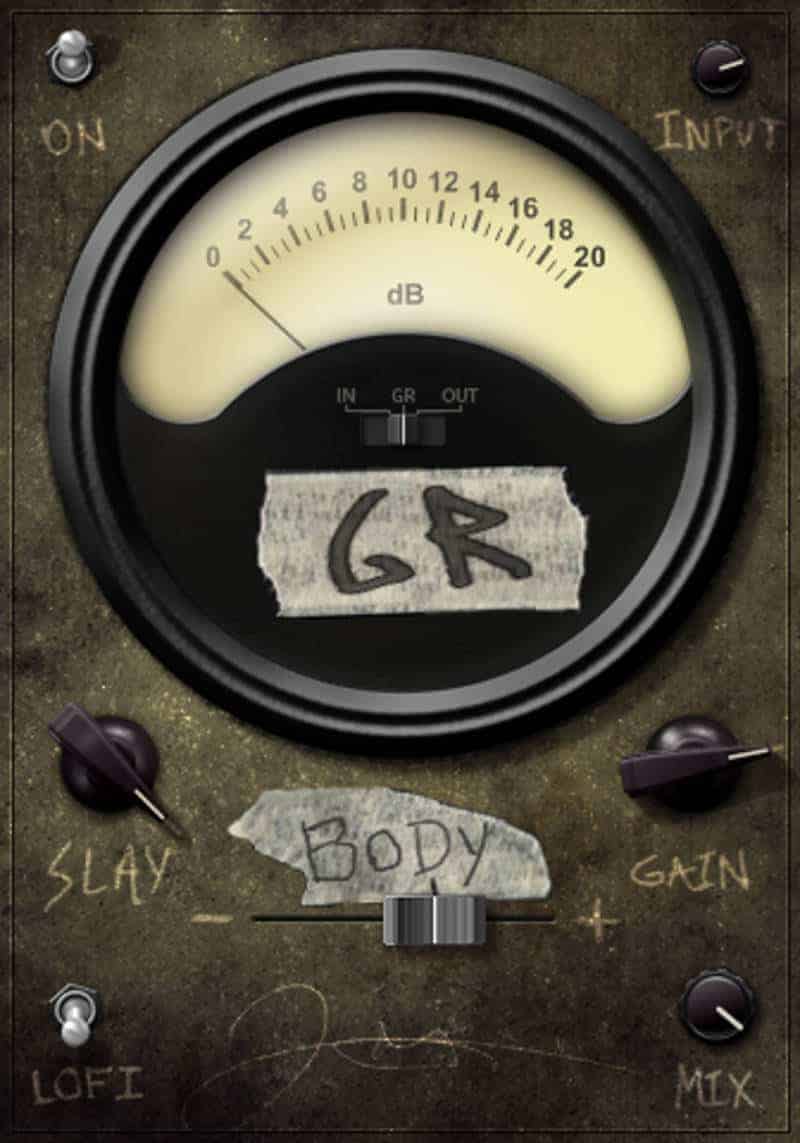
Starting with the GUI, the plugin has a hardware look, styled like an old, gritty, beat up hardware processor. Complete with masking tape and etched-in labels, this thing looks like it’s survived a nuclear blast and is still compressing. Post-apocalyptic visuals aside, the layout is straightforward and contains few controls.
The central part of the interface hosts the VU meter which shows the gain reduction being applied. The meter lights up when the plugin is turned on, controlled by an on-off flip switch on the top left. As soon as the plugin is engaged, its gritty sound character becomes apparent. This is in no way a transparent compressor. You’re getting a hefty amount of very pleasing saturation along the way. There is no threshold dial on this plugin. Instead, the threshold is at a set level. By adjusting the input level on the top right of the interface, you can control how hard your audio is pressed into the threshold.

The “Slay” control is effectively the ratio parameter and governs the amount of compression applied. There is a scratch mark on the GUI that indicates the default setting of 100%, which can be backed off as required. I quite like that the default setting is quite aggressive. It’s further reinforcement of the fact that this plugin is doing a lot with only a few controls. The manual states that the compressor’s internal signal detector has a high-pass filter applied to it, so the compressor is not reacting to bass frequencies.
“Gain” is a make-up gain control and by default is set to +27 dB. Along with gain, saturation is also applied, and by pushing the value beyond the default position, more noticeable distortion occurs. If you are processing a vocal track with even a minor amount of grit to it, this sounds fantastic, as it smooths out the vocal and makes it more prominent. For metal vocals, it almost felt like cheating to get such a good sound with so little effort.
“Body” is a tilt EQ control which allows the user to, if necessary, tame some of the low-end. Compression can make bass frequencies become overpowering, which becomes a real issue if the vocalist moves closer to the microphone during the performance. A tilt EQ will proportionally boost the highs and cut the lows simultaneously, correcting the issue in a single blow. Again, this sounded great on clean vocal recordings but helped even more when applied to metal vocals. I tested it on a vocal performance where the vocalist had a particularly percussive style and backing off the body control a little brought the whole thing under control without losing the punch.
The “Lofi” control provides an additional method of coloring the signal. Don’t be afraid; this isn’t a sea of hiss or anything like that. It’s a useful effect that adds a slightly more raw quality to the audio. I found this particularly handy on a project where the vocalist drastically changed the texture of his vocals throughout the song. Specifically, there was a part of the song where he changed from singing to spoken words. The raw audio was very jarring, and the whole thing felt awkward and almost pasted on like an afterthought. However, the Lofi effect in Gain Reduction was clear enough to maintain the clarity of the spoken words but dirty enough so that it gave it a bit of context. It added a bit of cohesiveness to the song, and to be honest, prevented the clean vocal part from sounding cheesy. The Lofi effect is a useful tool to try when a vocal part somehow bothers you, but you can’t quite diagnose the problem.
Finally, the ‘Mix’ control allows you to blend in some of the dry uncompressed signal with the wet signal for full control over how ‘in-your-face’ the compressed audio is. A little bit of parallel compression goes a long way when you want to add body and character to a vocal without making it sound overcompressed.
The Verdict
JST Gain Reduction Deluxe is the type of compressor to use when you want to achieve a full, warm vocal sound with just a few mouse clicks. It’s not the kind of plugin that can summon limitless flavors of compression. This compressor was built to do a task, and in that it excels. JST Gain Reduction Deluxe delivers a mix of compression, saturation, and filtering that simply works great on vocals.
All in all, for a reasonable price point, you get a product which outlines what it’s going to do for you. Then, with a combination of straightforward functionality, excellent tone, and distinctive visuals to wrap up the package, absolutely delivers on that claim.
More info: JST Gain Reduction Deluxe (on sale for $35.40)
Last Updated on September 26, 2017 by Tomislav Zlatic.
JST Gain Reduction Deluxe Review
JST Gain Reduction Deluxe is the type of compressor to use when you want to achieve a full, warm vocal sound with just a few mouse clicks.
-
Features7
-
Workflow10
-
Performance10
-
Design9
-
Sound10
-
Pricing9
