



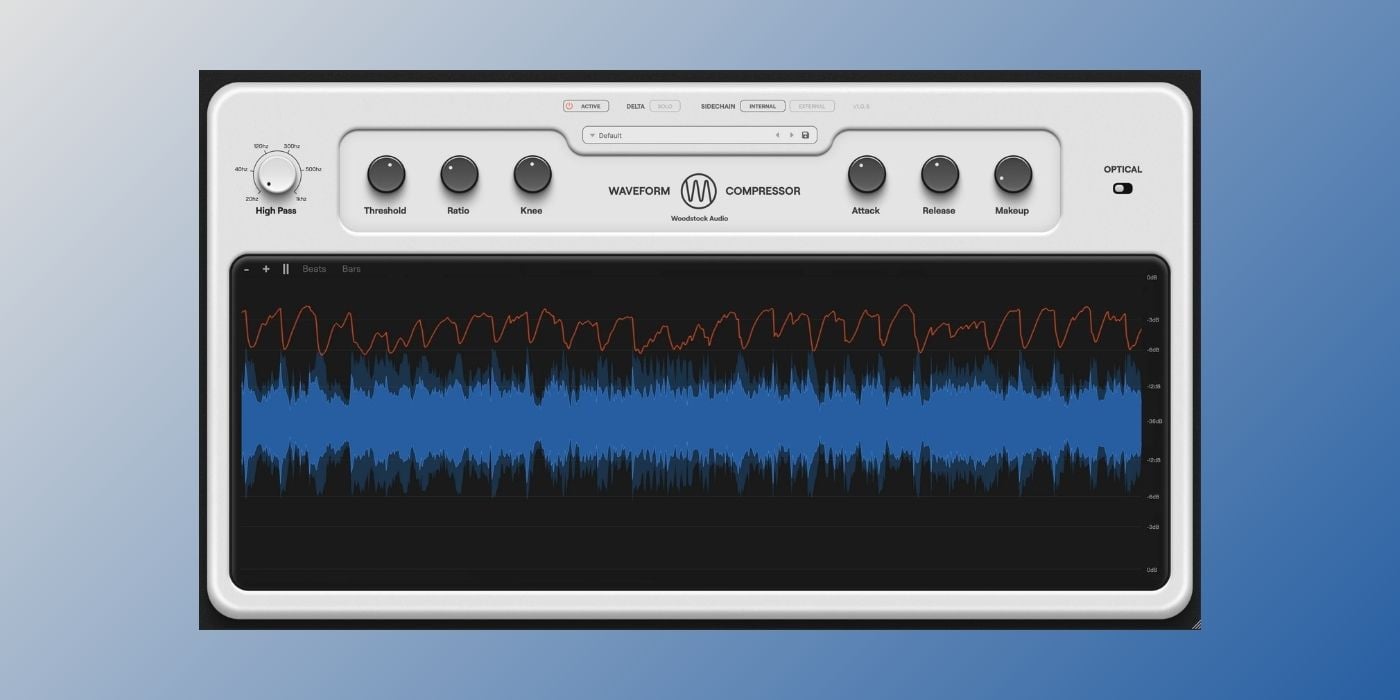
We covered Waveform Compressor briefly when it launched in February, but the developer has since released a detailed walkthrough, which is a good reason to take a closer look at what this free compressor from Woodstock Audio actually offers.
I think it’s one of the best free compressor plugins right now, and probably the best first compressor plugin for beginners who want to learn how compression actually works.
The Waveform Visualizer
The big advantage of Waveform Compressor is that it gives you clear visual feedback on what the compression is doing. This helps tremendously with understanding how the compression controls affect your sound.
I remember it was one of the hardest things for me to figure out when I was first learning about mixing, and a compressor like this would have helped a lot.

The waveform visualizer shows the input and output signals simultaneously, with a gain reduction line overlaid and a threshold line that moves as you adjust the threshold knob.
This lets you see which peaks in your audio the compressor will catch before committing to a setting. And it also helps you see what’s happening with the signal, which in turn helps you understand the changes you’re hearing.
The display supports zoom, pause, and optional bar and beat lines (it’s also GPU-accelerated for better performance).
Compression Modes
The default Regular mode is a feedforward design using peak detection, similar in behavior to a standard VCA compressor. The available controls are Threshold, Ratio (1:1 to 24:1), Attack (20 microseconds to 250 milliseconds), Release (25 milliseconds to 5 seconds), and Knee (0 to 18dB).
Optical mode changes the behavior quite a bit. In this mode, the attack and release are replaced by a program-dependent response.
The attack averages around 15 milliseconds when the compressor has recently been active, but slows to around 70 milliseconds after a period of silence.
The release runs through two stages: an initial fast phase around 70 milliseconds, followed by roughly 50% recovery within one second, then a much slower tail extending to around 12 seconds under heavy gain reduction.

You can still adjust the ratio and knee in Optical mode, giving some flexibility over the character within the opto model.
Other Features
The Delta Solo function lets you monitor the difference signal rather than the compressed output.
I haven’t seen this available in many other freeware compressors, and it’s another big plus for beginners because it makes it much easier to judge how much you’re affecting transients and which frequencies are most impacted.
The detector circuit has a high-pass filter, which I find useful for bus compression, where you want to reduce the influence of low-frequency content on the gain reduction. External sidechain routing is also supported.
Ten factory presets are included to help you get started. They cover various analog compressor characteristics, as well as mix bus and mastering applications. Custom presets can be saved from within the plugin.
The plugin is completely free to download and doesn’t require license activation.
Free Download
Waveform Compressor is available in AAX, VST3, and AU formats for macOS 10.13 and higher (with native Apple Silicon support from macOS 11) and Windows 10 and 11 (64-bit).
Download: Waveform Compressor by Woodstock Audio (FREE)
