



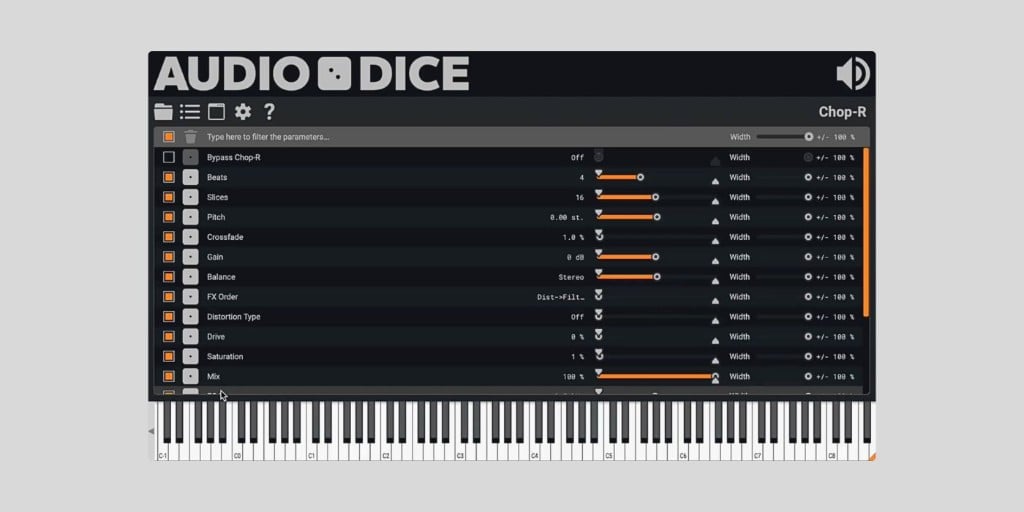
Sound Development has released AudioDice, a free plugin host that randomizes the parameters of other plugins.
AudioDice loads inside your DAW as a VST3 or AU plugin (in either FX or Instrument mode), and you then load the third-party plugin you actually want to randomize inside it.
From there, you can roll the proverbial dice on individual parameters or the entire plugin state at once, even on synths and effects with thousands of exposed parameters.
I love randomization in plugins, especially for sound design work. When you’re working with a complex synth or a multi-stage effect chain, sometimes the fastest path to something interesting is to roll the dice and see what comes out the other end.
This method led me to many happy accidents that I wouldn’t have programmed on purpose. Obviously, this doesn’t make much sense for simple plugins with three knobs, but for something like Vital or a complex effect that doesn’t ship with its own randomize button, AudioDice is a really cool option.
My favorite thing about AudioDice is how much control it gives you over the randomization. Each parameter has its own randomization width (up to ±100%) that determines how dramatically a value can change, plus a range that defines the minimum and maximum it’s allowed to land between.

There’s also a global width control that scales everything at once. And you can disable individual parameters entirely, which means you can keep some things locked in place while letting the dice loose on everything else.
So you still have a lot of control over what’s actually being randomized. It’s not like you’re pressing a button that leads to complete chaos in your plugins.
Selecting which parameters to enable is made easier with Knob Mode. When you switch it on, any control you touch in the hosted plugin’s UI gets added to the active list.
There’s also a parameter filter for when you’re working with a synth that exposes hundreds of entries, and a pretty well implemented undo/redo system so you can step back through dice rolls without losing the one you actually liked.
State management lets you save and recall randomized presets, and there’s a panic button (double-click the mute) to reset the hosted plugin if it goes off the rails.
The plugin recently hit version 1.1.1, which adds MIDI through, along with the option to disable discrete parameters by default (these often don’t randomize very well), and an optional safety dialog before randomizing.
I also like that plugin scanning runs out-of-process in a background thread, so a misbehaving plugin in your library won’t take AudioDice down with it.
It’s well-made, overall. It was rock-solid for me on macOS during testing, and getting it is painless. You can just download directly from the developer’s site, no account or activation required.
AudioDice is available in VST3 and AU formats for macOS and Windows.
Download: AudioDice (FREE)
Deal of the day 🔥: Get the VATRA mix finisher plugin by Flame Sound!More:
- DAWJunkie releases Knobs, a FREE random-effects processor plugin
- Midi Maker Is A FREE Music Generator Tool Based On Randomness
Last Updated on May 17, 2026 by Tomislav Zlatic.
