
Close Menu
Bedroom Producers Blog
  • Home
  • Favorites
    • Free VST
    • Free DAW
    • Free Autotune
    • Free Drum Kits
    • Free Music Production Software
  • Reviews
  • Tutorials
  • Gear
  • Samples
  • 💬 Community
  • News
    • Software News
    • Soundware News
    • Deals
  • Black Friday
Connect
  • About Us
  • Our Team
  • Privacy Policy
  • Advertise
  • Contact Us
Download
BPB Saturator Plus
Bedroom Producers Blog releases FREE BPB Saturator Plus analog saturation plugin
BPB Bassaturator
BPB Bassaturator is a FREE Bass Booster Plugin
BPB Dirty VHS
BPB Dirty VHS (FREE VHS Tape Plugin)
BPB Dirty Filter Plus
BPB Dirty Filter Plus (FREE Dual Filter Distortion)
BPB Dirty LA
BPB Dirty LA (FREE Vintage Limiting Amplifier)
  • Free VST
  • Free Autotune
  • Free DAW
  • Music Software
  • Drum Kits
  • Black Friday
YouTube Instagram Facebook X (Twitter) RSS
Bedroom Producers Blog
  • Home
  • Reviews
  • Tutorials
  • Gear
  • Samples
  • Downloads
  • Community
  • News
    • Software News
    • Soundware News
    • Deals
SUPPORT BPB ❤️
Bedroom Producers Blog
You are at:Home»News»Plea Tech offers Pure Amber spectral shaping plugin for Windows for FREE for a limited time
News

Plea Tech offers Pure Amber spectral shaping plugin for Windows for FREE for a limited time

March 20, 2026By James Nugent28 Comments
Plea Tech's Pure Amber spectral shaping plugin for Windows is FREE for a limited time
Pure Amber is a spectral-shaping and resonance-control plugin for Windows made by Plea Tech, usually priced at $9.99, but is now available for free for a limited time.
You can now download it for free using the promo code “VI-CONTROL” for a limited time.
I’m not sure how long the promo code will remain active, so grab it while you can.
Pure Amber is available as a VST3 plugin for Windows.
If you’re on macOS and looking for a spectral shaping plugin that’s a little bit different, check out Ewan Bristow’s ANINA.
Pure Amber is Plea Tech’s answer to resonance suppressors that leave you with a clean but lifeless mix.

YouTube video

The key to most things in music is balance, and sometimes, technically fixing a problem can suck the soul out of your music, and it’s about finding that sweet spot.
My initial thought on Pure Amber is that it looks like an incredibly well-put-together plugin.
On appearance, it doesn’t look like a $9.99 plugin; the interface looks great.
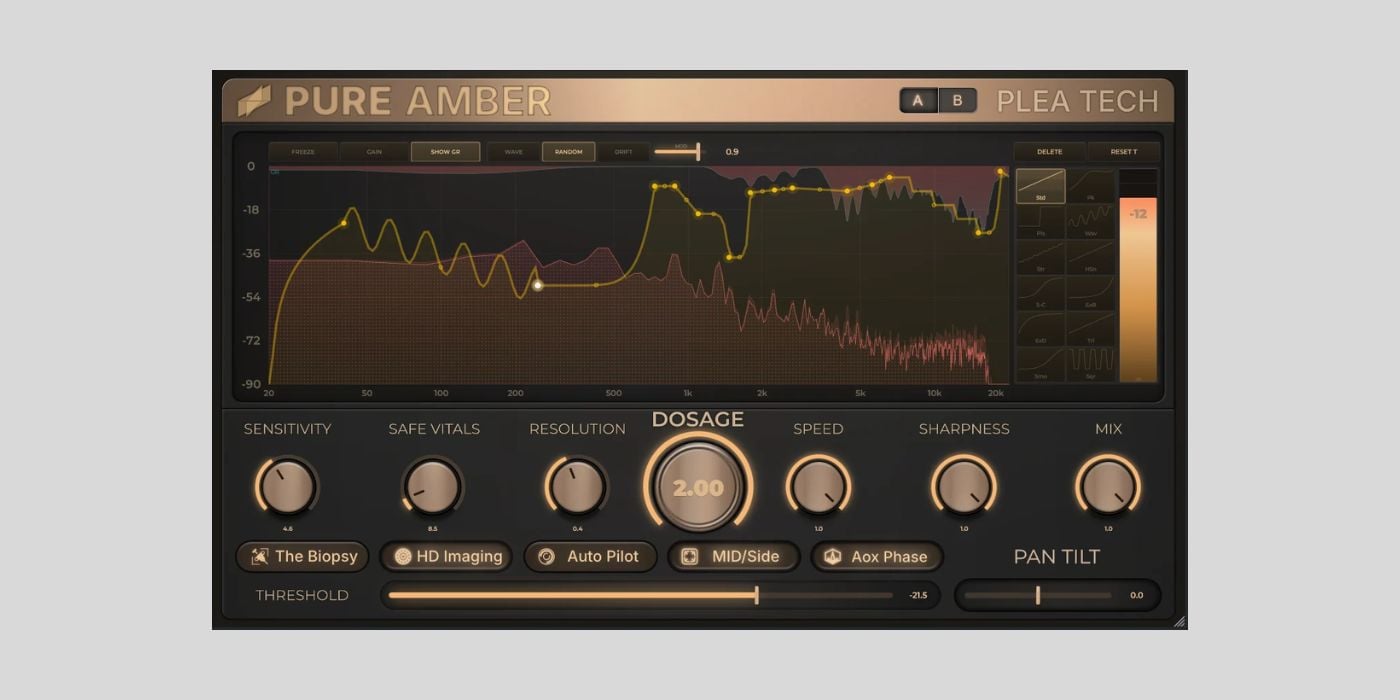
The first thing that stands out is the spectrum display, where you can see exactly what’s going on, and even draw custom suppression curves. Alternatively, you can choose from twelve available curve shapes.
The core controls are nice and clear:
  • Dosage – master intensity
  • Sensitivity/Resolution – these controls fine-tune what the plugin reacts to
  • Safe Vitals – determines how deep any single frequency can be cut
  • The Biopsy – delta mode (hear what the plugin is removing)
I like that all of the above controls, besides Dosage, are there to help maintain musical results, no matter how hard you push the intensity.
Pure Amber’s Mid/Side mode also helps you preserve the good stuff. In Mid/Side mode, the plugin splits your audio into eight bands of allpass decorrelation, tackling harshness while preserving your mono bass.
One of the features that interests me most is the Min/Pase/Variation Mode that the developer describes as “bringing life back to digital.”
In the mode, the plugin adds subtle movement to frequency bins that are being suppressed. This movement could be an ideal way to maintain a seemingly organic sound when you have to make very aggressive cuts.
I’m interested to hear how Windows users get on with that feature.
I’m also interested in hearing what you make of the Auto Pilot mode with a multi-pass learning engine; let me know how well it works for speedy results.
With everything working as it should, it seems to me like Pure Amber would be a good buy for $9.99, so grabbing it for free should be a no-brainer.
Download: Pure Amber (FREE for a limited time with code “VI-CONTROL”)
Deal of the day 🔥: Get 59% OFF Roland ZENOLOGY PRO!
More:
  • Animate by Mastering The Mix is FREE at Plugin Alliance until March 24th
  • HoRNet Plugins TrackUtility is FREE until March 20th

Last Updated on March 20, 2026 by Tomislav Zlatic.

Free Software Windows
Avatar photo
James Nugent

James is a musician and writer from Scotland. An avid synth fan, sound designer, and coffee drinker. Sometimes found wandering around Europe with an MPC in hand.

Subscribe
Notify of
28 Comments
Newest
Oldest Most Voted
Inline Feedbacks
View all comments
📬 BPB Newsletter
GET FREE STUFF - Receive the latest FREE plugins in your inbox every week.
Latest
Analog Obsession releases MuChild, a FREE Fairchild 660 emulation plugin
May 6, 2026
Pulsar Audio Smasher is FREE for a limited time again
May 6, 2026
NovoNotes releases SnapClip, a free clipper plugin with graph-based control
May 6, 2026
Mastering The Mix releases STEREOVAULT, a new stereo width plugin (LAUNCH OFFER)
Sponsor: Mastering The MixMay 6, 2026
DEALS
Deal of the day 🔥: Get 59% OFF Roland ZENOLOGY PRO!
Featured
How to Prepare A Song For Mixing
September 6, 2024
A Guide To Mixing Music For Music Producers
April 13, 2024
The Best FREE Drum Kits in 2026
January 27, 2026
Free Kontakt Libraries
January 28, 2025
COMMUNITY

🔥 Deals & Freebies Thread – May 2026

May 1, 2026201

🤝 Plugin Exchange Thread – May 2026

May 1, 202617
aHow to Prepare A Song For Mixing
9 Mins Read
How to Prepare A Song For Mixing
How To Make Beats: A Quick Beat Making Guide For Beginners
10 Mins Read
Beat Making 101: How to Make a Beat for Beginners
Browse
# Music Production Software
# Free VST Plugins
# Digital Audio Workstations
# Video Editing Software
# Free Mastering Software
Download

# BPB Dirty Filter Plus
# BPB Dirty VHS
# BPB Dirty LA
# BPB Dirty Spring
# BPB Saturator

Community
# BPB on YouTube
# BPB on Facebook
# BPB on X (Twitter)
# BPB on SoundCloud
# BPB on Instagram
Subscribe
Subscribe to our mailing list to receive the latest music freeware news. We also have an RSS Feed.
Click to subscribe
© 2009 - 2026, Bedroom Producers Blog.
  • About Us
  • Our Team
  • Privacy Policy
  • Advertise
  • Contact Us

Type above and press Enter to search. Press Esc to cancel.