



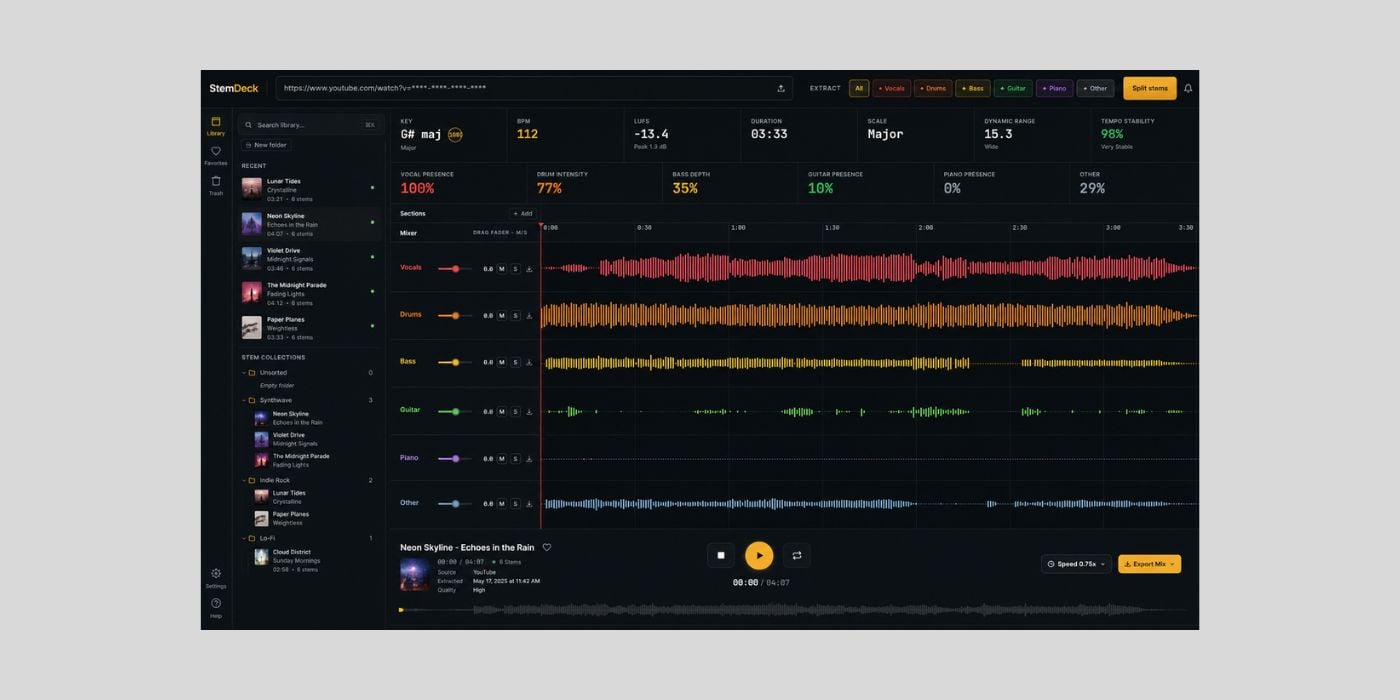
Solo developer Thales Claro has released StemDeck, a free and open-source stem separation tool for Windows, macOS, and Linux.
Thales says he built StemDeck to help his kid practice drums, after wanting a way to pull stems without paying a subscription or uploading music to someone else’s server.
We’ve covered a few stem tools over the years, including Ultimate Vocal Remover and Go-Splitter, but StemDeck is unusually straightforward compared to most other similar tools. It is free, local, open source, and does not require an account, quota, upload, or subscription.
StemDeck uses the open-source Demucs htdemucs_6s model to separate songs into up to six stems, covering vocals, drums, bass, guitar, piano, and others. It automatically chooses the best available Torch device, including CUDA on NVIDIA systems, MPS on Apple Silicon, or CPU fallback.
You can import local files in common formats like MP3, WAV, FLAC, OGG/Opus, MP4, and M4A, or paste a YouTube URL for content you have the right to process. That said, the GitHub page makes it clear that StemDeck is a stem separation tool, not a downloader, and that users are responsible for respecting copyright and platform terms.
Once the separation is finished, StemDeck opens a browser-based multitrack mixer. You can mute, solo, and balance stems, monitor a single stem, zoom the waveform, loop a section, and export individual stems or a custom mix.
If you select only part of the available stems, StemDeck can also create an “Original” lane containing the rest of the song, which is pretty useful for A/B checking or if you’re using this stuff for practice.
The app also includes song analysis, with BPM detection, key and scale estimation, confidence, integrated LUFS, and sample peak information. MP4 export is supported too, so you can mux the current mix with the source video when working with an MP4 upload or YouTube source.
Another cool part is the local network option. The developer told me that StemDeck can be made available on your local network from the settings, so you can run the processing on your computer and control the library and mixer from another device on the same network.
StemDeck is still alpha software, though. Separation quality is useful for practice, remix prep, transcription, sampling preparation, and experimentation, but it is not intended as a direct replacement for polished commercial services.
There are also some practical setup details. On the first launch, StemDeck downloads the Python runtime, FFmpeg, and the Demucs model. Once that’s done, subsequent launches start much faster.
Windows users can choose CPU-only or NVIDIA CUDA builds, while macOS has separate Apple Silicon and Intel downloads.
StemDeck is available on GitHub, where it has already passed 2,000 stars. The developer said it has reached more than 13,000 downloads in roughly two months, mostly through word of mouth.
Download: StemDeck (FREE)
Deal of the day 🔥: Get the VATRA mix finisher plugin by Flame Sound!More:
