



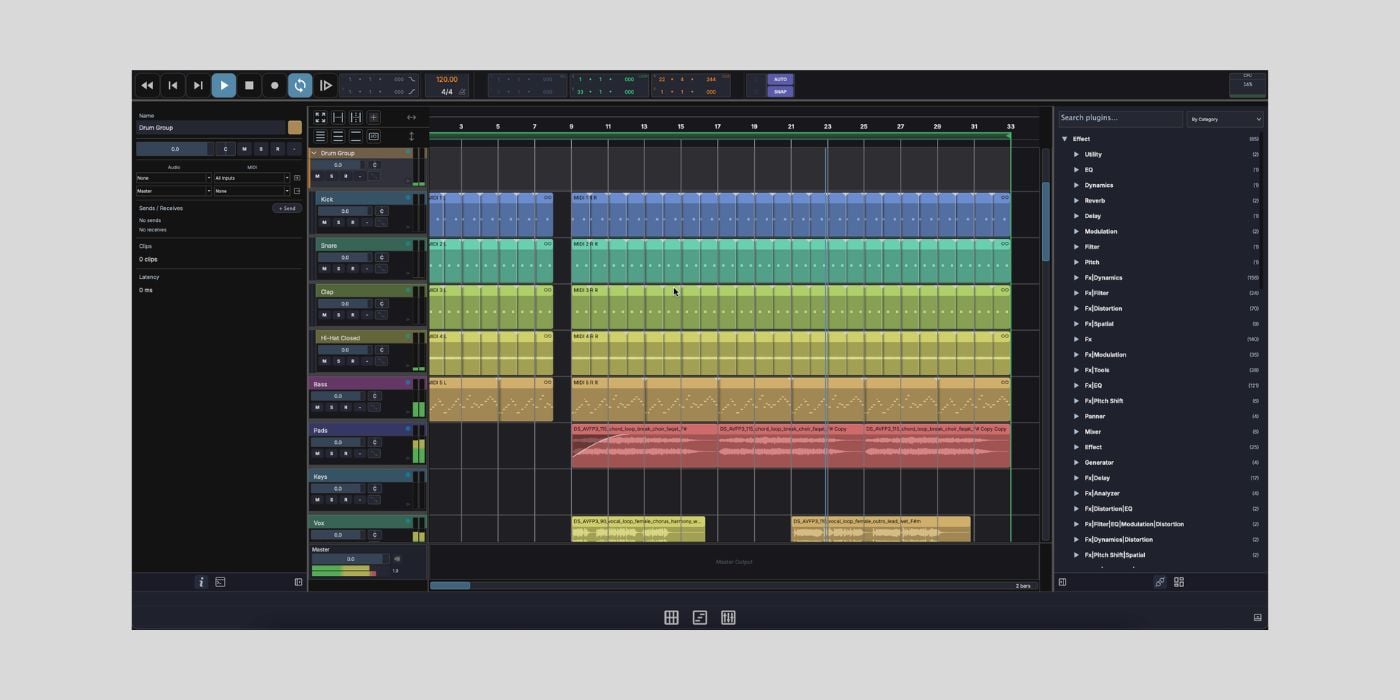
MAGDA is a free and open-source DAW built on JUCE and Tracktion Engine, and Conceptual Machines has just released version 0.4.0.
It’s very early days for MAGDA, so updates might come with significant additions, but before we get into what the latest version has to offer, let’s take a broader overview.
Although it’s early days, MAGDA, which stands for Multi-Agent Digital Audio, has all the fundamental features you’d expect to make new users feel at home.

Luca, the developer behind Conceptual Machines, drew inspiration from existing DAWs, such as Bitwig, Ableton, and Reaper, when designing MAGDA’s layout and workflow.
We all use a particular DAW for a reason, and over time, we develop a sense of comfort and familiarity with it.
The last thing we want when trying a new DAW or workflow is to have to look for things that should be easy to find.
So, in the very short time I’ve spent looking at MAGDA, I’m glad to say that my initial thought was that nothing seemed alien to me or needlessly convoluted.
The transport bar, with all expected controls, is clearly visible along the top of the interface.
Along the bottom, the footer bar lets you switch between three main views: Session, Arrangement, and Mix.
The Arranger view, where we’d likely spend most time, feels very familiar. The inspector panel on the left shows details of the currently selected track, tracks in your timeline are central, and plugins (AU and VST) and Samples (preview) are on the right.
So far, basic functions seem very easy and intuitive. For example, in addition to using the menu or keyboard shortcut, you can create a new track by dragging an instrument or sample into the timeline.
MAGDA tracks are hybrid (MIDI and Audio), so you don’t have to manually select a track type.
I can’t say I’ve had a deep dive into MAGDA yet, and I’m sure that some things will improve on its journey, but I like that it doesn’t seem to overcomplicate anything just to be different at this stage.
Different is only worthwhile if it’s better, which is often lost on new products.
The Session view provides a clip-based workflow for jamming or live performance, which is something many modern producers/artists love.
The latest update focuses on timing and MIDI, with a new Time Bend feature.
The Time Bend feature is interesting; it lets you redistribute or re-space notes across a phrase according to a curve. Changing the spacing between notes and creating clusters can be useful in various ways, rhythmically, harmonically, and melodically.
This new feature, available in the piano roll and drum grid editors, is also built into the two new MIDI devices: the Arpeggiator and Step Sequencer.
Of course, there are many, many aspects of MAGDA to explore, and too many to list here, so check out the website and have a go.
But, since it’s a fairly hot topic (and in the header), I should mention some of the AI-assisted features.
In the inspector panel mentioned earlier, you’ll also find an AI chat box, where you can type plain language commands.
MAGDA translates your commands into a built-in DSL and executes your requests.
For example, this could be beneficial in many basic workflow applications, such as asking the AI agent to create a track with various specific requirements/settings.
Or, ask the AI agent to mute or solo all tracks that meet a specified condition, which could obviously save time and tedious clicking if you have a large number of tracks.
There’s also an AI-generated element, such as AI-generated chord progressions or requests for a new track with a catchy melodic synth line.
Practical benefits are obvious, and I guess creative benefits derived from AI-generated content begin a trickier and more divisive conversation. However, as always, the intention of AI tools and how we use them is important.
MAGDA seems like an ambitious project with the right intentions, and I’m looking forward to seeing how it grows.
Well done, Luca, and Conceptual Machines.
We could soon be saying well done to you if you’re one of our FSK Audio Bark24 winners, but the giveaway ends on April 10, 2026, so enter now, before it’s too late!
Download: MAGDA (FREE)
More:
