



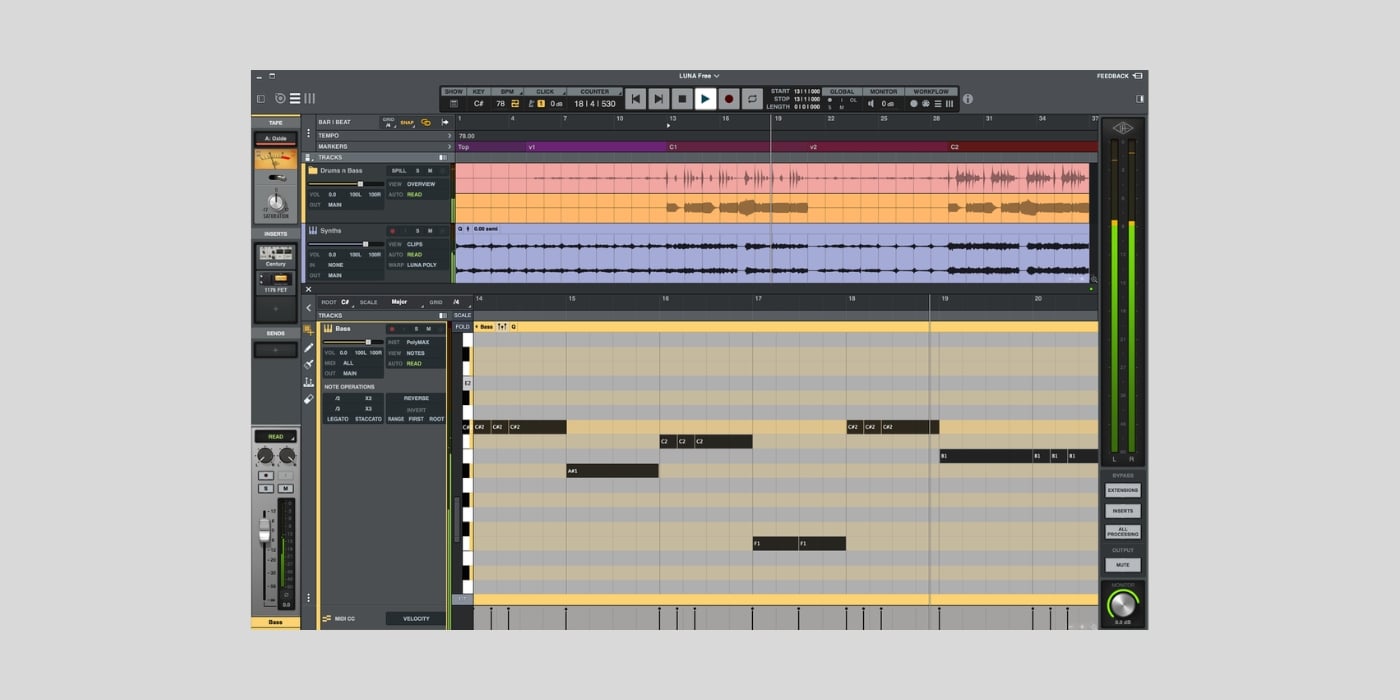
UAD has launched a major update to its award-winning DAW Luna (macOS and Windows). The update brings a slight name change, new workflows, and AI-powered smart features.
Luna Pro becomes Luna Studio; Luna Free is still free, and UAD Spark subscribers now get more for their money.
We’ll take a look at what’s new in the free version, what’s not included, and what UAD Spark customers can expect from their subscription.
What is Luna?
If you’re new to Luna, here’s a brief overview to get you up to speed.
Luna is UAD’s digital audio workstation, available in both free and paid versions.

What makes Luna a little different is that it aims to emulate an analogue recording console, rather than starting from a typical digital blank canvas.
One way Luna pushes its analogue character is by adding a dedicated tape slot on every channel strip (the free version includes the Oxide Tape Recorder extension).
The general workflow isn’t much different from any other DAW, and Luna doesn’t force you to use tape on every track, but the analogue emulation has arguably been the main selling point for years.
If the analogue emulation has been the high point, a lack of MIDI editing and common features like a piano roll have historically been the low point.
With the 3.0 update, UAD hopes to bridge the gap between audio and MIDI capabilities and provide an intuitive workflow for all users.
What’s new in Luna Free 3.0?
Luna 3.0 introduces some interesting new smart features, alternative workflows, and, more importantly, addresses some of the most user-requested additions.

Luna Play
Luna Play is a simplified workflow that lets you sketch ideas quickly. It’s also one of the most significant additions to Luna 3.0.
You start with a sound-check screen, and after a short play, Luna auto-detects your instrument and tempo.
Luna also does basic session setup by adjusting levels and creating a suitable channel strip. The channel strip includes plugins that come free with Luna; Luna Play offers simplified controls, with the option to open individual plugin interfaces.
So far, I’m impressed with how appropriate Luna’s choices are and how smooth the process is.

You can add more instruments as you develop your idea, and when you’re ready, you can move into the full Luna timeline workflow.
Alternatively, you can download your recorded idea as a .WAV for future reference.
It’s not too much hassle to set up a basic session in your DAW; you might even have custom templates, but I really like Luna Play as a sketchpad; it’s great.
Another cool feature of Luna Play is that you can import any song for stem separation; it’s a great way to learn parts for songs or just have fun.
Piano roll
Although Luna has always featured a piano-roll-style view in the main timeline, version 3.0 comes with a fully fledged piano roll, and I’m so glad to see it.
The new piano roll brings Luna more in line with other DAWs by offering quick, easy MIDI note editing and time-savers like scale-aware editing.
A dedicated piano roll is a must, and launching Luna 3.0 without it would have been disastrous; disaster avoided.
Mono input to stereo track
Forums and conversations quickly show that the previous inability to assign a mono input directly to a stereo track for stereo processing irritated Luna users.
Although routing workarounds existed, no one likes a tedious workflow; Luna 3.0 has fixed this issue.

Quick clip tidy
Luna detects audible regions in your audio recordings and trims silent sections.
This feature could be great for podcasters, content creators, and musicians. The feature has adjustable parameters, so you can always feel comfortable with what it’s doing.
Fast and accurate level correction
Clip gain automation lets you accurately target very specific regions, words, or phrases with custom gain curves.
It’s a very handy addition that speeds up your workflow and helps you get the best out of UAD’s excellent analog emulations.
Click track automation
I imagine some people will never use click track automation. But it’s a good indication that UAD wants Luna to appeal to every kind of user and session.
In the right context, it’s a very useful feature.
Stem separation
The stem separation I mentioned above lets you split stereo mixes into four tracks. So far, the results are very good, but I imagine some sources will work better than others.
Ideal for creating acapella tracks.
FX Record
Recording FX directly into the timeline with processing already applied is one feature previously reserved for Apollo interface owners.
Now, every user can do the same thanks to a dedicated Record FX slot.
Folder tracks
Folder tracks are another feature that brings Luna closer to other DAWs.
You can group related tracks together to tidy up your project and make it function like a summing bus.
Adaptive grid
Grid values adapt to your zoom level; this small but impactful feature enhances the overall workflow.
Luna Free includes the UAD Explore Bundle with eight plugins/instruments:
- UA 610 Tube Preamp & EQ Collection
- UA 1176 Classic FET Compressor
- Teletronix LA-2A Tube Compressor
- Vibe Analog Machines Essentials
- Pure Plate Reverb
- UAD Showtime ‘64 Tube Amp
- Century Tube Channel Strip
- PolyMAX Synth
Luna Studio
Luna Studio replaces Luna Pro.
I’m new to Luna, so I’m not entirely clear on the transition process for existing Luna Pro users.
UAD says you can upgrade from Pro to Studio for $79.99, but what does the future look like for Pro users who don’t want to upgrade?
I’d expected Pro users to automatically upgrade to Studio for free.
Anyway, if you are interested in Luna Studio, it offers some features that the free version doesn’t have.
- Stem separation – six tracks (the free version is limited to four)
- Lyric transcription
- Chord extraction
- Audio-to-MIDI
The chord extraction and audio-to-MIDI functions could be very useful, especially when you want to create supporting parts from existing audio.
Luna Studio costs $199 and includes 33 UAD plugins/instruments.
UAD Spark Studio
UAD Spark becomes UAD Spark Studio, and the good news for existing customers is that it now includes Luna Studio.
If you can get on board with a subscription model, UAD Spark Studio is good value compared to many others.
At $149.99 per year for the entire UAD plugin collection and Luna Studio, it’s one of the best subscriptions around (in an ever-growing world of subscriptions).
Final Thoughts
I have a UAD Spark Studio subscription, so adding Luna Studio to the mix is a bonus for me.
But, as much as I love many UAD plugins, I have no inherent bias towards Luna; it previously lacked too many fairly standard features, and it was never seriously on my radar as competition for my main DAW.
Although Luna 3.0 is my first hands-on experience with the DAW, it’s clear this update is a significant step forward.
I’ve been surprised by how much I’ve enjoyed Luna, and while I’m not ready to jump ship just yet, I will certainly use it again. I can see myself using Luna Play whenever I want to capture an idea quickly or pass some time jamming.
I understand it’s easier to enjoy Luna when it comes with an existing subscription; buying it as a new customer is a different proposition.
The $199.99 price tag puts it in direct competition with the likes of Logic Pro.
I can see some users preferring Luna’s analogue-like character over a standard DAW, and the fact that the “stock plugins” are premium UAD products.
However, DAWs like Logic Pro have been around for over 20 years, and Luna is much earlier in its journey.
Luna 3.0 is very good, and it’s a sign that UAD intends to push to become the industry standard in the future.
More info: Luna 3.0 (Luna Free / Luna Studio – $199)
More:
Last Updated on September 16, 2026 by Tomislav Zlatic.
