



OpenDAW isn’t the first DAW to claim free, open-source, and browser-based status, but it might be the most ambitious.
OpenDAW aims to bring professional music production tools to the masses at no cost and will not even ask for your email address.
What is OpenDAW?
OpenDAW is a free browser-based digital audio workstation.
Developer André Michelle built OpenDAW entirely in TypeScript with Web Audio API.
OpenDAW provides a free music production platform where you can record audio and MIDI, produce, arrange, and mix tracks with a growing selection of built-in tools.
In addition to the built-in tools, instruments, and FX, you can write custom audio effects and MIDI processors in JavaScript inside OpenDAW.
OpenDAW is completely open-source, so if you aren’t set on using a browser-based DAW, you can download files directly from GitHub, allowing you to build it locally on your system and tweak, customise, or fork the project.
Browser benefits
The obvious benefit of a browser-based DAW is that you can use it anywhere on any system, and, in this case, it doesn’t even require a login.
When you save your work, it saves locally on your system in a space owned by the browser. If you delete the browser, its data, or switch to another user profile, your saved projects will disappear too.
However, you can export a project bundle as an .odb file, which you can send or store anywhere for easy recall. The .odb file contains all project material, including samples and soundfonts.
Browser-based approaches also come with obvious drawbacks.
The most significant issue, creatively speaking, could be that OpenDAW doesn’t support third-party plugins.
Some browser-based DAWs, like Amped Studio and Audiotool, use host applications or bridge companion apps to run third-party plugins in your browser project. But for now, many OpenDAW users are limited to stock plugins.
I say many users and not all users, because OpenDAW’s Werkstatt and Spielwerk tools let you code custom DSP inside the DAW. You can create anything from simple audio FX to complex MIDI processors. You may also be able to port specific audio algorithms via WebAssembly, etc., but those options won’t apply to people looking for a plug-and-play experience.

The user experience will also differ from one browser to another. For example, Chrome and Firefox support MIDI devices, but Safari doesn’t. You can find more information in the support manual.
Being limited to stock plugins may be a benefit in some cases. Not only can you run OpenDAW on any system, but you’ll have the same toolbox every time, and that consistency is great for beginners.
OpenDAW requires an internet connection for the initial launch, after which it runs locally from cached JavaScript and the Web Audio API.
OpenDAW is still very new, and it already has some excellent features; given the developer’s passion for the project, I imagine the feature set will continue to grow steadily.
What is already an interesting prospect for some should become a more viable alternative for many more.
Interface and workflow
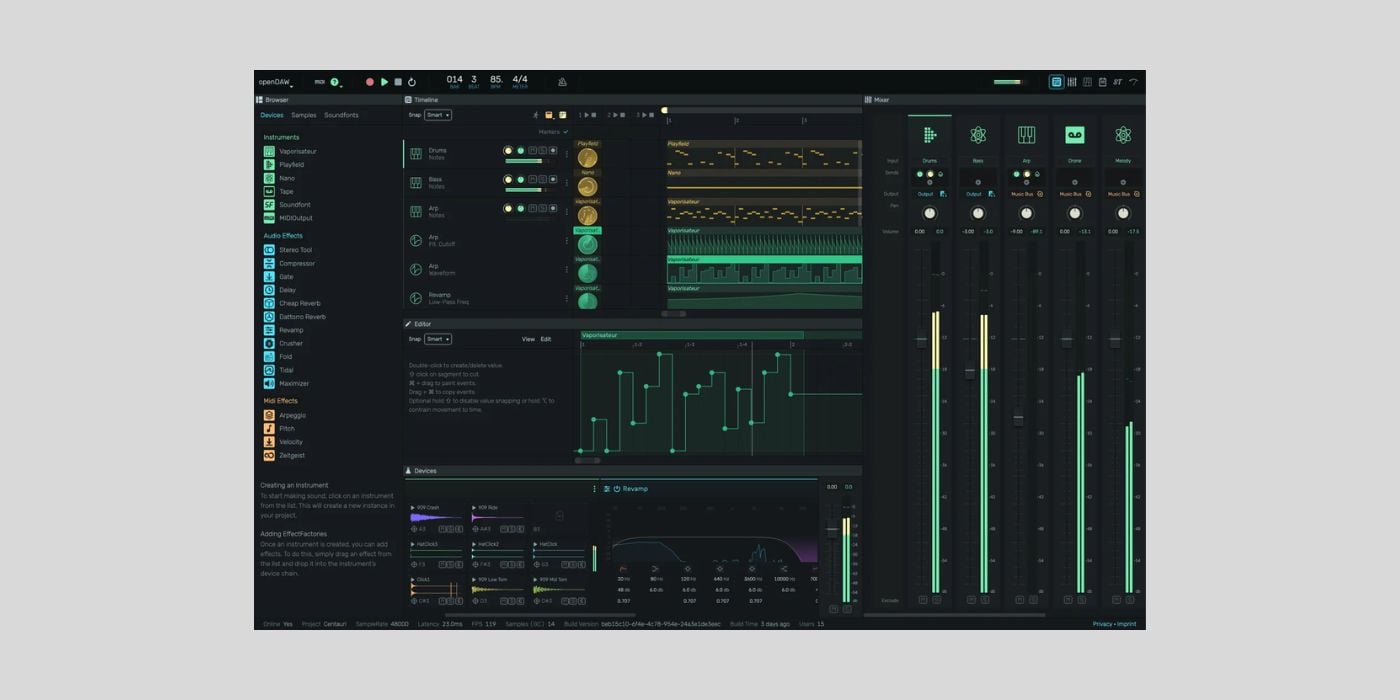
What I like about the interface is that it looks sleek and modern while maintaining a familiar layout.
On the left, you have a browser showing available Instruments, Audio FX, and MIDI FX, with tabs for Samples and Soundfont files. OpenDAW comes with a collection of over 200 loops and one-shots from ModeAudio, a great starting point; ModeAudio is among the best in the business.
A familiar Timeline display takes up most of the default view; you can tweak the displayed information, including markers, tempo data, and Clips columns.
Below the Timeline are Editor and Device panels.
The Editor panel displays the appropriate tools for any selected audio or MIDI region. The piano-roll-style note editor lets you fine-tune in cents and easily edit velocity, note pitch/length, quantisation, grid snapping, etc.
The Device panel displays the active instrument for the selected track and any active FX.
I like the default view; it’s familiar to anyone with DAW experience, and everything is easily accessible and intuitive for beginners.
The workflow is pretty smooth from creating new tracks to editing. You’ll also find lots of expected functionality, like multi-track and multi-take recording, and an on-screen MIDI keyboard.
Transport controls and track/project settings are neatly arranged along the top bar. On the right side of the top bar, you’ll find buttons to select different views, including a dedicated mixer and a Piano Tutorial Mode.
The mixer, with FX, send-FX, output, volume, and pan settings, includes an export function that lets you export all stems as a zip file; even without extra features, it’s nice to have a dedicated mixer view because not all free DAWs provide one.
The Piano Tutorial Mode is interesting; it’s like the countless piano song tutorials you see on YouTube; notes descend into a keyboard layout like a vertical piano roll.
I’m not a massive fan of those YouTube tutorials, but only because they often teach complex music incorrectly, without making it much simpler, which seems to defeat the purpose. Otherwise, they are a great way for piano beginners to learn some songs.
In this case, I quite like it as a built-in feature because people can learn to play parts they programmed, and it highlights the developer’s intention to create an inclusive platform by combining traditional and less traditional features.
When you launch OpenDAW, you get access to demo projects from various contributors, including André Michelle and Bitwig Studio wizard Polaris, who has been a vocal champion of OpenDAW since day one. These demo projects are a good way to jump in and see how everything works.
It’s worth checking out the OpenDAW content from the Polaris Music YouTube channel.

Features
Although there is a long way to go, the current feature set is relatively impressive and inspires optimism for future progression.
- Stock Instruments include:
- Apparat – scriptable instrument
- Cubed – 303-style synth
- Nano – sampler
- Neon – CZ-style synth
- Playfield – drum machine
- Soundfont – sample-based instrument for .sf2 files
- Tape – tape machine playback device
- Vaporizer – subtractive synth
- MIDI Output – send MIDI
All of the instruments and their respective interfaces are relatively simple. My favourite so far is the dual-oscillator subtractive synth, Vaporizer. Vaporizer features a resonant low-pass filter, an LFO, an ADSR envelope, and unison voice stacking. With poly and mono modes, it’s a solid starting point for basses, pads, and leads; I particularly like it for retro analogue-like poly synth stabs.
Despite their relative simplicity, the available instruments cover a lot of ground. The Playfield sample-based drum machine is another nice addition with a drag-and-drop workflow and easy sample editing.
Stock audio Audio/MIDI FX include:
- Stereo Split – per-channel split
- Frequency Split – multiband split
- Autotune – pitch correction
- Compressor
- Crusher – bit crusher
- Dettorro Reverb
- Delay
- Fold – wavefolder
- Free Reverb
- Gate – noise gate
- Maximizer – brickwall limiter
- Revamp – graphic EQ
- Stereo Tool – stereo imaging
- Tidal – tremolo and autopan
- Tone3000 – amp modeller
- Vocoder
- Waveshaper
- Werkstatt – scriptable FX
- Arpeggio – arpeggiator
- Pitch – pitch transformer
- Spielwerk – scriptable FX
- Velocity – velocity transformer
- Zeitgeist – groove/shuffle effect
Even without getting into custom FX scripting, all the basics are covered, and devices like the Tone3000 NAM model loader help broaden your sonic potential.
It’s more than enough for beginners, and it will expand.
Democratizing music production
While free, open-source, and web-based DAWs already exist, OpenDAW goes a few steps further to ensure free access and transparency for all users.
OpenDAW promises:
- No SignUp
- No Tracking
- No Cookie Banners
- No User Profiling
- No Terms & Conditions
- No Ads
- No Paywalls
- No Data Mining
Web-based alternatives like Audiotool require a sign-up, and others like BandLab Studio offer paid membership levels.
Even if we forget the web-based aspect of OpenDAW and focus purely on other free alternatives, there are typically some barriers.
For example, Ardour is free and open-source, but if you want to download pre-compiled installers for macOS and Windows, there is a cost.
OpenDAW has the potential to be the most transparent and most comprehensive free DAW, if all goes to plan.
André Michelle is the original founder of Audiotool, although he left in 2023 after 16+ years.
Given his work with Audiotool and this new venture, it’s fair to say André is passionate about making music production as accessible and unintrusive to as many people as possible.

It’s worth checking out some of André’s other previous endeavours. His portfolio has some interesting projects, including a web-based replication of the Roland TR-909 Rhythm Composer unit.
Education
Education is at the forefront of André’s OpenDAW mission, and that makes sense.
It provides an ever-growing environment where anyone interested in music can learn and experiment at no cost with very limited hardware restrictions.
In turn, it provides a platform for educational institutions of all levels to introduce students to music production.
Whether it’s community-based workshops or colleges, not all music courses are well-funded, if at all. Free software helps level the playing field, and I believe OpenDAW could become a fantastic tool for providing students with a consistent experience that prepares them well for all digital audio workstations.
Final Thoughts
Transparency is a hot topic these days, and with software generally becoming more intrusive, OpenDAW earns a lot of points with its up-front approach.
The open-source structure and ability to code custom elements inside the DAW will appeal to a lot of people, too.
However, if you’re like me and not likely to code custom FX or modify anything, there’s still plenty to be excited about.
Experimenting with OpenDAW is an enjoyable experience, and even if it’s not ready to replace your main DAW yet, it’s already a relatively capable platform considering its short existence.
Additionally, easy access to the web-based workflow could be beneficial to anyone at times, even if you do use another DAW.
My biggest takeaway from looking at OpenDAW is that I’m excited to see and hear what the future brings. Projects that provide the tools we need to make music for free can have a huge impact on music education and the realisation of hidden potential for some.
OpenDAW is an impressive undertaking from André Michelle, and I hope to see it go from strength to strength.
More info: OpenDAW (FREE, browser-based)
More:
Last Updated on August 22, 2026 by Tomislav Zlatic.
