



I tested the best free recording software available in 2026 and picked the top options for this guide.
The list covers everything from simple one-button voice recorders to full multi-track studio software. I’ve ordered the entries from simplest to most advanced, so you can stop reading the moment you find something that fits.
This page focuses on recording audio. If you want a full music production environment with virtual instruments, MIDI, and mixing, see our best free DAWs guide. If you need to edit, clean up, or process existing audio files, our best free audio editors page is the better fit.
Most of the free audio recording software on this list works on Windows, macOS, and Linux. A couple are platform-specific, and one runs entirely in the browser.
Before you download anything: built-in OS recorders
Most people who search for “free recording software” don’t actually need to install anything. Your operating system already has a basic built-in recorder.
On Windows 10 and Windows 11, the Sound Recorder app (formerly called Voice Recorder) is preinstalled. It records single-track audio from any input device, lets you trim the start and end, and exports as M4A, MP3, WAV, FLAC, or WMA. For voice memos, lecture notes, or quick interview recordings, it does the job without any setup.
On macOS, Voice Memos handles the same simple recording task and syncs across iPhone and iPad through iCloud. I use it all the time to capture musical sketches and ideas.
QuickTime Player is the better choice for slightly more involved recording. It can capture audio from any input and, with a free virtual audio driver like BlackHole or the donationware Loopback, it can also record system audio (the sound playing through your speakers).
If any of that covers what you need, you’re done. If not, keep reading.
Best free recording software in 2026
- Audacity
- Ocenaudio
- Wavosaur
- BandLab (web)
- OBS Studio
- GarageBand
- Cakewalk Sonar
- Waveform Free
- Pro Tools Intro
- Ardour
Free recording software comparison
A quick overview of what each program does well in 2026.
| Software | OS | Best for | Multi-track | Plugin support | Catch |
|---|---|---|---|---|---|
| Audacity | Win / Mac / Linux | Default for everyone | ✔ | VST3, LADSPA, Nyquist | Interface feels dated |
| Ocenaudio | Win / Mac / Linux | Fast single-file recording | ✘ | VST | No multi-track |
| Wavosaur | Windows | Portable Windows recording | ✘ | VST | Windows only, no longer updated |
| BandLab (web) | Browser, iOS, Android | No-install, collaboration | ✔ (16 tracks) | None | Internet required, 15-min cap |
| OBS Studio | Win / Mac / Linux | System audio + multi-source | ✔ | VST2 (limited) | Built for streaming, not editing |
| GarageBand | macOS, iOS | Mac multi-track recording | ✔ (255 tracks) | AU only | Apple devices only |
| Cakewalk Sonar | Windows | Windows multi-track | ✔ (unlimited) | VST2, VST3 | Windows only, BandLab account required |
| Waveform Free | Win / Mac / Linux | Cross-platform multi-track | ✔ (unlimited) | VST2, VST3, AU | Layout takes some adjustment |
| Pro Tools Intro | Win / Mac | Learning the studio standard | ✔ (8+8+8) | AAX | 8-track cap, iLok setup |
| Ardour | Linux / Win / Mac | Open-source pro recording | ✔ (unlimited) | VST2, VST3, AU, LV2 | Free on Linux only; $1+ binary on Win/Mac |
Which free recording software should you choose?
Best for everyone (the safe default): Audacity. It’s free, open-source, runs on every operating system, and has been the universal answer to “what should I record audio with?” for over two decades. Start here unless you have a specific reason not to.
Best for recording in the browser: BandLab. No installation, works on any device with Chrome, and includes real-time collaboration with up to 50 people. Useful when you can’t install software (school computer, work laptop, Chromebook).
Best for recording system audio: OBS Studio on any platform, or QuickTime with BlackHole on macOS. OBS captures multiple audio sources at once and is the easiest way to record what’s playing through your speakers alongside your microphone.
Best for recording a band, podcast, or full song: Cakewalk Sonar on Windows, GarageBand on Mac, or Waveform Free on any platform. All three handle multi-track sessions with no track count limits and full plugin support.
Best for learning the studio standard: Pro Tools Intro. The 8-track limit is restrictive, but the workflow you learn here is the same one used in commercial studios.
Best for Linux users: Ardour from your distro’s package repository. It’s the only professional-grade DAW that’s fully free and properly maintained on Linux.
Audacity
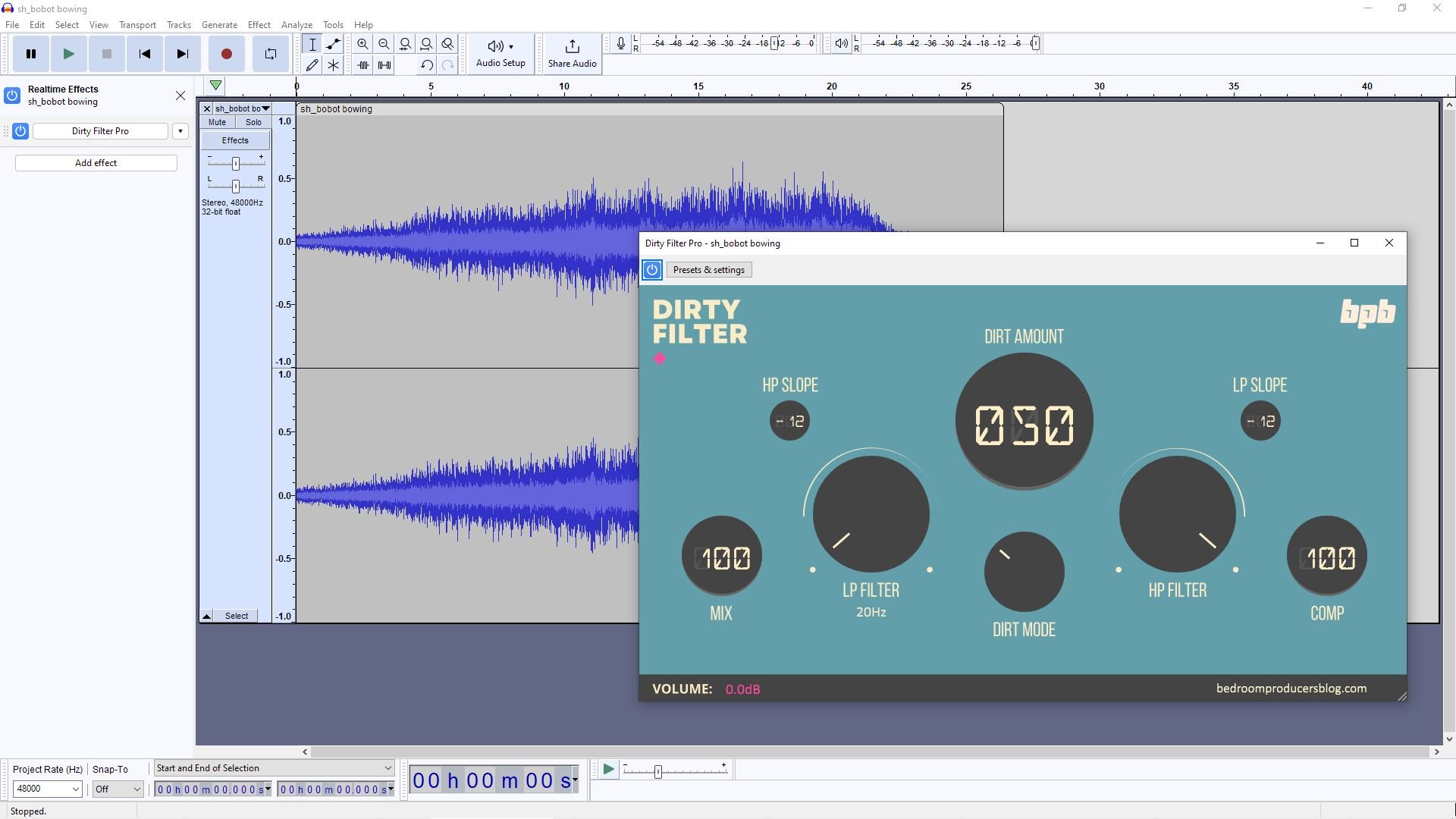
Audacity is still the default answer to “What should I use to record audio for free?” It runs on Windows, macOS, and Linux, costs nothing, and has been actively developed since the early 2000s.
You hit the red record button, audio gets captured from your selected input, and the waveform appears on screen. From there, you can trim, split, fade, normalize, apply effects, and export to almost any format. It handles multi-track recording when you need it, but works equally well as a single-track tool.
I’ve been using Audacity for as long as I’ve been making music, and I still keep it installed even when I have a full DAW open. It’s the fastest way to record a quick voice memo, edit a sample, batch-convert files, or capture a guitar idea before it disappears.
The interface looks dated, and the workflow can feel clunky compared to a modern DAW, but the trade-off is stability and simplicity. Audacity 3.x supports VST3, LADSPA, and Nyquist plugins, includes a useful noise reduction tool, and, in recent versions, adds a set of OpenVINO-based AI features (transcription, music separation, noise removal).
A quick note on the spyware rumors from a few years back. Those concerns related to telemetry settings were quickly walked back after community pushback. The current version is clean, open-source, and shipped through the official site or via MuseHub.
More info: Audacity (free for Windows, macOS, and Linux)
Ocenaudio
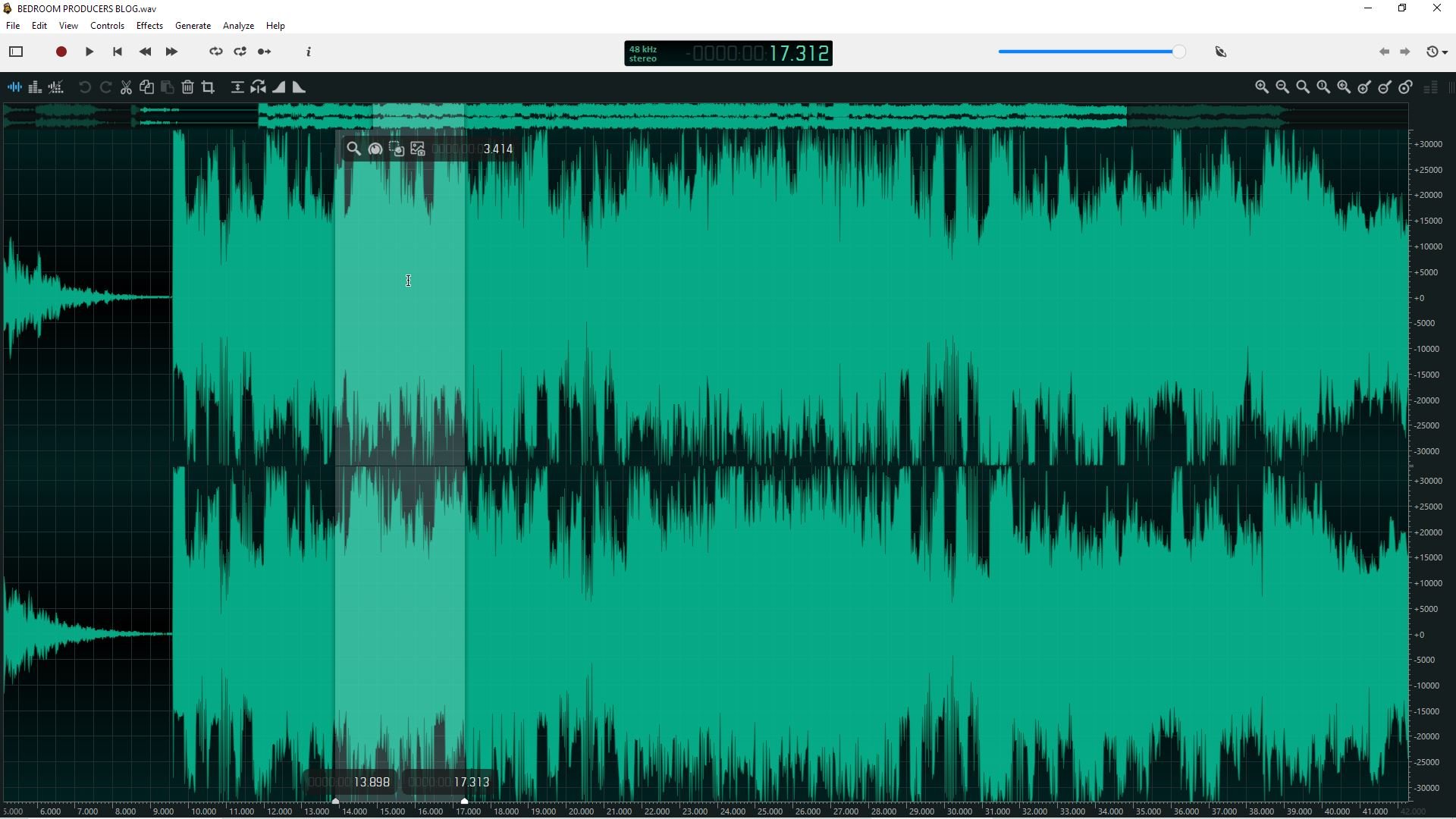
Ocenaudio is a lightweight, single-track audio recorder and editor for Windows, macOS, and Linux. It’s the program I reach for when I want something faster and cleaner than Audacity for one-file work.
Ocenaudio loads large files almost instantly, offers more responsive zooming and navigation than Audacity (the mouse wheel zoom works great!), and supports VST2 plugins for processing.
The real-time effect preview is the standout feature for me. You can hear EQ or filter changes before committing them, which makes Ocenaudio a handy tool for quick tonal adjustments and trimming.
The catch is that Ocenaudio only handles single-track recording. If you need to record vocals over a backing track or capture a band, look further down this list.
For deeper coverage of Ocenaudio and similar editors, see our free audio editors page.
More info: Ocenaudio (free for Windows, macOS, and Linux)
Wavosaur
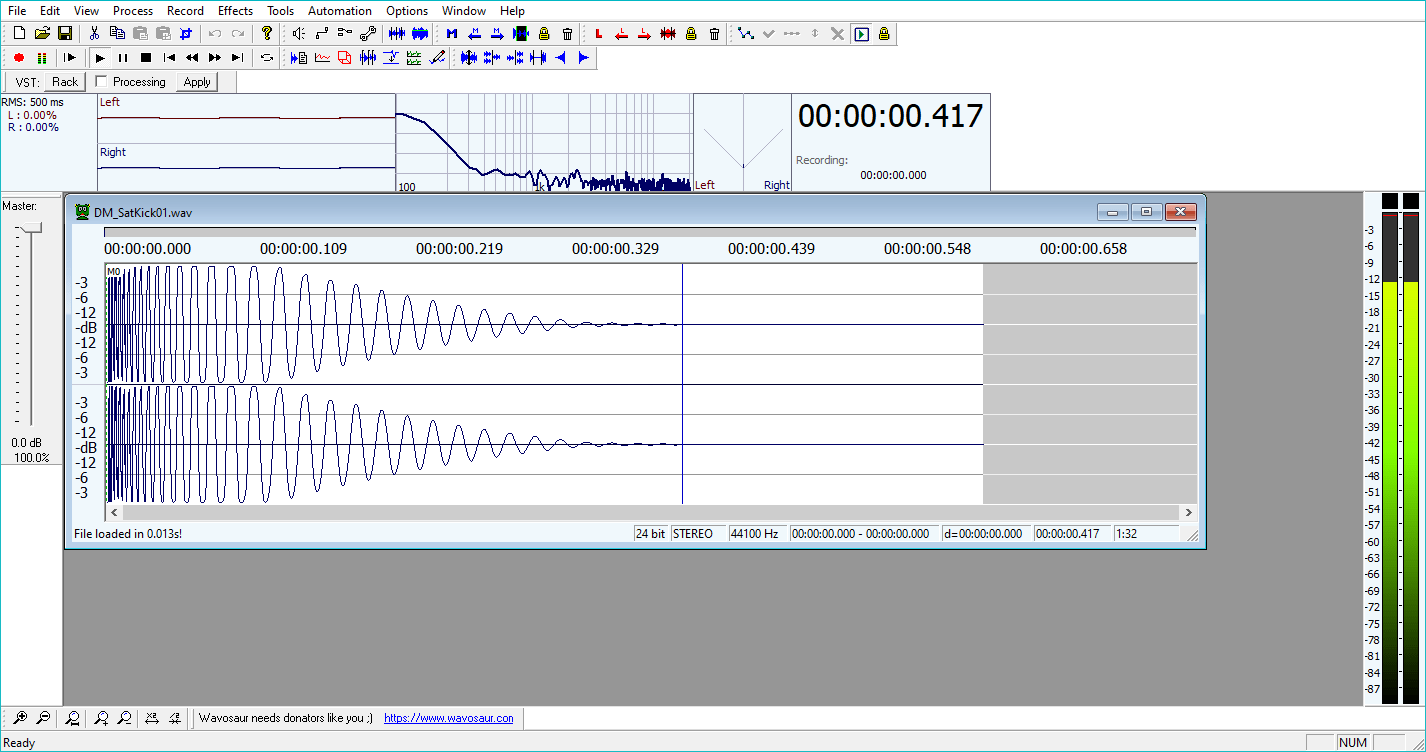
Wavosaur is a portable single-track audio recorder and editor for Windows. The whole program is a single executable that runs from a USB stick, which makes it useful for recording on machines where you can’t install software.
It supports VST plugins, batch processing, loop editing, and the kind of bit-perfect editing tasks that audio professionals occasionally need. Development has slowed significantly in recent years (the most recent stable build is from 2020), but it still runs fine on modern Windows and remains a solid lightweight option.
There’s no macOS or Linux version. Mac users should use Audacity or Ocenaudio instead.
For a full breakdown of how Wavosaur compares to Audacity and Ocenaudio, our free audio editors page goes into more detail.
More info: Wavosaur (free for Windows)
BandLab
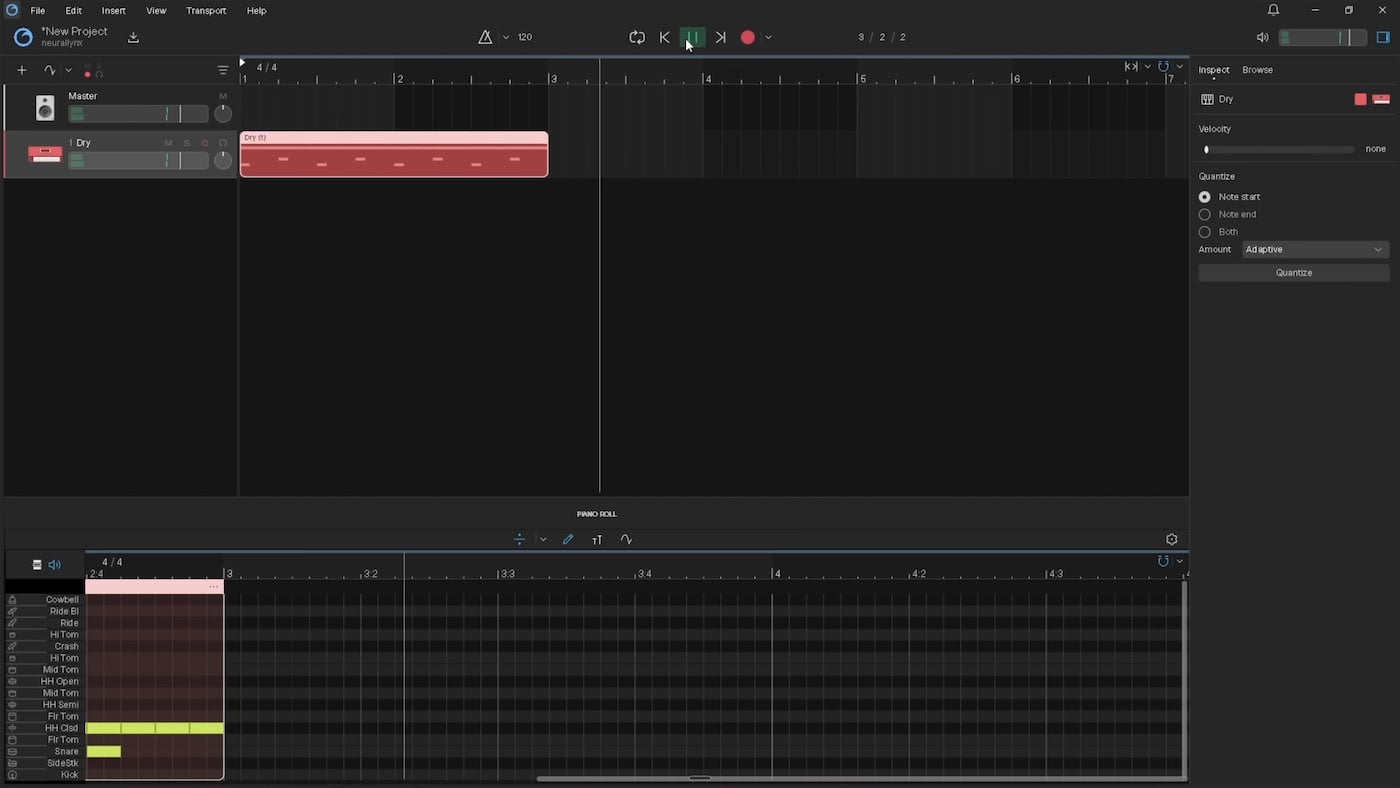
BandLab runs entirely in the browser at bandlab.com. There’s nothing to install; it works on any device with Chrome or Safari, and the iOS and Android apps share the same projects through the cloud.
The free tier gives you 16 tracks per project with a 15-minute project cap, 370+ built-in instruments, 160,000+ royalty-free samples, and 16-bit WAV export. You also get real-time collaboration with up to 50 people on a single project, which is rare in the free DAW space.
I’d recommend BandLab for sketching ideas on a Chromebook, recording while traveling without your main laptop, or collaborating with someone in another city. It’s not the right tool for serious recording, though.
There’s no VST plugin support at any tier, browser latency makes live monitoring difficult, and the 15-minute project ceiling is a hard wall for anyone trying to make a long-form piece. Browser storage issues can also cause occasional project loss, so save and export often.
If you want a real desktop recorder with no install, look at OBS Studio next.
More info: BandLab (free for browser, iOS, Android)
OBS Studio
OBS Studio isn’t usually called recording software, but it’s the best free way to capture system audio, microphone input, and multiple sources at once. It’s open-source, available on Windows, macOS, and Linux, and used by millions of streamers and screencasters.
Most people use OBS for video, but the audio side is also very good. You can route your microphone, system audio, and any virtual audio device into separate tracks, monitor each one with its own meter, and record straight to MP4 or MKV with multiple discrete audio tracks. Pull the audio out in any editor afterward.
OBS is my first answer when someone asks, “How do I record what’s playing on my computer?”
On Windows, the Application Audio Capture source pulls audio from a specific app (great for recording game audio or a video call without picking up other sounds). On macOS, you’ll need a virtual audio driver like BlackHole to route system audio into OBS, but the setup is a one-time thing.
Limited VST2 plugin support is built in for basic on-the-fly processing (gate, EQ, compressor), though you’ll do more serious mixing in a proper DAW.
Most music-focused free recording roundups skip OBS entirely. That’s a miss. If you record podcasts, screencasts, gameplay, lectures, or anything involving system audio, OBS belongs in your toolkit.
More info: OBS Studio (free for Windows, macOS, and Linux)
GarageBand
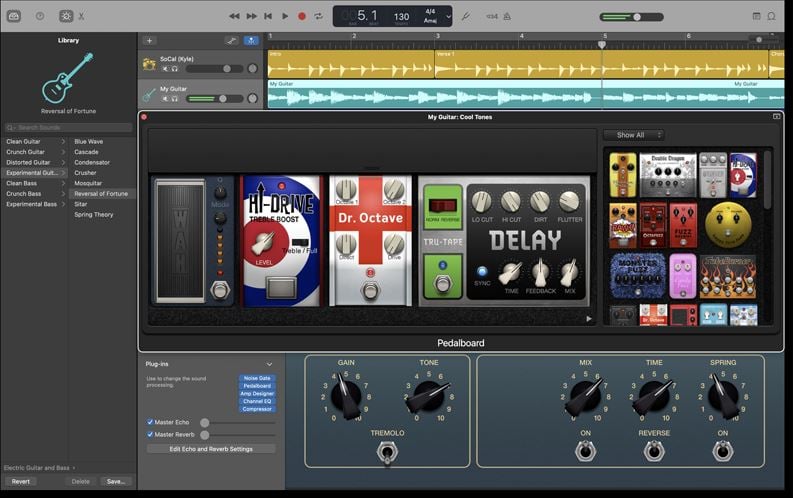
GarageBand comes preinstalled on every Mac, iPhone, and iPad. If you’re on Apple hardware and you want to record audio, this is the most natural starting point.
You get up to 255 tracks per project, multi-track audio recording at 24-bit/96kHz, MIDI sequencing, a full library of stock instruments and effects, and AU plugin support. The interface is designed for beginners, but doesn’t feel limited once you know your way around.
Several commercially released songs were recorded primarily in GarageBand, including Rihanna’s “Umbrella” and several A$AP Rocky tracks.
I use GarageBand for quick recording sessions on my MacBook when I don’t want to launch a heavier DAW. Plugging in an audio interface, arming a track, and recording takes under a minute. The included drum loops, amp simulators, and software instruments cover most things you’d need for a demo.
The trade-off is that GarageBand is Apple-only and doesn’t support VST plugins (just AU, which most plugin developers also ship). Some routing and mixing features in pro DAWs aren’t available here. For most recording tasks on a Mac, those limits won’t bother you.
For broader DAW comparisons, see our best free DAWs guide.
More info: GarageBand (free, included with macOS and iOS)
Cakewalk Sonar

Cakewalk Sonar is the Windows-only successor to Cakewalk by BandLab, which BandLab discontinued in September 2025. The new free tier launched in June 2025 and gives you a full professional DAW with no track limit, ProChannel modular channel strip, AudioSnap, ARA support, and full VST2/VST3 plugin hosting.
For recording vocals, instruments, or a full band on Windows, this is the best free option in 2026. The interface follows the classic studio model with a timeline and detailed mixer; the audio engine is powerful, and you can record at up to 32-bit/384kHz.
A few power-user features (multiple arranger tracks, workspaces, the new Cakewalk Core Plugins suite) sit behind the optional BandLab Membership ($14.95/month), but the free tier is fully usable for serious work.
You need a free BandLab account to activate it, and the program shows a brief upgrade prompt at launch, which some users find annoying. For now, though, free Sonar offers more than any other free Windows recorder.
If you’re on macOS or you want a simpler beginner-focused interface, BandLab also offers Cakewalk Next, a separate cross-platform free DAW built from scratch. Next is less mature than Sonar but works on Mac, includes built-in lyric tools, and shares the same Membership upgrade path.
More info: Cakewalk Sonar (free for Windows, BandLab account required)
Waveform Free
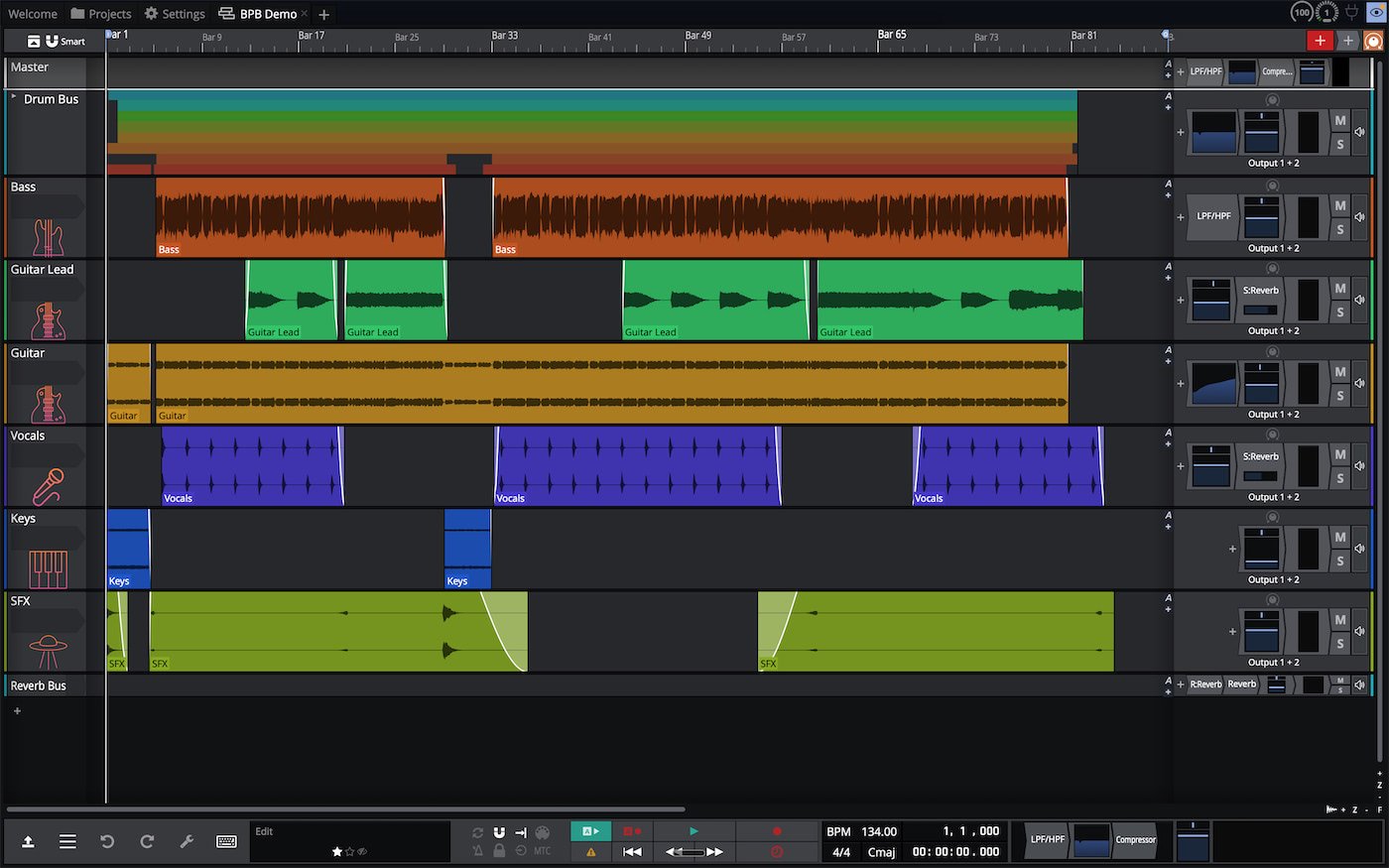
Waveform Free is one of the only free DAWs that runs on Windows, macOS, and Linux while still offering unlimited tracks and full VST2, VST3, and AU plugin support. If you bounce between operating systems or you’re on Linux, it’s the most complete recording option you’ll find.
The current version (V13) introduced a rewritten audio engine, expanded built-in plugin set, and tighter MIDI tools. For multi-track recording specifically, it covers everything you’d want: input monitoring, takes folders, comping, automation, and routing.
The included instruments and effects are decent enough that you can finish a project without installing anything extra.
I recently tested Waveform Free side by side with several other free DAWs and ended up using it as my main travel setup. The only real adjustment is the layout. Waveform doesn’t follow the standard “mixer on the bottom, timeline on top” convention used by GarageBand or Sonar, so the first hour feels unfamiliar. After that, it gets out of your way.
Tracktion (the developer) keeps the free tier feature-rich because it’s a funnel for the paid Waveform Pro upgrade. That works in your favor.
For broader DAW comparisons, see our Waveform Free coverage.
More info: Waveform Free (free for Windows, macOS, and Linux)
Pro Tools Intro
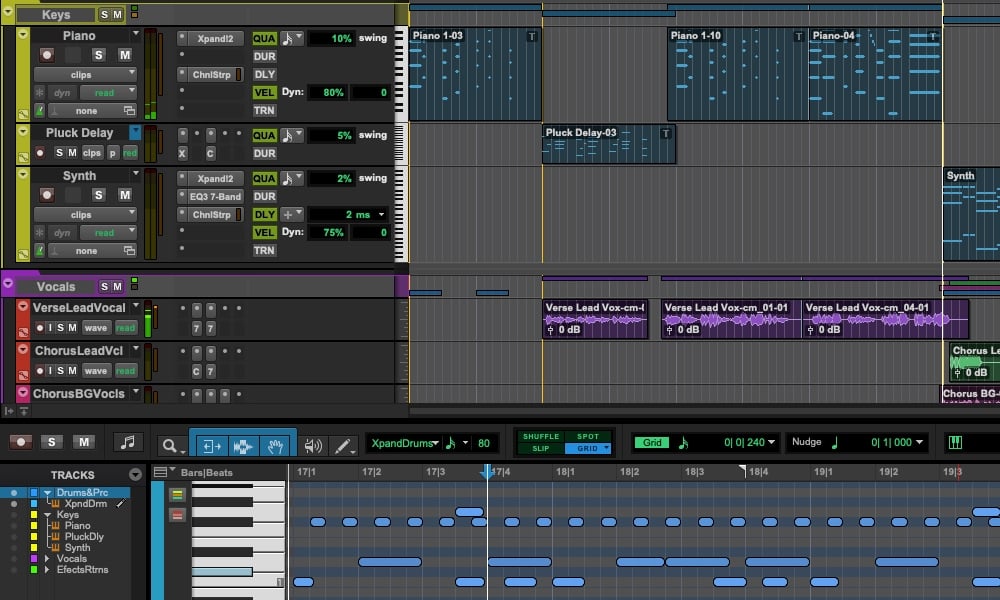
Pro Tools Intro is Avid’s free tier of Pro Tools, aimed at people who want to learn the industry-standard workflow used in commercial studios, post-production houses, and major label sessions. It runs on Windows and macOS and uses the same codebase as the paid versions.
The free tier gives you 8 audio tracks, 8 instrument tracks, 8 MIDI tracks, 4 simultaneous record inputs, and full AAX plugin support. That last part matters because no other free DAW can run commercial AAX plugins. You also get 36 included Avid plugins, AIR Xpand!2 with 2,500+ presets, and the standard .ptx session format that paid Pro Tools rigs can open directly.
Setup is the friction point. You need a free Avid account, a free iLok account, and a running PACE License Service on your machine. If the PACE service fails to start (a known intermittent Windows issue), Pro Tools defaults to Intro mode even when you have a paid license. For a free download, that’s a lot of moving pieces compared to clicking install on Audacity.
The 8-track cap is hit fast in any real production. For a solo singer-songwriter recording vocals and a guitar, it’s fine. For anything more complex, you’ll outgrow it within a couple of sessions.
Use Intro if you specifically want to learn Pro Tools. Otherwise, almost any other entry on this list will record more efficiently.
More info: Pro Tools Intro (free for Windows and macOS, Avid + iLok accounts required)
Ardour
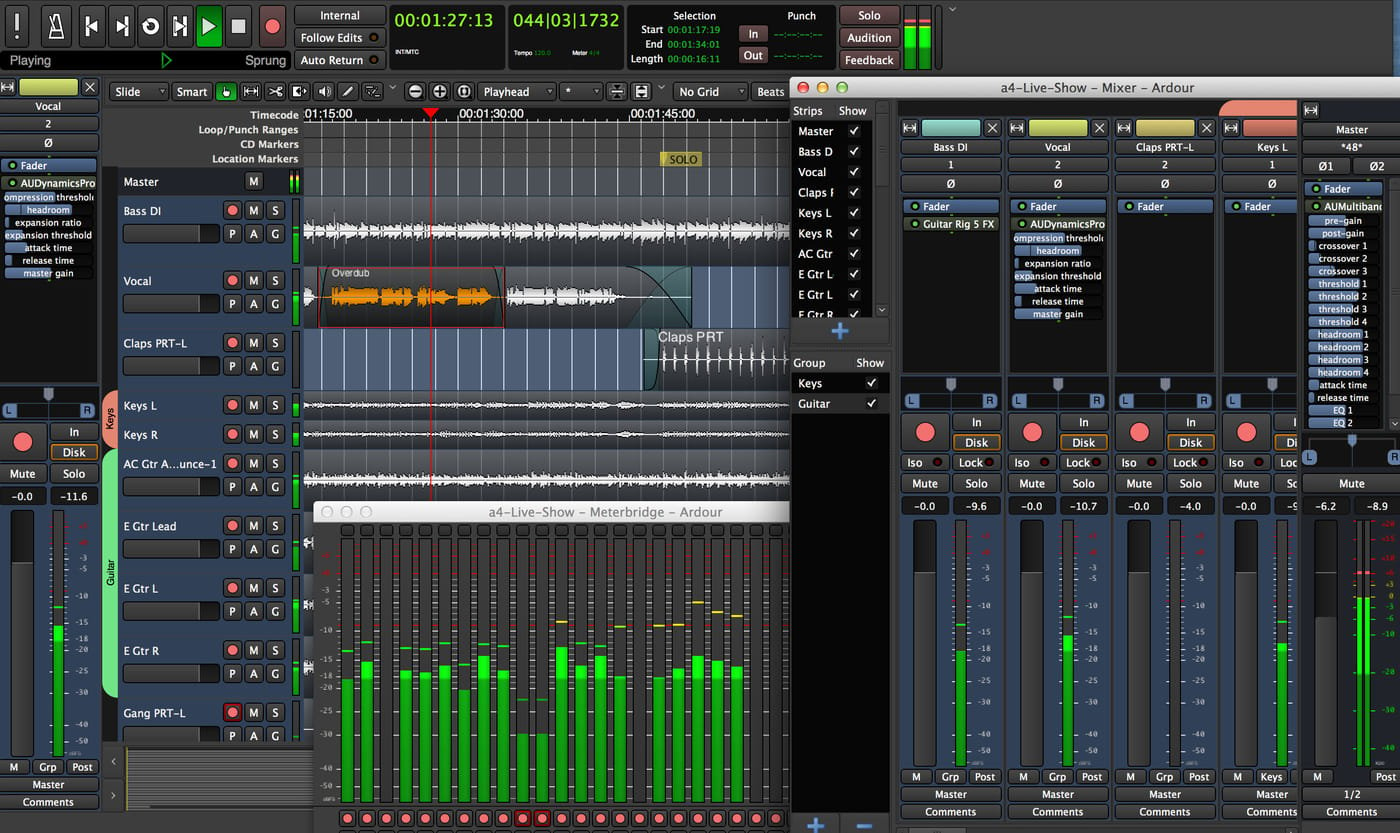
Ardour is a professional-grade open-source DAW that ships in a different way than anything else on this list, and the licensing situation is worth understanding before you download.
On Linux, Ardour from your distro’s package manager (apt, dnf, pacman) is fully free with no limitations. This is the version most users mean when they call Ardour “free.” It supports unlimited tracks, every common plugin format (VST2, VST3, LV2, LADSPA, AU on macOS), and the kind of routing flexibility that JACK and Pipewire users expect. Ardour 9.0, released in February 2026, brought major upgrades including piano roll windows, cue recording, region effects, and a real-time perceptual analyzer.
On Windows and macOS, the official binary from ardour.org costs at least $1. The free demo binary works but mutes audio every 10 minutes (and the intervals get shorter each time you reset it). You can compile Ardour from source for free on any platform, though the developers don’t provide build support for Windows or macOS.
This is open-source software in the strictest sense. The code is GPL-licensed and free to use, but the convenience of a pre-built installer on Win/Mac requires a one-time payment that supports the project. It’s a fair model that nobody else on this list uses.
In real use, Ardour is best for engineers, sound designers, and Linux power users who want full control and zero proprietary lock-in. The MIDI workflow has improved a lot in v9 but still trails Reaper and the commercial DAWs. Beginners on any platform will find the learning curve steep.
More info: Ardour (free on Linux distro repos; $1+ binary for Windows and macOS)
Honorable mentions
- Reaper — fully functional 60-day free trial (continues working past 60 days with a small reminder), then $60 for a personal license. The most respected option for anyone who plans to keep recording long-term and is okay paying eventually.
- Fender Studio — free guitar-focused recording app with one-tap recording, authentic Fender amp sims, and 8 tracks unregistered (16 with a free Fender Connect account). Cross-platform across Windows, macOS, Linux, iOS, and Android. No third-party plugin support.
- DaVinci Resolve (Fairlight tab) — Blackmagic’s free video editor includes a multi-track audio recorder and mixer that’s surprisingly capable. Useful if you’re already using Resolve for video work.
- Voicemeeter (Windows) — virtual audio mixer that lets you route system audio into any recorder. Donationware. Combine with Audacity or OBS for flexible system-audio recording on Windows.
- BlackHole (macOS) — free virtual audio driver that lets QuickTime, GarageBand, or any DAW record system audio on a Mac. Loopback (paid, by Rogue Amoeba) is the more polished alternative.
What about full music production or editing audio files?
This page is focused on the act of recording. If your needs are different, two other BPB pages cover them better.
For making music end-to-end (recording, virtual instruments, MIDI sequencing, mixing, mastering), see our best free DAWs guide. There’s a lot of overlap between that list and this one (GarageBand, Cakewalk Sonar, Waveform Free, and Pro Tools Intro all appear on both), but the framing is different. The DAW page compares them as production environments rather than recording tools.
For editing existing audio files (cutting, trimming, applying effects, batch processing, restoration), our best free audio editors page is the right starting point. Ocenaudio and Wavosaur both shine as dedicated editors, and Audacity sits comfortably between the two categories.
Frequently Asked Questions
What’s the best free recording software for beginners?
Audacity is the safest starting point on Windows, macOS, or Linux. It’s free, easy to install, and covers everything from voice memos to multi-track recording. Mac users with no software installed already have GarageBand, which is even simpler for capturing instruments and vocals.
Can I record system audio for free?
Yes. On any platform, OBS Studio is the easiest free option for capturing what’s playing through your speakers alongside your microphone. On macOS specifically, you can also pair QuickTime Player with the free BlackHole virtual audio driver. On Windows, Voicemeeter works as a free virtual mixer that routes system audio into Audacity or any other recorder.
What’s the best free multi-track recorder?
Cakewalk Sonar on Windows, GarageBand on macOS, and Waveform Free on Windows, macOS, or Linux. All three offer unlimited or very high track counts, full VST or AU plugin support, and the kind of mixing tools needed for serious recording sessions in 2026.
Do I need a DAW just to record audio?
Not for simple recording. For voice memos, single-instrument captures, or quick demos, Audacity or your operating system’s built-in recorder (Sound Recorder on Windows, Voice Memos on macOS) is enough. A full DAW like Cakewalk Sonar, GarageBand, or Waveform Free becomes useful when you’re recording multiple sources, layering tracks, or want to mix and produce inside the same program. See our best free DAWs guide for production-focused recommendations.
Is Audacity safe to use?
Yes. Audacity is open-source software released under the GPL license. There were concerns in 2021 about telemetry settings introduced by a new owner, but those were quickly walked back after community pushback. The current version downloaded from the official website is clean, free of bundled software, and used by tens of millions of people worldwide.
What’s the best free recording software for podcasts?
Audacity is the standard for solo podcast recording and editing. For remote interviews where each guest is on a separate track, OBS Studio works well because it can record multiple audio sources to discrete tracks. For multi-host in-person podcasts, Cakewalk Sonar (Windows), GarageBand (Mac), or Waveform Free (cross-platform) all handle multi-mic recording cleanly with proper takes and editing tools.
Can I use free recording software to release commercial music?
Yes, with the programs on this list. Audacity, GarageBand, Cakewalk Sonar, Waveform Free, Pro Tools Intro, and Ardour all permit commercial use of recordings made with them. The only nuance is BandLab. If you distribute music through the BandLab Membership distribution service, your releases are removed from streaming platforms if your Membership lapses. Other than that, recordings made in any of these programs are fully yours to release, sell, or license.
What’s the difference between a recorder, an editor, and a DAW?
A recorder captures audio from an input. An editor lets you modify existing audio files (cut, trim, apply effects, normalize). A DAW (digital audio workstation) does both, plus virtual instruments, MIDI sequencing, multi-track mixing, and mastering. Most modern programs blur the lines. Audacity is technically an editor with strong recording features, and Cakewalk Sonar is a full DAW that also functions as a multi-track recorder.
Return to our Free VST Plugins page for more freeware plugins and instruments. For deeper coverage of related software, see our guides to the best free DAWs, best free audio editors, and best free music production software.
This page was last updated by Tomislav Zlatic on April 23, 2026.
The author, Tomislav Zlatic, is the founder and editor-in-chief of Bedroom Producers Blog (BPB). Since starting BPB in 2009, he has tested and reviewed hundreds of VST plugins and DAWs.