



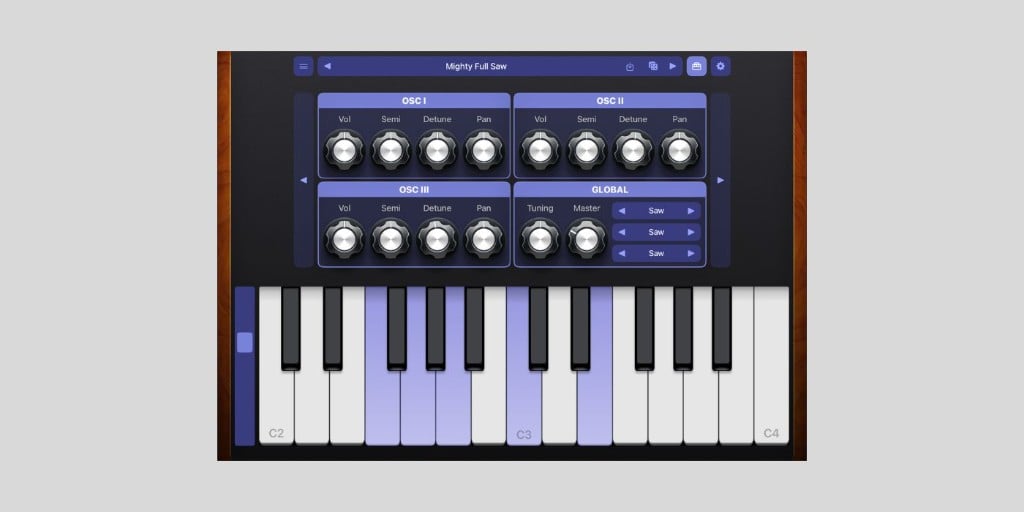
Moby Pixel has released Mighty Synth Sampler, a free synth and sampler app for iPhone, iPad, and Mac.
It is an app that lets you turn any sound into a playable instrument. This is possible with other workflows, of course, but Mighty Synth Sampler was designed to save a great deal of time.
I keep saying the iPad is a fantastic tool for music production, and then I still use it less often than I should. Apps like Mighty Synth Sampler keep reminding me that the iPad can be an excellent sound design tool.
And that’s especially true when an app gives you sampling, synthesis, AUv3 support, and performance controls in one place.
Mighty Synth Sampler is built with AudioKit and works as both a standalone app and a collection of AUv3 plugins. The main synth engine has three independent oscillator layers, each with volume, semitone, detune, and pan controls.

You can shape the sound with amplitude and filter envelopes, a low-pass filter, LFO, unison, glide, drive, and a built-in arpeggiator. It also includes multiple play surfaces, including keys, pads, an All 4ths layout, and a scale layout.
The sampler side lets you record directly in the app or import audio files, then map samples across the keyboard. You can set loop points, root notes, and note ranges, and save your creations as reusable instruments and banks.
That is what makes Mighty Synth Sampler so cool for sound design. For example, you can capture a small sound, map it, loop it, run it through the synth engine, add effects, and turn it into something playable without moving back to a desktop DAW.
The app also supports SF2 and SFZ SoundFonts, which give you almost unlimited flexibility. Even if you ignore the deeper sampling features, it can work as a free SoundFont player on iPhone, iPad, and Mac.
Moby Pixel split the AUv3 side into four plugins. Mighty Synth is the instrument, Mighty Sampler is an audio effect for capturing sounds and building instruments, Mighty Effects is a standalone effects chain, and Mighty MIDI is a MIDI processor and play interface.
That modular approach should work nicely in hosts like AUM, where you can capture another instrument into Mighty Sampler, save it as an instrument, load it in Mighty Synth, and process it with Mighty Effects.
For me, these types of setups capture the idea of making music on an iPad in the best way. You fire up your favorite synths and effects, play around with some sounds, and a small creative loop can quickly turn into a full session.
Mighty Synth Sampler includes a starter bank and supports downloadable sound packs, both free and paid. At launch, the developer offers premium packs like Vintage Synth, Super Chiptune, and Tape Drift, plus a free Arduino Drums pack.
You can also create your own banks and share or sell them outside the app, which could be interesting if sound designers start building third-party libraries for it.
Mighty Synth Sampler is available for iPhone, iPad, and Mac. The app is free with optional in-app purchases for additional sound packs.
Download: Mighty Synth Sampler (FREE)
Deal of the day 🔥: Get the VATRA mix finisher plugin by Flame Sound!More:
