



I tested every free autotune VST plugin available in 2026 and reviewed the best ones in this article.
Like it or not, autotune is very popular in modern music. Our ears grew accustomed to pitch-perfect vocals, and we got used to the slightly unnatural sound of autotune.
Thanks to free autotune alternatives, the pitch correction features that were once exclusive to the Antares Auto-Tune Pro ($399) plugin are now available to everyone.
Pitch correction is primarily used to correct imperfect vocal recordings as transparently as possible. I recommend MAutoPitch and Graillon 3 Free Edition for transparent pitch correction.
However, autotune can also intentionally change the vocal timbre and melody. This technique is known as the “T-Pain effect” or “the Cher effect” and was made famous by Cher’s song “Believe.”Spoton and GSnap are excellent for aggressively autotuned vocals.
Best free autotune VST plugins in 2026
- Graillon 3 Free Edition
- MAutoPitch
- PitchCure
- Spoton
- GSnap
- KeroVee
- TrapTune Free Edition
- Vox Tune Auto Pitch
- Voloco
Free autotune plugin comparison
Here’s a quick overview of each plugin’s features and strengths to help you choose the right one.
| Plugin | OS | Format | Transparent | Hard-Tune | Formant Shift | MIDI Input | Difficulty |
|---|---|---|---|---|---|---|---|
| Graillon 3 Free Edition | Win / Mac | VST, AU | ★★★★★ | ★★★★ | ✔ | ✘ | Easy |
| MAutoPitch | Win / Mac | VST, VST3, AU, AAX | ★★★★★ | ★★★ | ✔ | ✘ | Easy |
| PitchCure | Win / Mac | VST3, AU, AAX | ★★★★ | ★★★★★ | ✘ | ✔ | Easy |
| Spoton | Win / Mac | VST3, AU, AAX | ★★★★ | ★★★★ | ✘ | ✘ | Very Easy |
| GSnap | Win / Mac | VST | ★★★ | ★★★★★ | ✘ | ✔ | Medium |
| KeroVee | Win only | VST (32-bit) | ★★★★ | ★★★★ | ✔ | ✔ | Medium |
| TrapTune Free Edition | Win / Mac | VST, VST3, AU | ★★★ | ★★★★ | ✘ | ✘ | Easy |
| Vox Tune Auto Pitch | Win / Mac | VST3, AU | ★★ | ★★★★ | ✘ | ✘ | Very Easy |
| Voloco | Win / Mac | VST3, AU | ★ | ★★★★ | ✘ | ✘ | Very Easy |
Which Free Autotune Plugin Should You Choose?
Best for transparent, natural pitch correction: Graillon 3 Free Edition or MAutoPitch. Both have smooth pitch-correction algorithms that can fix vocal imperfections without making your voice sound artificial. Graillon 3 edges ahead with its multiple pitch engines, but MAutoPitch offers useful extras like stereo widening and auto-gain.
Best for the T-Pain / hard-tune effect: GSnap or Spoton. GSnap’s MIDI input gives you precise control over which notes the vocal snaps to, making it ideal for melodic hard-tuning. Spoton gets you there faster with a simpler plug-and-play workflow.
Best for preserving natural vibrato: PitchCure. Its Humanize control keeps vibrato and expressive pitch movement intact while still correcting the overall line, so corrected vocals keep their breath and dynamics instead of flattening out.
Best for beginners: Spoton. You can simply load it, pick a scale, turn the Amount knob, and you’re done. There’s no learning curve.
Best for hip-hop and trap vocals: TrapTune Free Edition. The built-in presets are tailored for modern trap production, and the included distortion, reverb, and delay effects save you from loading extra plugins on the channel.
Best for MIDI-controlled pitch correction: GSnap, KeroVee, or PitchCure. All three let you feed MIDI notes into the plugin to dictate exact pitch targets instead of relying on automatic detection. KeroVee also supports MIDI chords.
Best for mobile: Voloco. The iOS and Android app is the strongest free autotune option for mobile production.
Graillon 3 Free Edition by Auburn Sounds

Graillon 3 Free Edition is the best free autotune plugin in 2026.
Its pitch correction module is efficient and easy to use, earning Graillon 3 the number-one spot on this list. It is compatible with all digital audio workstations on Windows and macOS.
Autotuning vocals with Graillon 3 is straightforward. Place it in your vocal mix channel as an insert effect, turn on the Correction module, and you’re ready.
Those who require more control over the pitch correction process can limit the note range to a particular scale, adjust the pitch correction speed, and define the autotune algorithm’s note detection range.
Graillon 3 can sound more or less natural, thanks to its flexible pitch-correction engine. The mix knob on the right-hand side of the user interface can reduce the autotune module’s intensity if needed.
On the other end of the realism spectrum, you can pair Graillon 3’s pitch shifter module with its pitch correction algorithm to develop some unusual-sounding vocals. For example, you can mix the dry vocal with the autotuned signal for a unique chorus-like effect.
The developer recently released an updated version of Graillon 3. It features multiple “pitch engines,” which affect how the plugin changes the sound.
Pros
- It has a great-sounding pitch correction algorithm.
- Offers optional pitch shifting and formant shifting.
- Supports all major operating systems.
Cons
- It’s a free version of paid software, so some options are grayed out on the user interface.
- The color scheme lacks contrast.
Download: Graillon 3 (32-bit & 64-bit VST/AU plugin format for Windows & Mac OS)
MAutoPitch by MeldaProduction
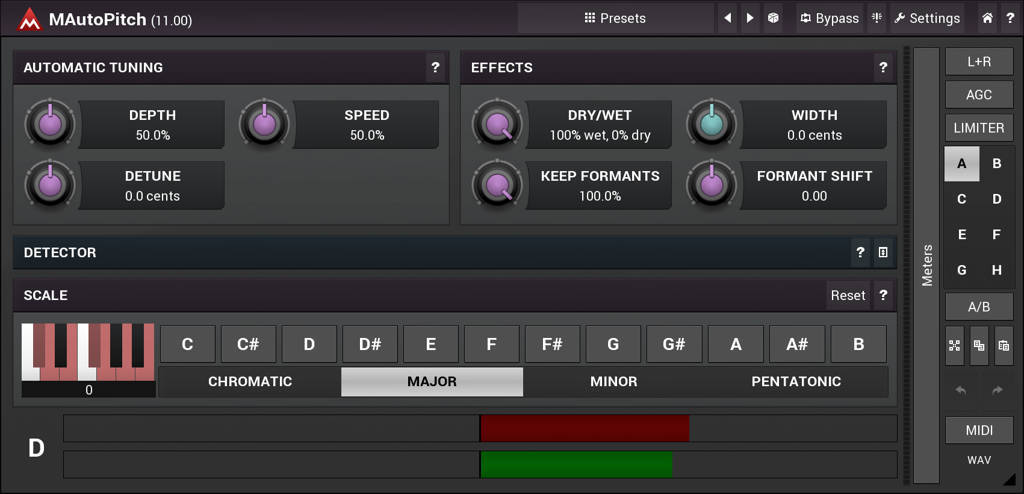
MAutoPitch is a free pitch correction plugin for Windows and macOS.
MeldaProduction included several bonus tools, such as stereo width adjustment, automatic gain control, and a limiter.
MAutoPitch is flexible and easy to operate, with adjustable speed, range, scale, and depth. The interface lets you define the notes that the vocalist is “allowed” to sing, making it almost impossible for the vocal to go out of tune.
I often use the included stereo-widening feature because it sounds excellent on backing vocals. The ability to control the formats is another big plus.
If you don’t like the default color scheme, choose one of the alternative skins. MeldaProduction did a great job with the interface design, and it’s easy to customize to your liking.
Pros
- The core pitch correction algorithm is excellent.
- Helpful bonus features like auto-gain and stereo width.
- Customizable user interface.
Cons
- The control layout takes some time to get used to.
Download: MAutoPitch (32-bit & 64-bit VST/VST3/AU/AAX plugin format for Windows & Mac OS)
PitchCure by Saint Mike DSP
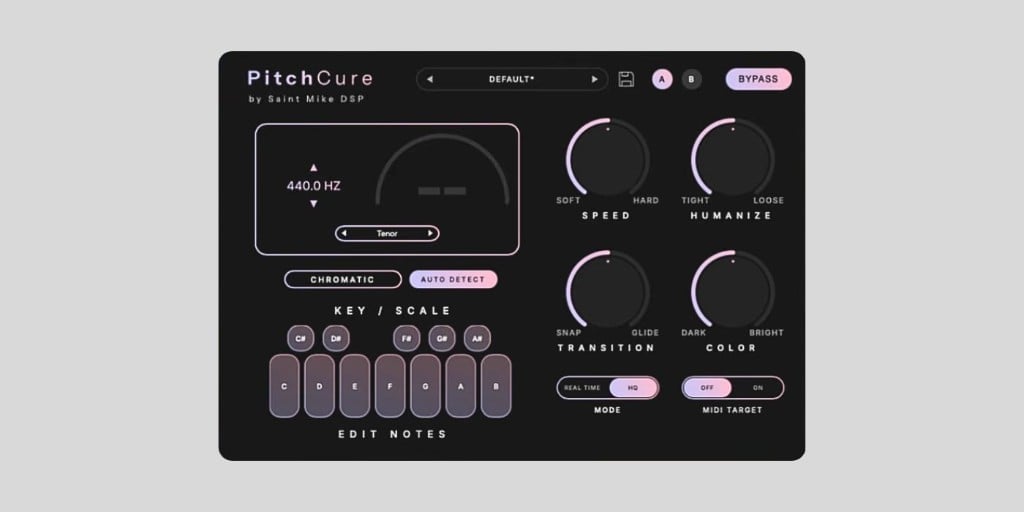
PitchCure is a free vocal pitch correction plugin by Saint Mike DSP for Windows and macOS.
It doesn’t reinvent the autotune category, but it exposes more of the pitch correction algorithm on the front panel than most of the minimal free options. The Speed knob sets how aggressive the correction is, going from transparent tuning all the way to hard T-Pain-style snapping. Transition controls how the voice moves between corrected notes, so you can dial in instant hard snaps or smooth portamento glides.
My favorite is the Humanize control. It preserves vibrato and natural expression, so you can keep the correction strong without the performance going robotic. There’s also a Color knob, which is a tilt EQ that adds chest warmth on the dark side or air on the bright side.
For setting up the correction, you can let PitchCure auto-detect the key with one click, build a custom scale using the Edit Notes matrix, or switch to MIDI Target mode to force the vocal to follow the exact notes you play on a controller. There’s also a vocal range selector to help the algorithm track better.
The plugin runs in two modes. Real Time mode has near-zero latency for tracking in the vocal booth, and HQ mode is meant for mixdown when you want maximum quality. It’s optimized for low CPU, so you can stack it across a dozen vocal layers in a session. I tested it on my M1 MacBook Air and it ran without issues.
Pros
- Speed, Transition, Humanize, and Color give you real front-panel control.
- MIDI Target mode for forcing exact notes.
- Low CPU with a dedicated HQ mode for mixdown.
Cons
- No formant shift control.
- Windows version is VST3/AAX only (no VST2).
Download: PitchCure (VST3/AU/AAX for macOS 11+, VST3/AAX for Windows 10/11 64-bit)
Spoton by Sixth Sample

Spoton is the easiest-to-use free autotune plugin. However, that doesn’t make it less useful if you’re looking for quick pitch correction results.
The plugin utilizes a simple plug-and-play workflow. Load it on your vocal track, and the pitch will snap to the selected scale as soon as you move the Amount knob.
If the resulting vocal is too “autotuned” for your taste, use the Speed knob to make the pitch correction more natural.
You can use the keyboard at the bottom of the interface to define the scale. This will ensure the pitch is corrected to match the notes in your song.
Spoton is a simple, fast, and completely free autotune effect. It closely matches the pitch correction quality of Graillon 2 Free Edition while being more straightforward for beginners.
Pros
- Speedy plug-and-play workflow.
- Lets you control the speed and intensity of pitch correction.
Cons
- Lacks advanced controls.
Download: Spoton (VST3, AU, AAX for Windows & macOS)
GSnap by Graham Yeadon
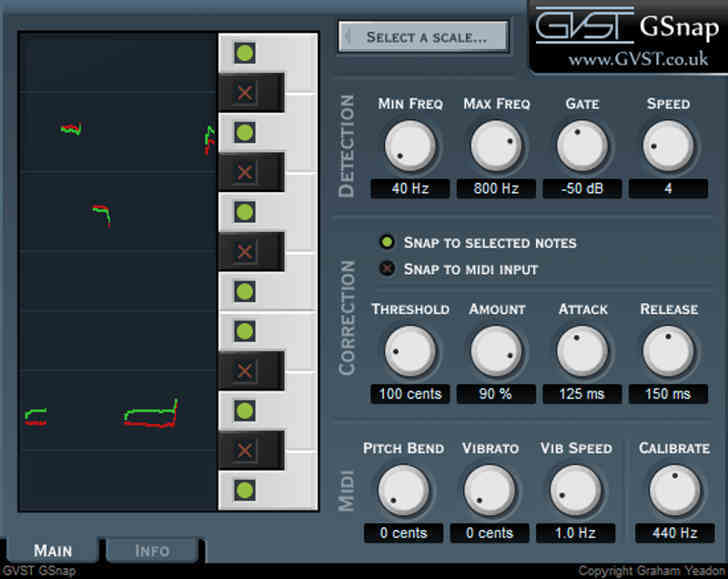
GSnap is an old plugin, but it’s still quite capable and fully compatible with modern DAWs. It was the first free autotune VST on the market.
At first glance, GSnap seems similar to Graillon 2 and MAutoPitch. However, one excellent feature that sets it apart is the ability to tune the processed audio signal according to the MIDI notes on the input.
In other words, you don’t have to rely on the plugin’s automatic pitch detection algorithm. Instead, the user can feed the correct MIDI notes into the plugin and let it handle the rest.
GSnap’s automatic pitch detection algorithm also performs well, though it lacks the formant-shifting features available in Graillon 2 and MAutoPitch.
Unlike Graillon 2 and MAutoPitch, GSnap only works on Windows-based systems. However, it does come with a very well-written manual. The instructions are worth reading if you want to use GSnap as your go-to free autotune effect.
Pros
- Lets you play the correct notes via MIDI.
- Lightweight and easy to use.
Cons
- It’s an old plugin, so the GUI is a bit small.
Download: GSnap (32-bit & 64-bit VST plugin format for Windows & macOS)
KeroVee by g200kg
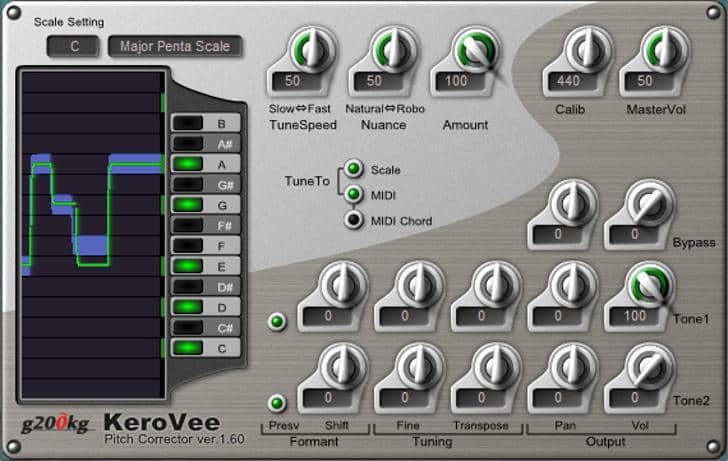
KeroVee is another old-school pitch correction tool, released way back in 2010.
Although it looks less modern than the previous three autotune VSTs on this list, KeroVee’s feature set is on par with the competition. It also features the MIDI input mode seen in GSnap.
Although MIDI input isn’t required for that classic “T-Pain autotune effect,” the feature is convenient if you want absolute control over the vocal pitch. In a way, KeroVee is closer to Celemony Melodyne than Antares Auto-Tune.
However, KeroVee can also operate in automatic “free autotune” mode, like Graillon 2 and MAutoPitch.
One area in which KeroVee doesn’t shine is system compatibility. It will only work as a VST plugin in Windows-based digital audio workstations, so Mac users are out of luck.
If you use an older Windows DAW, KeroVee could be the best option for a gratis autotune plugin. It uses almost zero CPU resources and works excellently on older 32-bit systems.
Pros
- Highly customizable pitch correction algorithm.
- Visual representation of the incoming pitch.
- Option to use MIDI chords.
Cons
- Looks very dated.
- The control layout is somewhat confusing.
- Windows only.
Download: KeroVee (32-bit VST plugin format for Windows)
TrapTune Free Edition by UnitedPlugins
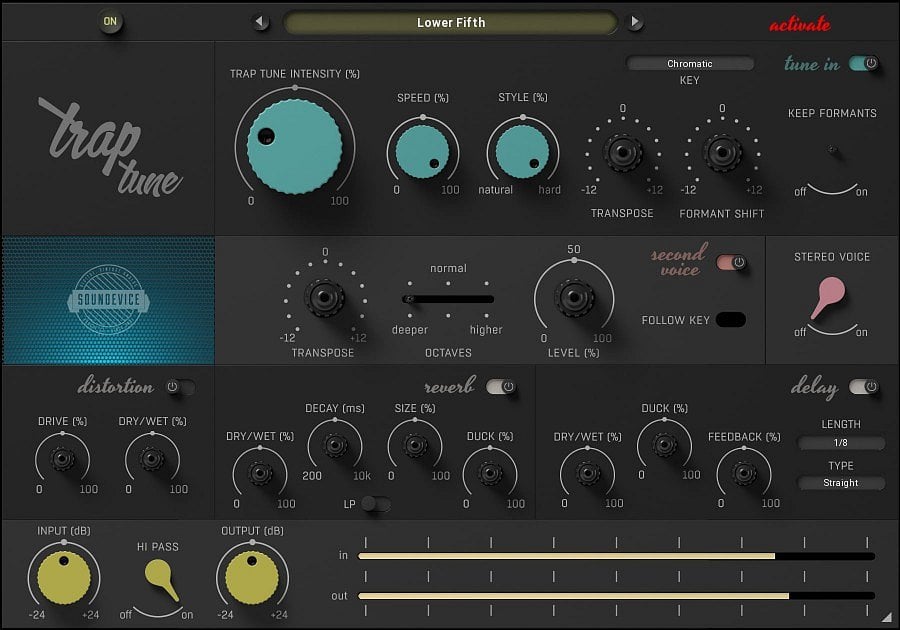
TrapTune Free Edition is a freeware autotune alternative by UnitedPlugins. It is a lightweight version of the full TrapTune pitch correction software.
The plugin’s main limitation is that several pitch correction controls are locked. However, users can browse the included presets covering various common autotune effects.
Furthermore, users can fine-tune the intensity, speed, and character of the pitch correction. The plugin also includes a set of vocal-processing effects, such as distortion, reverb, and delay.
TrapTune Free Edition is a helpful tool for producers who need a quick autotuning effect with plenty of presets.
Pros
- Provides a decent selection of presets for different autotune effects.
- Adjustable intensity, speed, and style.
Cons
- Most of the controls on the GUI are disabled.
- Limited usability because it is a free version of paid software.
Download: TrapTune Free Edition (64-bit VST/VST3/AU plugin format for Windows & macOS)
Vox Tune Auto Pitch

Vox Tune Auto Pitch is a simple but effective autotuning plugin by Vox Samples.
It’s a bare-bones pitch-correction tool you can quickly load onto a channel to instantly get the classic “autotuned vocal” sound. The plugin features a streamlined interface that sacrifices flexibility in exchange for immediate results.
You can adjust only three parameters: Key, Smooth, and Scale. The Key and Scale define the target pitch regions, whereas the Smooth knob lets you make the vocal sound less artificial if needed.
I tested Vox Tune Auto Pitch, and the results are acceptable but far from perfect. It’s certainly helpful if you want to quickly create a trap-style vocal.
On the other hand, if you’re looking for something more subtle, Vox Tune Auto Pitch isn’t the autotune alternative you’re looking for.
Pros
- Easy to use.
Cons
- Limited customization and features.
- Only useful for trap-style vocals.
- Annoying GUI design and color scheme.
Download: Vox Tune Auto Pitch (64-bit VST3/AU plugin format for Windows & macOS)
Voloco by Resonant Cavity
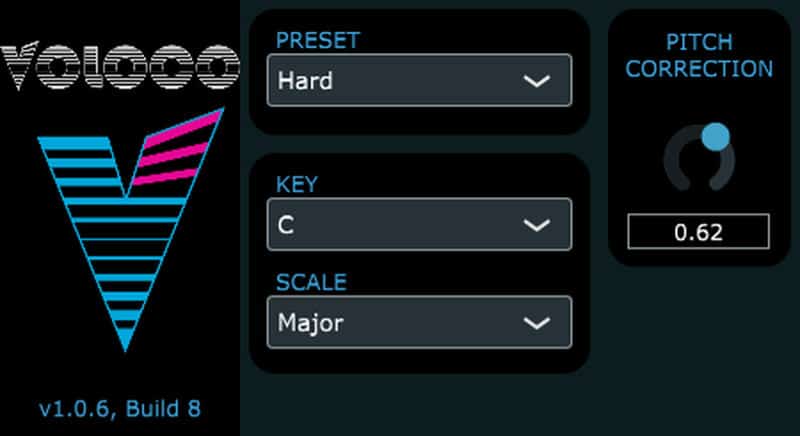
Voloco is a free and lightweight autotune plugin designed exclusively as a creative tool.
Voloco is an intentionally robotic-sounding autotune plugin for electronic and urban music. It does not offer subtle vocal pitch correction.
Although Voloco is available as a VST3 and AU plugin on desktop operating systems, it is primarily used on iOS and Android. The app version of Voloco is easily the best free autotune for mobile devices.
Voloco is an excellent free autotune alternative for beginners who don’t want a plugin with advanced controls. It offers six autotune vocal presets and lets users adjust the song key and scale.
More info: Voloco (32-bit & 64-bit VST3/AU plugin format for Windows & macOS)
Pros
- As simple as it gets.
Cons
- Limited customization.
- Rudimentary interface.
Budget-Friendly Autotune Alternatives
Auto-Tune Access by Antares is a good budget-friendly autotune plugin. If you’re looking for something more advanced, try iZotope Nectar 3.
Although more of a pitch shifter than a pitch correction plugin, another interesting vocal processing tool is the excellent Little AlterBoy by Soundtoys. For complete control over the pitch correction process, try using Waves Tune.
If you want complete control over the pitch correction process, check out Melodyne 5 Essential.
Frequently Asked Questions
What is the best free autotune plugin?
Graillon 3 Free Edition is the best free autotune plugin in 2026. It offers a flexible pitch correction engine with optional formant shifting and pitch shifting, and it works on both Windows and macOS.
Is there a free version of Auto-Tune?
There is no free version of the official Antares Auto-Tune plugin. However, several free alternatives offer similar pitch correction features. Graillon 3 Free Edition and MAutoPitch are the closest to Auto-Tune in terms of sound quality and flexibility.
What free autotune plugin do rappers use?
TrapTune Free Edition and Voloco are popular among hip-hop and trap producers for their preset-based workflow and aggressive autotune sound. GSnap is another common choice because its MIDI input mode gives precise control over the vocal melody.
Can I get free autotune on Mac?
Yes. Graillon 3 Free Edition, MAutoPitch, PitchCure, Spoton, TrapTune Free Edition, Vox Tune Auto Pitch, and Voloco all support macOS. KeroVee is the only plugin on this list that is limited to Windows.
What is the difference between autotune and pitch correction?
They refer to the same technology. Pitch correction is the general term for software that detects and adjusts vocal pitch. Autotune is a brand name by Antares that became a generic term for the effect, similar to how “Photoshop” is used to mean any image editing.
How Autotune Works
Autotune analyzes the audio in real time to detect pitch, focusing on the fundamental frequency of a sound—usually a vocal or instrument. It uses the Fast Fourier Transform (FFT), a mathematical algorithm that breaks complex audio into individual frequencies to isolate the key pitch.
Most real-world vocals are messy—full of overtones and harmonics—so FFT helps cut through the noise and detect the fundamental frequency.
Once Autotune determines the pitch, it compares it to the musical scale you’ve chosen, serving as a pitch reference. If the note is off, the software calculates the difference in pitch and automatically nudges it into tune.
I recommend manually tweaking the scale when possible to achieve the best results. Also, listen to the autotuned vocal and adjust the effect’s intensity so it doesn’t sound too artificial.
The trick is to make the vocal sound in-tune while allowing for some natural pitch inconsistencies that give it a human quality.
Return to our Free VST Plugins page for more freeware plugins and instruments.
This page was last updated by Tomislav Zlatic on April 30, 2026.
The author, Tomislav Zlatic, is the founder and editor-in-chief of Bedroom Producers Blog (BPB). Since starting BPB in 2009, he has tested and reviewed hundreds of VST plugins.