
Close Menu
Bedroom Producers Blog
  • Home
  • Favorites
    • Free VST
    • Free DAW
    • Free Autotune
    • Free Drum Kits
    • Free Music Production Software
  • Reviews
  • Tutorials
  • Gear
  • Samples
  • 💬 Community
  • News
    • Software News
    • Soundware News
    • Deals
  • Black Friday
Connect
  • About Us
  • Our Team
  • How We Test
  • Privacy Policy
  • Advertise
  • Contact Us
Download
BPB Saturator Plus
Bedroom Producers Blog releases FREE BPB Saturator Plus analog saturation plugin
BPB Bassaturator
BPB Bassaturator is a FREE Bass Booster Plugin
BPB Dirty VHS
BPB Dirty VHS (FREE VHS Tape Plugin)
BPB Dirty Filter Plus
BPB Dirty Filter Plus (FREE Dual Filter Distortion)
BPB Dirty LA
BPB Dirty LA (FREE Vintage Limiting Amplifier)
  • Free VST
  • Free Autotune
  • Free DAW
  • Music Software
  • Drum Kits
  • Black Friday
YouTube Instagram Facebook X (Twitter) RSS
Bedroom Producers Blog
  • Home
  • Reviews
  • Tutorials
  • Gear
  • Samples
  • Downloads
  • Community
  • News
    • Software News
    • Soundware News
    • Deals
SUPPORT BPB ❤️
Bedroom Producers Blog
You are at:Home»News»Carve Audio releases Gas Can Amp plugin inspired by rare 1980s amp ($49)
News

Carve Audio releases Gas Can Amp plugin inspired by rare 1980s amp ($49)

Sponsored By: Carve AudioJune 3, 2026No Comments3 Mins Read
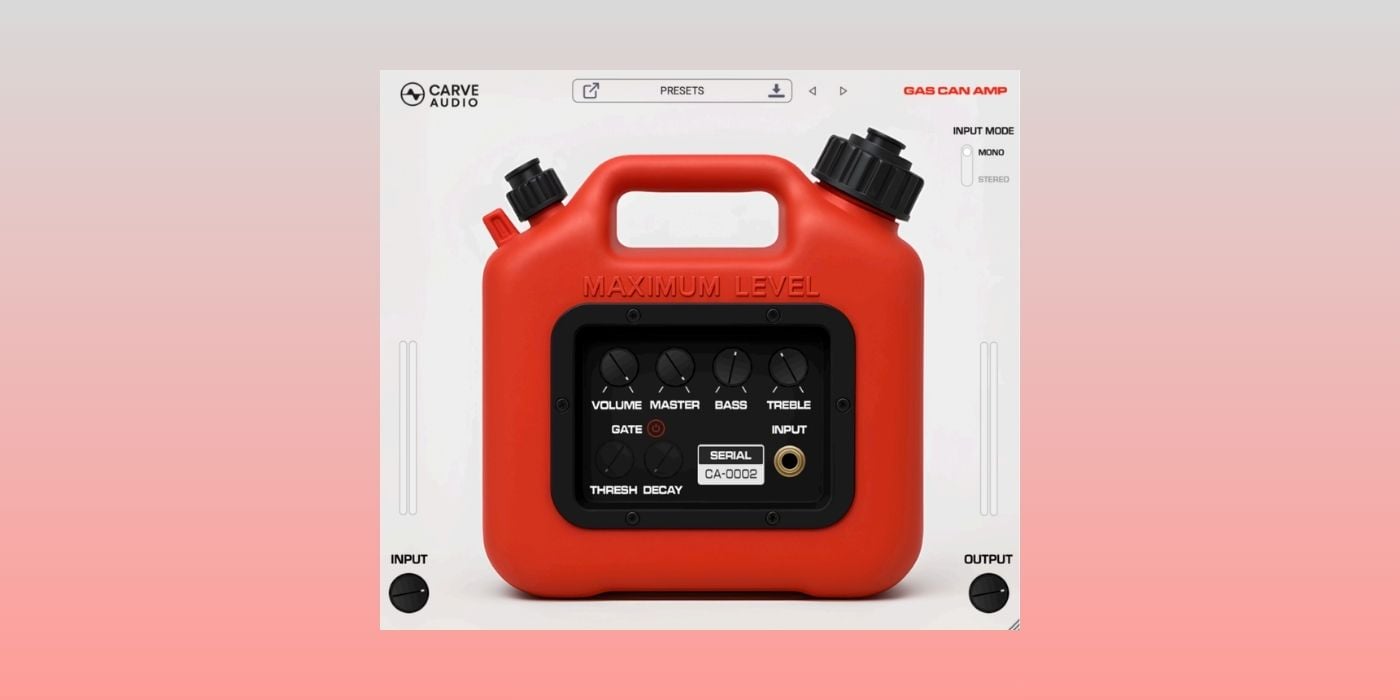
Gas Can Amp

Carve Audio has released Gas Can Amp ($49), a guitar amp plugin inspired by the rare battery-powered amplifier known as “The Can.”

The original amp was built by SLM Electronics in the 1980s and housed in a plastic gas-can-style enclosure. It later became associated with the first Foo Fighters record, where its unusually gritty tone helped shape some of the album’s guitar sounds.

Having this type of amp in plugin format is definitely more interesting than the average amp sim. “The Can” is not exactly something you can grab from the local ads, and when units do appear, they are usually hard to find in good condition.

YouTube video

Gas Can Amp brings that angry amp character into the DAW, but Carve Audio didn’t stop at recreating the original’s cranked sound.

The plugin preserves the hardware’s raw buzz while adding controls that make it easier to use in a modern mix. The original amp is famous for the everything-on-10 approach, but Carve Audio tweaked the plugin to give you more room to shape the result.

The main controls include Input, Volume, Master, Bass, Treble, and Output. Input handles the gain before the amp, while Volume acts more like the preamp drive. That means you can push it into full-on fuzz or back it down for a more controlled edge-of-breakup tone.

The expanded EQ section is there to help the sound sit in a mix, which is important because this kind of amp character can get very grungy. You can thin it out for a small-speaker/radio effect, add more weight, or smooth the top end if the bite gets too sharp.

Carve Audio also added a built-in noise gate with Threshold and Decay controls. That’s definitely useful in a plugin based on a noisy little battery amp because you can keep the attitude without fighting constant buzz between notes.

Although Gas Can Amp is obviously aimed at guitar tones, it also works as a character effect for synths, drums, and other sounds. It definitely works as a creative effect to give your sounds that small-speaker grit.

There is also a mono/stereo input mode, a nice selection of factory presets, user preset saving, and a resizable interface. Double-clicking any knob snaps it to the classic all-at-10 setting associated with the original amp.

Also, producer/engineer Barrett Jones (Foo Fighters, Nirvana, Pearl Jam) said the plugin sounds very close to the real thing.

Gas Can Amp is available for macOS and Windows in VST3, AU, and AAX formats. It is priced at $49, includes three activations per purchase, requires no iLok, and comes with a fully functional 14-day free trial.

More info: Carve Audio Gas Can Amp ($49)

Last Updated on June 3, 2026 by Tomislav Zlatic.

Deals Hot Mac Windows
Tomislav Zlatic
  • Facebook
  • X (Twitter)

Tomislav Zlatic is the founder and Editor-in-Chief of Bedroom Producers Blog (BPB). As a professional sound designer and music producer, Tomislav has personally tested and reviewed thousands of VST plugins and music software tools since launching BPB in 2009. His mission is to make music production accessible to everyone by highlighting the best software tools for beginners and professionals alike.

Comments are closed.

📬 BPB Newsletter
GET FREE STUFF - Receive the latest FREE plugins in your inbox every week.
Latest
UnderwaterFX is a FREE open-source underwater filter plugin for Windows
June 3, 2026
Carve Audio releases Gas Can Amp plugin inspired by rare 1980s amp ($49)
Sponsor: Carve AudioJune 3, 2026
S1gns Of L1fe releases FREE Texture Loom atmosphere engine plugin
June 3, 2026
OTODESK releases FREE open-source Ambience algorithmic reverb plugin for Windows
June 2, 2026
DEALS
Deal of the day 🔥: EXCLUSIVE ROLAND SALE (up to 80% OFF)!

Featured
How to Prepare A Song For Mixing
September 6, 2024
A Guide To Mixing Music For Music Producers
April 13, 2024
The Best FREE Drum Kits in 2026
January 27, 2026
Free Kontakt Libraries
January 28, 2025
COMMUNITY

🔥 Deals & Freebies Thread – June 2026

June 1, 202696

🤝 Plugin Exchange Thread – June 2026

June 1, 202629
aHow to Prepare A Song For Mixing
9 Mins Read
How to Prepare A Song For Mixing
How To Make Beats: A Quick Beat Making Guide For Beginners
10 Mins Read
Beat Making 101: How to Make a Beat for Beginners
Browse
# Music Production Software
# Free VST Plugins
# Digital Audio Workstations
# Video Editing Software
# Free Mastering Software
Download

# BPB Dirty Filter Plus
# BPB Dirty VHS
# BPB Dirty LA
# BPB Dirty Spring
# BPB Saturator

Community
# BPB on YouTube
# BPB on Facebook
# BPB on X (Twitter)
# BPB on SoundCloud
# BPB on Instagram
Subscribe
Subscribe to our mailing list to receive the latest music freeware news. We also have an RSS Feed.
Click to subscribe
© 2009 - 2026, Bedroom Producers Blog.
  • About Us
  • Our Team
  • How We Test
  • Privacy Policy
  • Advertise
  • Contact Us

Type above and press Enter to search. Press Esc to cancel.