
Close Menu
Bedroom Producers Blog
  • Home
  • Favorites
    • Free VST
    • Free DAW
    • Free Autotune
    • Free Drum Kits
    • Free Music Production Software
  • Reviews
  • Tutorials
  • Gear
  • Samples
  • 💬 Community
  • News
    • Software News
    • Soundware News
    • Deals
  • Black Friday
Connect
  • About Us
  • Our Team
  • How We Test
  • Privacy Policy
  • Advertise
  • Contact Us
Download
BPB Saturator Plus
Bedroom Producers Blog releases FREE BPB Saturator Plus analog saturation plugin
BPB Bassaturator
BPB Bassaturator is a FREE Bass Booster Plugin
BPB Dirty VHS
BPB Dirty VHS (FREE VHS Tape Plugin)
BPB Dirty Filter Plus
BPB Dirty Filter Plus (FREE Dual Filter Distortion)
BPB Dirty LA
BPB Dirty LA (FREE Vintage Limiting Amplifier)
  • Free VST
  • Free Autotune
  • Free DAW
  • Music Software
  • Drum Kits
  • Black Friday
YouTube Instagram Facebook X (Twitter) RSS
Bedroom Producers Blog
  • Home
  • Reviews
  • Tutorials
  • Gear
  • Samples
  • Downloads
  • Community
  • News
    • Software News
    • Soundware News
    • Deals
SUPPORT BPB ❤️
Bedroom Producers Blog
You are at:Home»News»S1gns Of L1fe releases FREE Texture Loom atmosphere engine plugin
News

S1gns Of L1fe releases FREE Texture Loom atmosphere engine plugin

June 3, 2026By Tomislav ZlaticNo Comments
Texture Loom

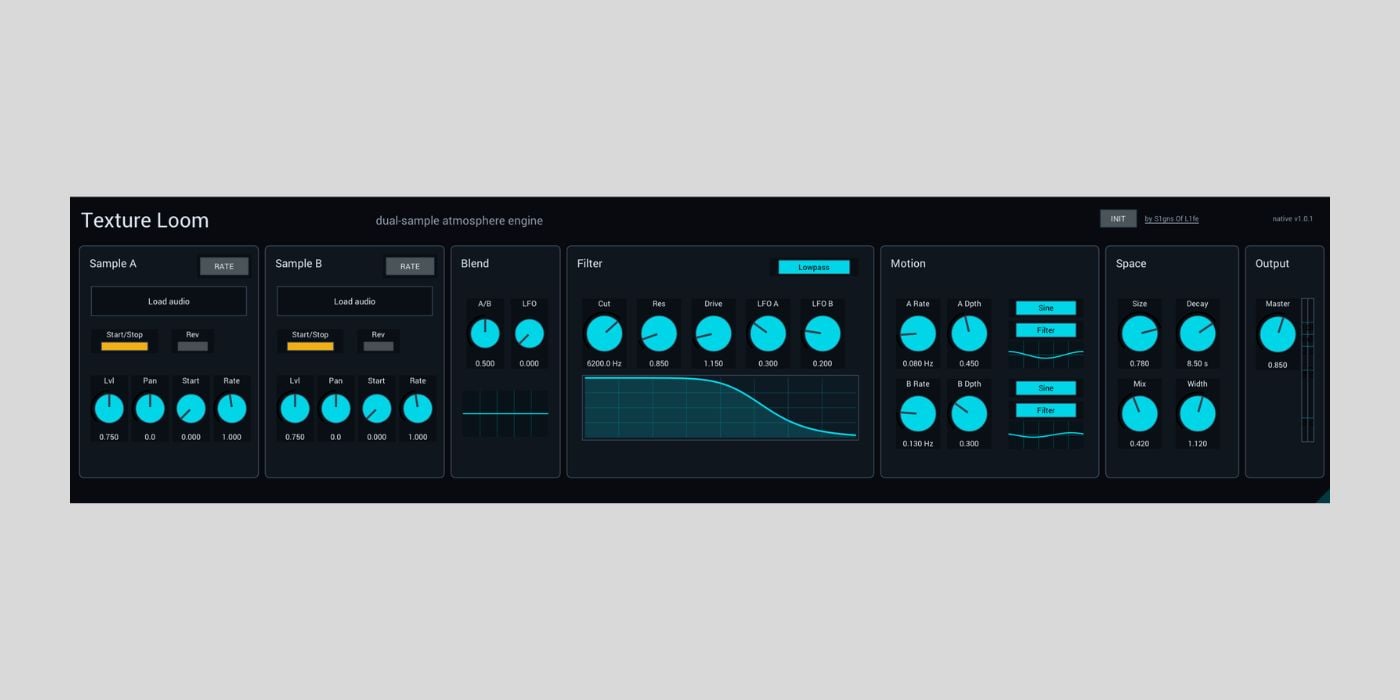
S1gns Of L1fe has released Texture Loom, a free dual-sample atmosphere engine for Ableton Live, macOS, and Windows.

I tested Texture Loom last night and ended up playing it for over an hour while also coming up with several layered sounds that I’ll use in future sound design projects. I have also seen some of Chris Bryant’s S1gns Of L1fe videos in the past, so it is nice to see a free plugin that fits so neatly into the kind of ambient sound design he teaches.

Texture Loom is built for creating evolving pads, drones, cinematic beds, and slow-moving ambient material from your own samples and recordings.

Chris says the idea came from his love of using textures as soundscapes to build tracks from. He wanted something that does more than just basic sample playback. It lets you pitch material in semitones or by rate, reverse it, filter it, and send it through a big space section to make the source sound more atmospheric.

The plugin started as a Max for Live device, but the current release also includes native plugin versions, so you can use it outside Ableton while keeping the same visual style and workflow.

YouTube video

Texture Loom has two sample slots, Sample A and Sample B, with controls for start/stop, reverse, start position, level, pan, and rate. The Rate/Semi mode is useful because you can either treat playback speed continuously or move the pitch in semitone steps.

The A/B blend control lets you fade between the two loaded samples, and there is a dedicated Blend LFO for slow crossfading motion. And works surprisingly well when you combine field recordings, synth tones, vocal snippets, or noise layers.

The manual suggests starting with two contrasting samples, where one provides body and the other adds air, texture, or motion. From there, the signal flow is easy to follow. The two layers move through an equal-power crossfade, then a post-blend filter and drive stage, and finally into the stereo reverb and output section.

The sound then moves through a multimode filter with lowpass, highpass, bandpass, notch, peak, and allpass modes. You also get cutoff, resonance, drive, and LFO modulation depth controls.

Texture Loom includes two Motion LFOs with sine, triangle, ramp up, ramp down, random, drift, and glider shapes. The modulation destinations include Blend, Filter, Space, Sample A Start, and Sample B Speed, which should be enough for anything from gentle movement to more unpredictable generative ambiance.

The onboard space section handles reverb duties with Size, Decay, Mix, and Width controls. Chris says the Clouds reverb is based on Valdemar Erlingsson’s original Cloudseed reverb, and it adds the spaciousness that is required for ambient and cinematic sounds.

Texture Loom will not make sound from a blank instance until you load samples. The Max for Live version installs as a Max Audio Effect, while the native desktop versions are available for AU/VST3 hosts.

It is available as a Max for Live device for Ableton Live 12 and Max 9, a macOS AU/VST3 instrument, and a Windows VST3 instrument. It is offered as a free/name-your-price download on Gumroad.

Download: S1gns Of L1fe Texture Loom (FREE/PWYW)

Deal of the day 🔥: EXCLUSIVE ROLAND SALE (up to 80% OFF)!

More:

  • dBdone releases Pentimento texture layering plugin with FREE version
  • Saint Mike DSP releases QingX Clean Amp, a FREE clean guitar amp plugin

Last Updated on June 3, 2026 by Tomislav Zlatic.

Ableton Live Free Software Mac Windows
Tomislav Zlatic
  • Facebook
  • X (Twitter)

Tomislav Zlatic is the founder and Editor-in-Chief of Bedroom Producers Blog (BPB). As a professional sound designer and music producer, Tomislav has personally tested and reviewed thousands of VST plugins and music software tools since launching BPB in 2009. His mission is to make music production accessible to everyone by highlighting the best software tools for beginners and professionals alike.

Subscribe
Notify of
0 Comments
Newest
Oldest Most Voted
Inline Feedbacks
View all comments
📬 BPB Newsletter
GET FREE STUFF - Receive the latest FREE plugins in your inbox every week.
Latest
S1gns Of L1fe releases FREE Texture Loom atmosphere engine plugin
June 3, 2026
OTODESK releases FREE open-source Ambience algorithmic reverb plugin for Windows
June 2, 2026
UB DSP releases Vowel Blender formant filter plugin with intro offer
Sponsor: UB DSPJune 2, 2026
AIR Music Technology offers Jura Chorus plugin FREE until August 2nd
June 2, 2026
DEALS
Deal of the day 🔥: EXCLUSIVE ROLAND SALE (up to 80% OFF)!

Featured
How to Prepare A Song For Mixing
September 6, 2024
A Guide To Mixing Music For Music Producers
April 13, 2024
The Best FREE Drum Kits in 2026
January 27, 2026
Free Kontakt Libraries
January 28, 2025
COMMUNITY

🔥 Deals & Freebies Thread – June 2026

June 1, 202695

🤝 Plugin Exchange Thread – June 2026

June 1, 202629
aHow to Prepare A Song For Mixing
9 Mins Read
How to Prepare A Song For Mixing
How To Make Beats: A Quick Beat Making Guide For Beginners
10 Mins Read
Beat Making 101: How to Make a Beat for Beginners
Browse
# Music Production Software
# Free VST Plugins
# Digital Audio Workstations
# Video Editing Software
# Free Mastering Software
Download

# BPB Dirty Filter Plus
# BPB Dirty VHS
# BPB Dirty LA
# BPB Dirty Spring
# BPB Saturator

Community
# BPB on YouTube
# BPB on Facebook
# BPB on X (Twitter)
# BPB on SoundCloud
# BPB on Instagram
Subscribe
Subscribe to our mailing list to receive the latest music freeware news. We also have an RSS Feed.
Click to subscribe
© 2009 - 2026, Bedroom Producers Blog.
  • About Us
  • Our Team
  • How We Test
  • Privacy Policy
  • Advertise
  • Contact Us

Type above and press Enter to search. Press Esc to cancel.