



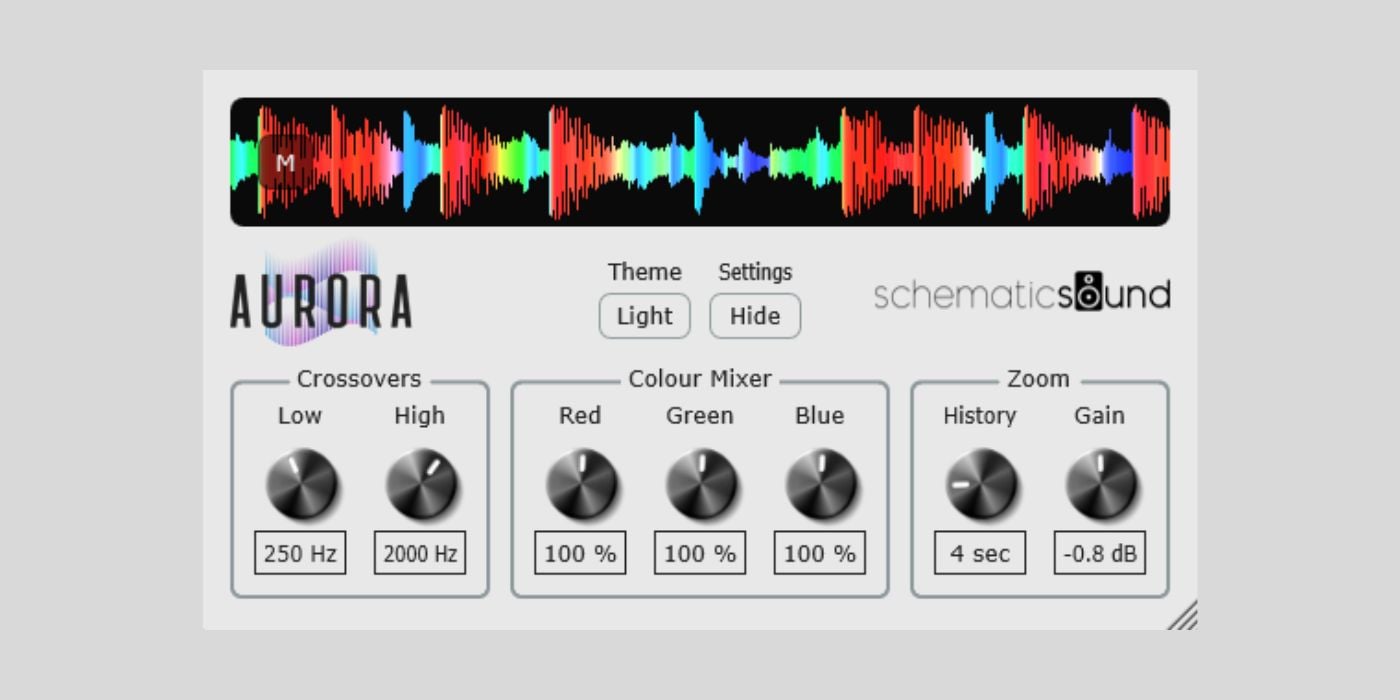
Schematic Sound has made Aurora, its DJ-style waveform visualizer plugin, open-source and available as a free pay-what-you-want download.
Aurora is a VST3/AU plugin that brings the frequency-colored waveform display you see in DJ software like Rekordbox, Traktor, and Serato into the DAW.
I used DJ software quite a bit in the past (mostly at friends’ parties but still, fun times), so I know that this type of waveform display can be useful for mixing. It gives you a quick visual sense of where the bass, mids, and highs are in the music, which is very different from looking at a standard waveform or spectrum analyzer.
I’m not sure how many other plugins are doing this exact thing right now, if any, so Aurora will definitely stand out in my plugin collection. It’s a simple idea, but I’ll use this one a lot in my sound design workflow.
The interface is also one of the things I like about Aurora. It’s clean and doesn’t give you much that you don’t need. You can hide the controls and shrink the window so it can stay open while you work without taking over the screen.
Aurora splits the signal into three frequency bands and blends them into an RGB waveform. The lower frequencies are represented in red, mids in green, and highs in blue, with the resulting colors showing the balance between the bands over time.
The crossover controls let you adjust where the low, mid, and high areas are separated. That means you can lower the low crossover to focus more on deep sub-bass, or raise it for genres where the bass content sits higher. The high crossover can be adjusted to isolate brighter elements like vocals, cymbals, and upper harmonics.
There is also a color mixer for changing how much each band contributes to the final waveform color, plus a History control for setting how much time is visible in the scrolling display. Gain changes the vertical waveform size without affecting the audio output.
Version 1.1.0 recently added a dark theme, a new mono L+R waveform mode as the default, and the ability to pause waveform scrolling during playback by clicking the waveform. The update also removes the licensing and activation system now that Aurora is open-source and pay-what-you-want.
Aurora is available in VST3 format for Windows 10/11 and VST3/AU formats for macOS 13 or higher, with Intel and Apple Silicon support. The source code is available on GitHub, and pre-compiled installers are available from Schematic Sound.
Download: Schematic Sound Aurora (FREE / PWYW)
Deal of the day 🔥: Get the VATRA mix finisher plugin by Flame Sound!More:
- Growl Audio releases gFractor, a FREE spectrum analyzer plugin
- PSP AudioWare releases PSP stereoAnalyser2 plugin for FREE
Last Updated on June 17, 2026 by Tomislav Zlatic.
