



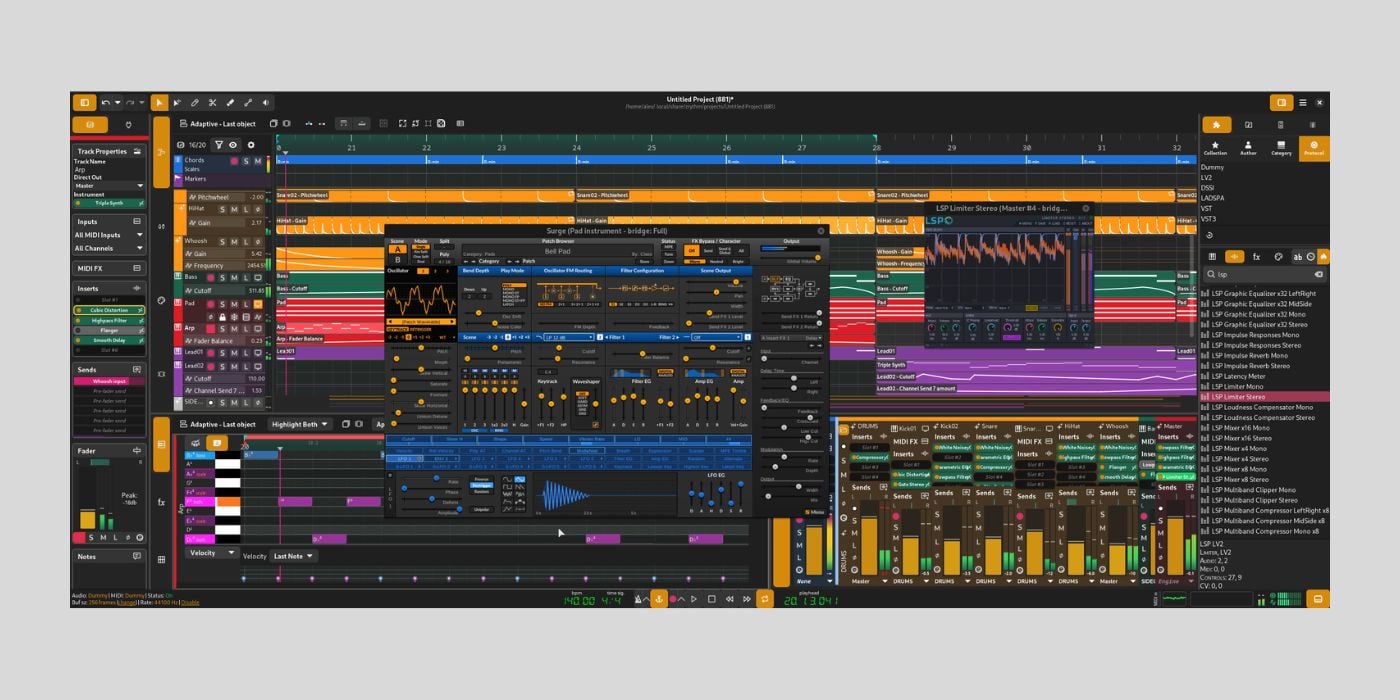
You can now access and test the Alpha version of Zrythm v2, a free and open-source DAW.
When it comes to digital audio workstations, especially free options, there have been plenty of changes in recent years. We’ve seen old favourites discontinued, rebranded, and, in some cases, limited features and a push towards subscription models.
We’ve also seen new DAWs arrive on the scene, and with audio software releases coming thick and fast at the moment, I’m sure we’ll continue to see new projects pop up regularly.
With that in mind, we’re shining a light on a DAW that’s been around for a few years, but still relatively early in its journey: Zrythm.
I’ve been playing around with the current v1 release, and looking at the v2 alpha.
What is Zrythm?
Zrythm is a free and open-source DAW for macOS, Windows, and Linux, created by Alexandros Theodotou.
Zrythm is a copyleft project, which means you have the freedom to change the source code and share your new version, as long as you share it with the same copyleft license (you cannot lock the code or sell your version as a paid product).

There are a few reasons a producer might be interested in a free and open-source DAW. If you have the ability, you can customise your setup by modifying the source code and even fix bugs independently.
Another reason is that many premium DAWs focus exclusively on macOS and Windows, while open-source projects provide more options for Linux users.
Of course, for many, it’s just about transparency and avoiding the sometimes scandalous costs of paid software (providing the DAW suits your needs). But free often comes with a caveat, as developers need to fund the project somehow, and sometimes donations aren’t enough.
In this case, Zrythm offers a few options:
- FREE – limited to 25 tracks per project
- Snapshot $18 – unlimited tracks, but limited to v1.0.0
- Bundle $31 – unlimited tracks, Z Series plugins, and access to all v1/v2 releases.
- Subscription $50 per year – all of the above plus access to all future releases and nightly builds.
What’s in the toolbox?
We’re going to focus on the free version of Zrythm. With that free version, you’ll get the basic Zrythm plugins.
The basic plugins are exactly as advertised: some essentials like delay, compression, and a couple of small synths. The plugins all have extremely simple interfaces, with no frills whatsoever, appealing to some users.
Otherwise, the basic plugins could serve as a decent introduction for beginners, but you’ll be reaching for your third-party collection pretty quickly.
In that case, Zrythm supports plugins in AU, VST2, VST3, LV2, CLAP, and JSFX formats, which covers all major formats. Using Carla, you also have additional support for SFZ/SF2 soundfonts and sandboxing.
There is a nice-looking plugin browser where you can search by author, type, or protocol with favourites, but it became unusable after a while and stopped displaying most plugins, even host plugins.
One of the core selling points for Zrythm, in terms of functionality, is an intuitive approach to simple tasks and editing.
Rather than a long list of tools for basic editing, you have a handful of tools and keyboard shortcuts for simple tasks like moving, cutting, joining, cloning, or looping regions. There are some nice touches, like quickly switching between repeating loops or stretching looped parts within the same region, that save on converting/merging regions in some cases.
There are a few little potential timesavers, and it’s in simplicity that Zrythm will attract users.
Another example is the adaptive snap options; if you’re working with lots of MIDI regions, you can adjust the snapping behaviour to avoid tedious misplacements, and even maintain object offsets when moving to a new position.
Zrythm offers extensive automation with the familiar lline/ramp/curve workflow, and an automation editor.
You also have an audio editor with easy-to-access fade, reverse, normalise, and pitch shift options, as well as a piano roll.
The piano roll isn’t dissimilar to anything you’d be used to elsewhere, but it has a couple of nice touches like the Highlight function.
There’s a Chord Assistance feature that I’ll get to in a minute, and in that feature, you have a scale section; the Highlight function highlights piano roll notes that are diatonic to the selected scale, or even notes within a current chord. It’s not an essential feature, but it’s pretty cool.
The Chord Assistance feature is one of the few instances where Zrythm steps beyond the basics because there are no built-in step sequencers, arps, etc.
The Chord Assistance provides an easy way to create backing tracks or temporary placeholders with various presets for musical genres and chord progression types.
UI and Workflow
Whenever trying a new DAW, I want to feel like I instantly know where most things are, and expect a few items to be in slightly unfamiliar places. Zrythm meets my expectations in that sense; the exceptions are things like looking to the top of the screen for transport controls that are actually at the bottom, in this case; nothing too drastic.
The UI has multiple panels, and the main panel provides the classic timeline view, and additional views for port connections and MIDI CC settings. You can detach panels into a separate window, which is handy if you use multiple screens.
The bottom panel houses the editors, piano roll, modulation macros, mixer, and chord pads.
The left and right panels house track/plugin inspectors and plugi/file browsers, respectively.
In the main timeline view, it launches with master and chord tracks showing, which you might not expect, but you can easily filter what shows and what doesn’t. The filter is handy if you have a load of tracks and want to focus on a particular type without distractions.
Which leads us to the biggest workflow issue, at least in terms of functionality: the 25-track limit.
The limit doesn’t mean that Zrythm Free isn’t for professional projects; many projects have fewer than 25 tracks, but many have far, far more. It will be an inconvenience for some, and a dealbreaker for others.
If you want more without changing the source code or paying for another version, there is a sort of workaround. Each track has multiple lanes, allowing you to stack layers of MIDI, audio, and automation in a single track. However, while it adds something, it doesn’t provide the full freedom of individual tracks.
Small differences aside, the workflow and interface are relatively pleasing.
What’s new in v2?
This update is substantial, and introduces multiple core engine and framework changes, including the migration from C to C++23. The interface moves from GTK to Qt6/QML, and introduces small tweaks like repositioning the transport controls and more refined view tabs.
Some v1 functions and features are still missing from this alpha, meaning this version is for testing and feedback only, and not to be used for projects.
Performance and Stability
This is where things go downhill faster than Vanilla Ice’s rap career after he explained the difference between Ice Ice Baby and Queen’s Under Pressure.
I installed Zrythm v1, and later the v2 alpha, on my Mac Mini M4, 16GB, running Tahoe 26.1.
It’s not a powerhouse machine, and I don’t use it for any heavy lifting at all, but it comfortably runs most sorts of projects in Logic Pro. However, from the start, Zrythm was slow and clunky; every movement or click felt like it lagged with a delayed response.
I wasn’t seeing readings of heavy CPU usage, but it acted like it; it wasn’t ideal, but workable.
Soon after, I found specific actions would always crash the DAW. For example, I could load an instrument by double-clicking it, but if I tried to drag anything into a MIDI track or the new track icon, it crashed.
I avoided a handful of things I knew triggered a crash, but there were plenty of seemingly random crashes, too.
So much so that I got angry with my Mac for continuously telling me that Zrythm has quit unexpectedly when I expected it.
There were stability issues on Mac when we first looked at Zrythm in 2023, and I’m disappointed that it’s not more ironed out by now, especially with v2 in alpha.
The alpha was almost a non-starter; I could open it, but couldn’t do much without crashing.
If you’re on Windows or Linux, let me know how stable Zrythm is for you because it has to be better on other platforms.
Final Thoughts
Zrythm has potential to be a straightforward DAW that focuses on making the most essential features easy to access, understand, and put to work.
I think a lot of producers prefer not to have too many distractions, and sometimes too many options kill creativity, so there is a market there.
Unfortunately, stability let it down, and I didn’t get to enjoy the elements I could see as beneficial, but I will revisit Zrythm in the future.
Download: Zrythm v2 Alpha (FREE)
More:
- OMNi (alpha v0.1), a FREE Rust-based DAW with native AI sample generation
- SoundBridge: Virtual Collaboration on steroids
- Best Free DAWs
Last Updated on August 6, 2026 by Tomislav Zlatic.
