



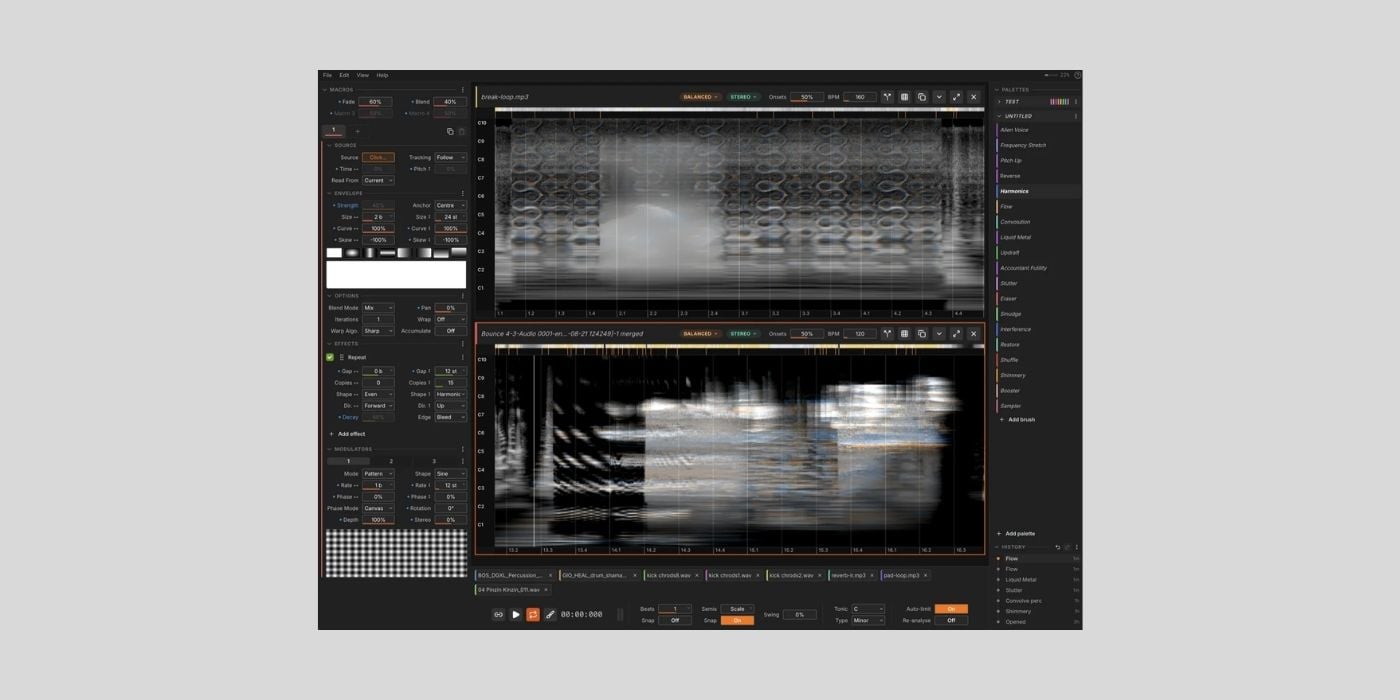
Rob Clouth calls its spectral sound design tool Noise Canvas “kind of like Photoshop, but for sound,” which already paints a picture of something more freeform and visually intuitive than typical sound design.
Some of you may already be familiar with Noise Canvas, since Rob has been working on the free and open-source project for a while and posting updates along the way.
Now, Noise Canvas v1.0.3 is here and available for macOS (11 or later), Windows (10-11), and Linux.
If you aren’t up to date with the journey to this point, Noise Canvas, in short, provides a range of multi-purpose brushes that let you paint effects and transformations directly onto the sound.
It loads and analyses audio files, turning them into a spectrogram canvas. The Brush Panel is arranged in categories like Restoration, Space, Mixing, and Mangle, and there you select brushes to add to your working palette.
Individual brushes include things like Gain, Octave Up/Down, Smudge, Noise Gate, and Reverse.
You can perform relatively basic but impactful transformations, like filtering in a more tactile way than normal, and someimes that blend of hands-on and visual workflows leads to moe unusual creative decisions, which is always interesting.
You can get into far more complex effects, whether it’s completely mangling sound into something glitchy and unrecognisable or smudging a textural pad/bed to create a sort of melting point before returning to normal.
The brushes and their parameters are a relatively broad topic, and the best thing to do is jump in and experiment.
However, before you go, some other features and workflow elements are worth highlighting.
Noise Canvas utilises the Constant Q Transform (CQT) rather than standard Fast Fourier Transform (FFT) to create a more musically accurate canvas.
The horizontal axis of the spectrogram display represents time in beats, while pitch is represented vertically in semitones. The structure allows loading any sample into the same grid, and while it’s still a freeform workflow, you can easily paint accurate pitch-shifting and time-based transformations.
The interface also uses brightness to indicate amplitude, and colour to represent stereo image (orange/left, blue/right, and grey/equal).
What is always appreciated is that you can hover over any element for a quick tip guide.
You can also add effects, including Evolve, which is a lovely way to grow a generic sound into something more organic.
Again, there’s a lot to explore and experiment with.
Two other features I like that extend the functionality of everything else are the 2D modulation system that allows you to modulate frequencies differently/independently, and the source separation function.
Source separation lets you separate elements of your sample, manipulate them individually, then merge them back together; it’s handy for removing elements or building complex sounds without completely muddying the water.
Noise Canvas has a very useful undo branching system that means you don’t lose potentially useable material, and you can export history, giving you as many variations of your edit as you worked on.
Noise Canvas works with your DAW as an external sample editor. To set that up in Logic Pro, head to Settings, Audio, File Editor, then choose your External Sample Editor.
I’m sure other DAW’s will have a similar process.
There is a beta Live 12 Extension that embeds the editor inside Ableton Live 12.
As always, if you happen upon any issues, reach out to the dev.
Last, but not least, don’t forget you can grab an €80 discount on Sonible’s smart:chain, bringing the price down to €99 (the offer ends on September 28, 2026).
Download: Noise Canvas (FREE)
More:
- ZL Audio releases ZL Spectrum Equalizer, a FREE dynamic spectrum EQ
- Growl Audio releases gFractor, a FREE spectrum analyzer plugin
Last Updated on September 1, 2026 by Tomislav Zlatic.
