
Close Menu
Bedroom Producers Blog
  • Home
  • Favorites
    • Free VST
    • Free DAW
    • Free Autotune
    • Free Drum Kits
    • Free Music Production Software
    • Black Friday Deals
  • Reviews
  • Tutorials
  • Gear
  • Samples
  • 💬 Community
  • News
    • Software News
    • Soundware News
    • Deals
  • Black Friday 2025
Connect
  • About Us
  • Our Team
  • Privacy Policy
  • Advertise
  • Contact Us
Download
BPB Saturator Plus
Bedroom Producers Blog releases FREE BPB Saturator Plus analog saturation plugin
BPB Bassaturator
BPB Bassaturator is a FREE Bass Booster Plugin
BPB Dirty VHS
BPB Dirty VHS (FREE VHS Tape Plugin)
BPB Dirty Filter Plus
BPB Dirty Filter Plus (FREE Dual Filter Distortion)
BPB Dirty LA
BPB Dirty LA (FREE Vintage Limiting Amplifier)
  • Free VST
  • Free DAW
  • Free Autotune
  • Music Software
  • Drum Kits
  • Black Friday 2025
YouTube Instagram Facebook X (Twitter) RSS
Bedroom Producers Blog
  • Home
  • Reviews
  • Tutorials
  • Gear
  • Samples
  • Downloads
  • Community
    • Deals & Freebies Thread
    • Plugin Exchange Thread
    • Music Feedback Thread
    • Production Thread
    • BPB Music Contest #1
  • News
    • Software News
    • Soundware News
    • Deals
SUPPORT BPB ❤️
Bedroom Producers Blog
You are at:Home»News»Matthias Kock Releases Free Tilt EQ VST/AU Plugin
News

Matthias Kock Releases Free Tilt EQ VST/AU Plugin

August 3, 2017By Bedroom Producers Blog1 Comment
Matthias Kock Releases Free Tilt EQ VST/AU Plugin

Matthias Kock has released a freeware equalizer effect called Tilt EQ, available in 32-bit and 64-bit VST/AU plugin formats for PC and Mac.

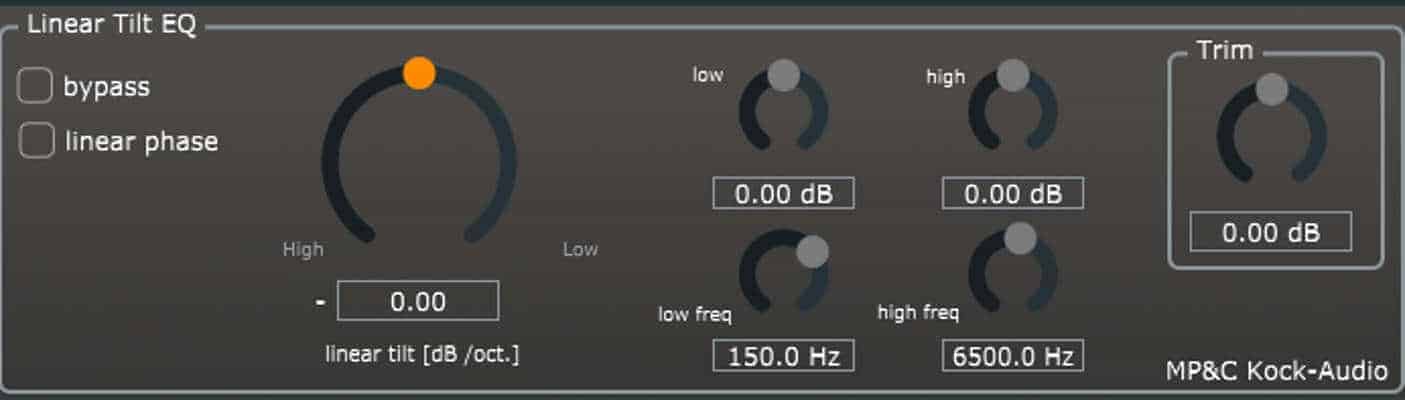
Tilt EQ is, as its name implies, a tilt equalizer with the center frequency located at 1.3 kHz. However, not everything there is to know about Tilt EQ is revealed in the title. Apart from the expected tilt equalizer functionality, the plugin also features low and high-frequency bands with adjustable gain for each band, as well as the optional linear-phase mode.

See also: Free sTilt Filter VST/AU Plugin By TBProAudio

The interface is a modern looking affair. A large knob on the left-hand side controls the tilt (marked for high and low frequencies), whereas the two knobs on the right control the high and low EQ bands. Above them are two more controls for adjusting the gain of the high and low shelves, with up to ±3 dB for the tops, and ± 6dB for the bottom end (which could be very handy for drum tracks, or curbing those bass synth sounds). Next to these is a simple Trim knob for gain control. Placed at the very top, there are two tickboxes marked “bypass” and “linear phase” which allow you to switch between the linear and minimum phase setting for the EQ, or bypass the plugin altogether.

While testing TiltEQ in my DAW, there were no stability or performance issues. Regarding its sound, this is a very smooth and transparent EQ with zero coloration. Plugins like this one are quite handy for when you need to dial in a subtle tilt to an audio track, slightly boosting the highs and taming the lows at the same time (and vice versa). This is not meant to be an instrument of audio mass destruction, but rather a subtle tool for adding shimmer or warmth to a track. Think of it as the “brightness” or “bass boost” dial on an old stereo, which coincidentally is where tilt EQs have their roots. The effect can be quite subtle but still discernible and could be a convenient tool for subtly shifting the frequency response of two clashing elements in a mix, moving them out of each other’s way.

Overall, Tilt EQ is an excellent addition to any bedroom producer’s audio plugin arsenal. The plugin is compatible with all major DAWs on PC and Mac and offers support for both 32-bit and 64-bit systems. It is a solid implementation of the tilt equalizer concept with a few useful additional features that expand its usefulness without bogging down the workflow. Please note, though, that Tilt EQ is donationware and users are encouraged to leave a tip when downloading the plugin. Even if it’s pocket change to you, every little helps independent developers like Matthias to create brilliant free plugins to be used by us bedroom producers.

Tilt EQ is available for free download via Matthias Kock’s website (8.34 MB download size, ZIP archive, 32-bit & 64-bit VST/AU plugin format for Windows & Mac OS).

Last Updated on August 3, 2017 by Tomislav Zlatic.

Free Software Mac Windows
Bedroom Producers Blog
  • Website

This is a sponsored article.

Subscribe
Notify of
1 Comment
Newest
Oldest Most Voted
Inline Feedbacks
View all comments
📬 BPB Newsletter
GET FREE STUFF - Receive the latest FREE plugins in your inbox every week.
Latest
Moog MoogerFooger MF-103S is FREE with any purchase
December 1, 2025
Loopmasters and Loopcloud returns to founder Matt Pelling
December 1, 2025
Warehouse Techno Sounds is FREE today as Ghosthack launches 2025 Advent Calendar
December 1, 2025
DAWJunkie releases Lil’ Miss Doubler, a FREE vocal doubler plugin
December 1, 2025
DEALS
Deal of the day 🔥: The best BLACK FRIDAY DEALS in one place!

Featured
How to Prepare A Song For Mixing
September 6, 2024
A Guide To Mixing Music For Music Producers
April 13, 2024
The Best FREE Drum Kits in 2025
February 12, 2025
Free Kontakt Libraries
January 28, 2025
COMMUNITY

🔥 Deals & Freebies Thread – December 2025

December 1, 202588

🤝 Plugin Exchange Thread – December 2025

December 1, 202540
aHow to Prepare A Song For Mixing
9 Mins Read
How to Prepare A Song For Mixing
How To Make Beats: A Quick Beat Making Guide For Beginners
10 Mins Read
Beat Making 101: How to Make a Beat for Beginners
Browse
# Music Production Software
# Free VST Plugins
# Digital Audio Workstations
# Video Editing Software
# Free Mastering Software
Download

# BPB Dirty Filter Plus
# BPB Dirty VHS
# BPB Dirty LA
# BPB Dirty Spring
# BPB Saturator

Community
# BPB on YouTube
# BPB on Facebook
# BPB on X (Twitter)
# BPB on SoundCloud
# BPB on Instagram
Subscribe
Subscribe to our mailing list to receive the latest music freeware news. We also have an RSS Feed.
Click to subscribe
© 2009 - 2025, Bedroom Producers Blog.
  • About Us
  • Our Team
  • Privacy Policy
  • Advertise
  • Contact Us

Type above and press Enter to search. Press Esc to cancel.