



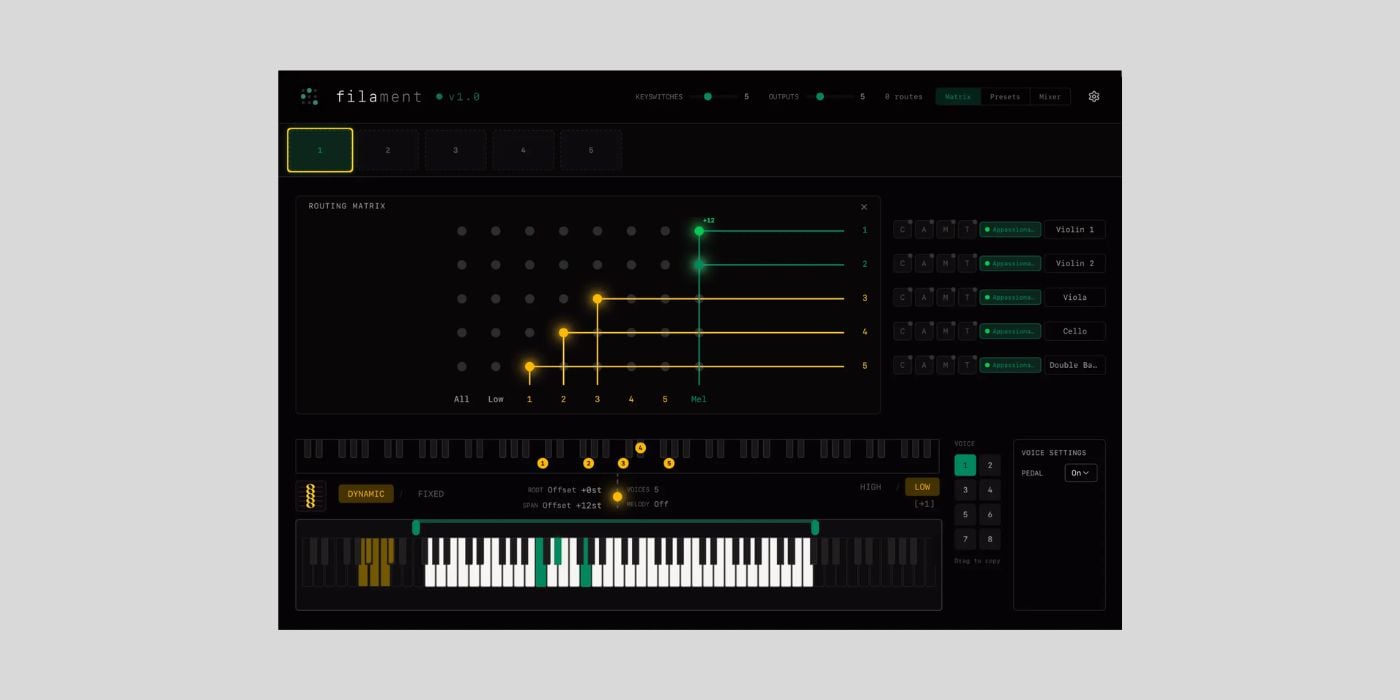
Filament is a new MIDI orchestration plugin from Forma Labs Audio, and it’s currently in the free public beta stage.
If you sign up to be one of the beta testers, you’ll get to play a part in shaping the final product, and you’ll receive the full v1.0 release at launch.
There are limited beta-tester spots, so I advise anyone interested to apply quickly, as the plugin will launch at a retail price of £149.
Filament is available in AU and VST3 formats for macOS (13 or later) and Windows (11 or later).
The idea of MIDI orchestration isn’t new, and if you’re an experienced media composer, you might already be familiar with orchestrator tools from companies like East West.
If not, the easiest way to think of it is that a MIDI orchestrator takes the notes you play and assigns them to various instruments in a way that reflects a real orchestral arrangement.
For example, if you take a basic orchestral quintet, as shown in the demo video, you can assign the notes you play, from lowest to highest, to the expected instruments (bass, cello, viola, and violins).
When we play with an ensemble strings patch, we often end up with something that sounds like a keyboardist playing strings, rather than a realistic string section. Even with advanced ensemble patches featuring multiple keyboard zones, we can still encounter the same problem due to unrealistic orchestration and chord voicings.
Filament lets you play as you would with an ensemble patch, and, in addition to creating a realistic orchestration via an easy-to-use routing matrix, it includes a Chord Revoicer that spreads the notes to suit the selected instrumentation.
For less-experienced orchestral arrangers/composers, the Chord Revoicer is a cool way to learn where notes might be placed in real-world contexts. And for more experienced users, it’s a time-saver.
It’s not just for small arrangements; you can load up to 64 instruments inside a single track.
If you’re creating something bigger than an intimate quartet/quintet sound, it’s more likely that the arrangement will have various layers, and Filament caters to that scenario with a built-in clip launcher and arpeggiator.
If you listen to any Hans Zimmer score, you’ll hear some of the most iconic ostinatos in cinema history, and you can use the built-in arpeggiator to create ostinatos that drive your composition.
One of the things I like best about Filament so far is that you can tackle multiple complex media-scoring elements at once.
With multiple voices available, we can assign each voice to a different task.
For example, voice one can build an arpeggio, and voice two can provide a harmonic bed (also nicely shown in the demo video).
This setup allows the user to create both rhythmic and harmonic elements from a single performance/chord.
Filament has many other interesting features, including adjustable keyboard zones with a clever overflow/buffer function.
It’s one you’ll have to test, because it’s pretty deep.
I know, when working with individual instrument patches, there’s a suggestion that you should play every part individually, even doubled parts, because every performance will be slightly different, and therefore, feel more human.
While I think that’s the way to go, in some cases, there’s also a time to use a good orchestrator, and that goes for everyone, from absolute beginners to AAA game composers.
I like the look and workflow of Filament, and I’m excited to see how it progresses.
If you’re looking for some free instruments to help you put Filament to the test, check out these right here at BPB:
- Spitfire Audio Symphony Orchestra Discover
- Fracture Sounds Blueprint Textural Cello
- Fracture Sounds Blueprint Textural Violin
- Impact Soundworks Tokyo Scoring Strings
Download: Filament (FREE public beta – signup required)
