



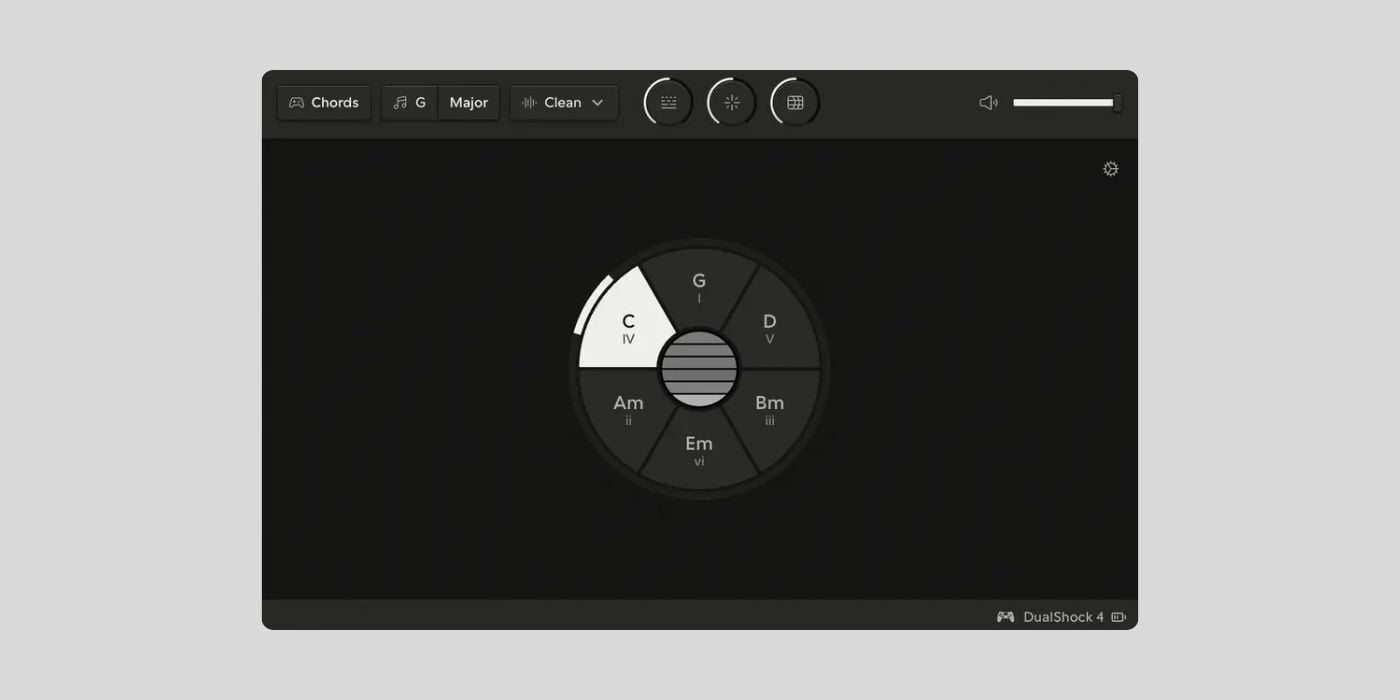
Steve Mitchell has released MIDIpad, a free macOS app that turns a game controller into a musical instrument and MIDI controller.
I used an old tool more than a decade ago that converted a game controller into a MIDI controller. I can’t remember the name now, but I loved the idea, especially because I didn’t have a MIDI keyboard with knobs and sliders back then. It was fun to control the filter cutoff with the little joystick controller.
MIDIpad is much more advanced, though, and I was surprised how much it feels like a real instrument rather than a simple gamepad-to-MIDI mapper.

MIDIpad has two main instruments: Chords and Drums. Chords works like a tactile guitar-style chord machine. You point the left thumbstick at a chord wheel, then strum “strings” using the touchpad on a PlayStation controller or the right stick on other pads.
The cool part is that the chord wheel keeps everything in key, so the worst you can play is a chord you didn’t mean, instead of some random cacophony. You can also use controller buttons for things like tension chords, chord color changes, and palm muting.
Drums works more like a gestural rhythm machine, with the sticks driving the groove and buttons triggering individual hits. MIDIpad shows up as two MIDI inputs on your system, MIDIpad Chords and MIDIpad Drums, so you can route each instrument separately in your DAW.
The app can also make sound on its own. Its internal voices are derived from Mutable Instruments’ open-source Plaits and Braids code, so you can plug in a controller and start playing without setting up a DAW first.
The PlayStation connection makes this especially fun for me. The DualShock 4 used in the demo video is my favorite game controller. I still play Pro Evolution Soccer 2021, which is my favorite game of all time, and I have spent hundreds of hours with that controller in my hand. Being able to use it to make music is pretty cool.
MIDIpad is built for the DualShock 4 and DualSense because their touchpad and motion sensors give the app the most expressive surface. Xbox and Switch Pro controllers can also work, but with some limitations.
MPE is supported in the licensed version. Each of the six strings can live on its own MIDI channel, carrying its own pressure and timbre, and the gyro/accelerometer shake can recharge the strings for tactile swells. In the free version, Chords output is folded onto one MIDI channel.
The free version is very generous. The developer describes demo mode as free forever, with no time limit, no nagging, both instruments, every playing gesture, and the built-in sounds. Commercial use is allowed, too. A paid early access license unlocks full MIDI/MPE routing, audio routing, more voices, and deeper customization.
I also love the design. MIDIpad looks minimal and clean, and the whole concept is fun if you want to try something a bit different with your gaming tools.
MIDIpad is available for macOS on Apple Silicon and Intel Macs. The developer says Windows and Linux are being explored, but there is no version for those platforms yet.
Download: MIDIpad (FREE)
Deal of the day 🔥: Get the VATRA mix finisher plugin by Flame Sound!More:
- Give your single channel MIDI keyboard polyphonic expression for FREE with MPE Emulator
- MIDIpushr MK2 is a FREE browser-based MIDI chord player for your DAW
- Easy MIDI Free – A Freeware Virtual MIDI Keyboard For Mac OS X
Last Updated on August 6, 2026 by Tomislav Zlatic.
