



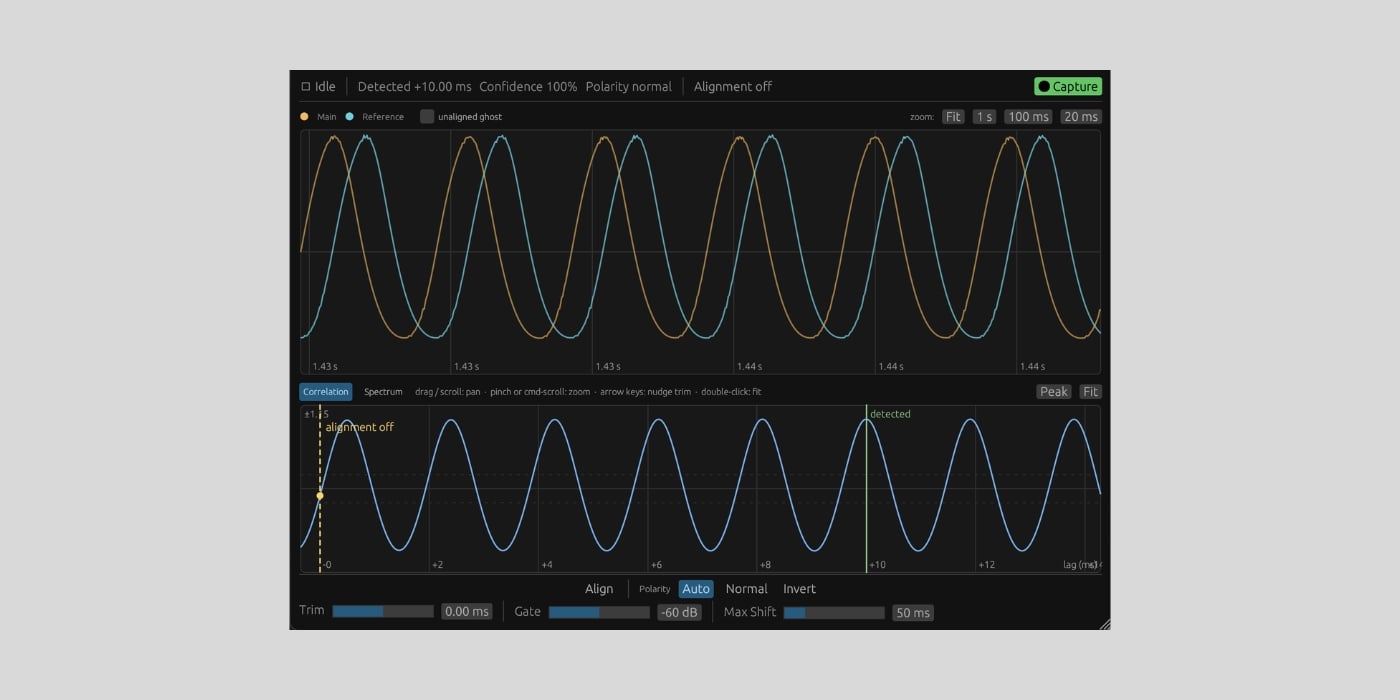
ConjureDSP has released ConjureAlign, a free and open-source plugin that automatically time-aligns two microphones recording the same source.
When you record something with multiple microphones, sound reaches each microphone at a slightly different time. Combining those recordings can introduce phase cancellation and comb filtering, both of which are super common in multi-mic setups.
ConjureAlign helps you handle that timing difference automatically. You simply insert it on the track you want to shift (usually the more distant microphone), then route the other track into its Reference sidechain input.
Then, play a loud section and click Capture. The plugin records a few seconds from both tracks, uses FFT cross-correlation to measure the offset, checks the polarity, and applies the correction with sub-sample precision.
The aligned track can move later or earlier. For negative shifts, ConjureAlign reports latency to the host so the DAW can keep everything else synchronized. Changes glide into place without clicks or dropouts, even during playback. Pretty smart and useful.
The interface displays the captured waveforms overlaid, with the cross-correlation curve and detected peak underneath. There’s also a separate Spectrum view that compares the unaligned sum in blue with the corrected sum in yellow, making the comb-filter dips and their removal visible.
In the official demo, you can hear how the aligned pair sounds fuller because less frequency content is canceling out.

You can add up to ±10 ms of Manual Trim if you prefer the automatic result with a small adjustment by ear. Capture Time can be set to 1, 2, or 4 seconds, while Max Shift defines a search window between 10 and 200 ms.
The Polarity control provides Auto, Normal, and Inverted modes. Alignment On bypasses the correction without changing the reported latency, and this is useful for fairer A/B comparison. Captured results are stored with your project, so you do not have to repeat the process when reopening a session.
Capture is gated, meaning you can arm it before playback without having to analyze a long stretch of silence. If the signals are silent or do not correlate properly, ConjureAlign rejects the result and keeps the previous alignment.
We previously covered NUGEN Audio’s Aligner, which addresses the same multi-microphone problem. ConjureAlign is similar, but it’s open-source, and the complete source code is published under the GPL-3.0-or-later license.
ConjureAlign v1.1.0 is available as a signed and notarized universal macOS installer with AU, VST3, and CLAP formats for Intel and Apple Silicon. The 64-bit Windows VST3 and CLAP builds are currently labeled beta, while Linux users need to build the plugin from source.
Download: ConjureAlign v1.1.0 (FREE)
Deal of the day 🔥: Get the VATRA mix finisher plugin by Flame Sound!More:
- NUGEN Audio offers Aligner plugin + $100 voucher for FREE with annual survey
- Free faSampleDelay VST/AU plugin announced by Forward Audio
- Free MFreeformPhase phase adjustment VST/AU plugin released
Last Updated on August 26, 2026 by Tomislav Zlatic.
