



To say Audacity has been down a bumpy road since Muse Group acquired the legendary audio editing and recording app back in 2021 would be an understatement.
Audacity went from cult hero to villain, then back to some sort of anti-hero; the sort that might save your life then take out a credit card in your name because that’s just how they roll.
Understandably, changes to Audacity over recent years have been met with emotional responses because it’s been a go-to tool for generations of aspiring musicians and producers for the last two decades and more.
But despite previous issues, Audacity has always maintained its two most fundamental principles: it’s free and open-source.
More importantly, it always will be.
So, with some time since the Muse Group takeover, some significant milestones met, and now the software’s biggest update yet, Audacity aims to remind everyone why it has been downloaded hundreds of millions of times.
Audacity 4
I mentioned some significant milestones before this latest update, and some of the most impactful were non-destructive editing, real-time effects, and VST3 support, which came a few years back in version 3.2.
As the biggest update in 26 years, Audacity 4 takes the app even closer to DAW status.
The update focuses on enhancing Audacity’s already simple workflow while adapting it to suit more complex, modern projects.

Improved clip-editing workflow
The development team has put a lot of effort into changes that make Audacity more flexible, and at the top of that list is the faster clip-editing workflow.
The non-destructive editing gave us the flexibility and freedom to make mistakes without derailing our flow.
Now, features like new clip handles, clip grouping, and overlapping clips let users work faster than before.
New handles let you trim or stretch clips as easily as you would in a traditional DAW. You can also group clips to perform the same actions on multiple clips at once.
Overlapping clips also means you can paste/position a clip anywhere without the same restrictions as previous versions.
New Split tool, shortcuts, and no more tool modes
The new Split tool allows you to chop single or multiple clips easily.
If you’re a fan of ripple editing from Audacity 3, or even from other audio/video editing software, it’s still here, but more intuitive than before. Now you have keyboard shortcuts to dictate how surrounding clips behave when you delete a clip/section.
Keyboard shortcuts control whether clips on the same track (or all project clips) move backwards to fill the gap of the deleted section.
It saves a little menu-diving, and that’s always good.
Avid Audacity users will notice that, aside from the Clip Envelope, the tool mode icons are gone. The functions remain, but to save tedious clicking/switching, you now have a context-based multi-tool.
For example, the cursor turns to the pencil tool when you zoom in to sample level, but if you move it away from that area, it becomes the standard selection tool again.
I really like these small changes; they make a huge difference.
The Clip Envelope tool functions like you’d expect automation in a traditional DAW, and provides much clearer visual feedback with the waveform reacting in real time.

The new look
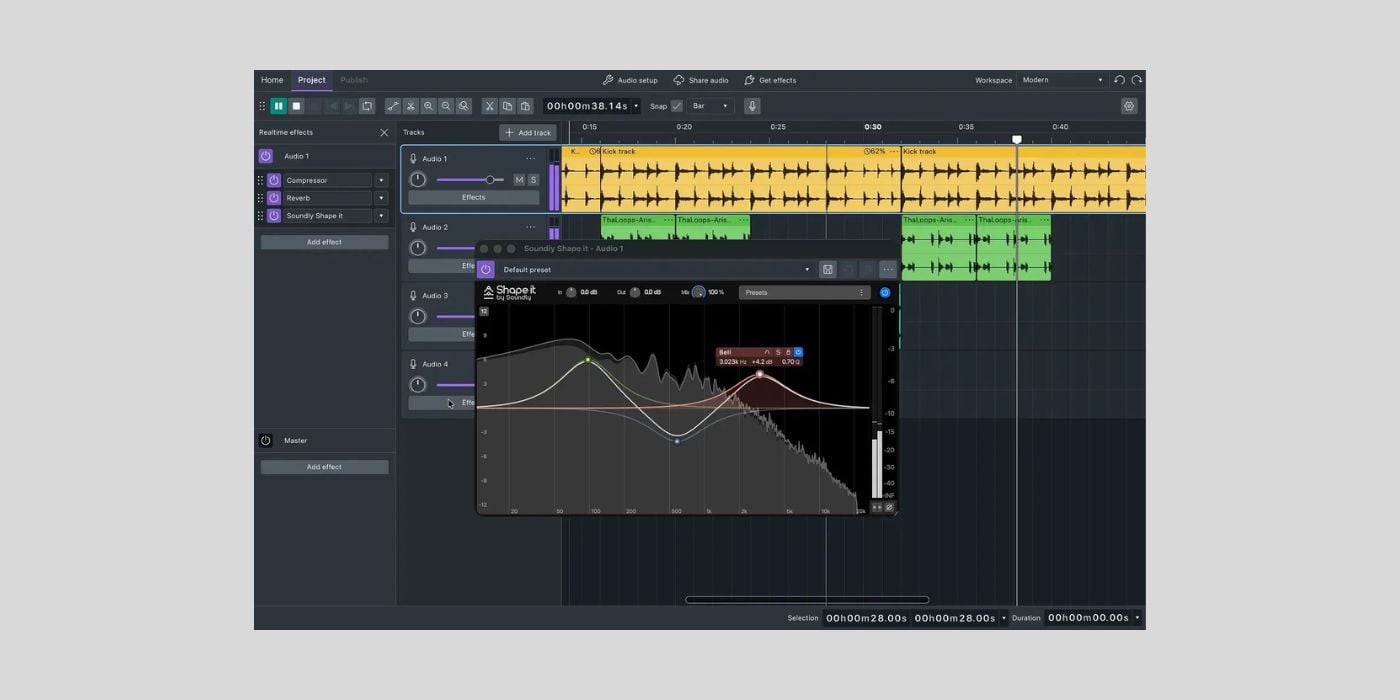
Audacity 4 has a much more modern interface, and it’s not just for aesthetic reasons.
Many elements of the new interface look great and offer practical benefits, too.
The whole thing has a new colour scheme that’s fairly close to something like Logic Pro.
With this new colour scheme, we get colour-coded clips per track, rather than the non-distinct grey of previous versions. You can also change clip colours to fit your preferences for specific track types, etc.
Another interface update with major benefits is per-track metering. It’s another thing you take for granted in your DAW, but it now lets you work much more efficiently inside Audacity 4.
Although Audacity 4 isn’t going to replace your fully-fledged DAW just yet, many of the small improvements align the software with traditional DAWs.
For example, creating/moving/adjusting a looped playback section above the timeline and exporting smaller sections of your project is now more straightforward.
It’s also easier to add labels freely.
There is a new feature I like that isn’t available in every DAW: saved workspaces. Audacity 4 lets you customise your workspace for specific project/workflow types and save it as a template.
Many free and entry-level DAWs have a fixed workspace, so I think it’s a nice touch from the Audacity team.
Overall, I much prefer the new interface, but if you prefer the old style (or want the occasional trip down memory lane), it’s still available.
Under the hood
Many of the improvements are easy to see and prioritise a faster, more efficient workflow.
But the developers also made under-the-hood changes to improve quality and performance, including rebuilt effects.
The built-in FX now perform better and showcase more intuitive interface designs.
Audacity 4 supports VST3, AU, LV2 (Linux), and Nyquist formats.
Audacity 4 introduces a new .aup4 project format; Audacity 3 projects will convert automatically, but there is no backward compatibility.
What’s missing and what’s to come?
In the current version 4.0.0, Audacity 3 features, including MIDI tracks, Time tracks, the Mixer, macros, and scripting, are not yet implemented.
Audacity development team member Leo Wattenberg says that multi-track recording is in the pipeline, although we don’t know when that will be possible.
Final Thoughts
This update seems like a fresh start for Audacity.
Although it never went away, and Audacity 4 isn’t the first update (or even significant change) of the Muse Group era, it seems like a good time to reset and go again.
There has always been a lot to like about Audacity; it’s free, open-source, and always will be. It’s a cross-platform app, available for macOS, Windows, and Linux.
And now, it has a brand-new look and a sleeker, faster, more intuitive workflow than ever.
There’s obviously a long way to go, and maybe for now, Audacity 4 is an excellent entry-level audio recorder/editor for those who want to dip their toes in the water without getting bogged down in complicated features.
But maybe it becomes much more than that.
Audacity 4 certainly looks and feels more like something resembling a DAW than ever, which is a pretty strong statement of intent.
Download: Audacity 4 (FREE)
More:
