



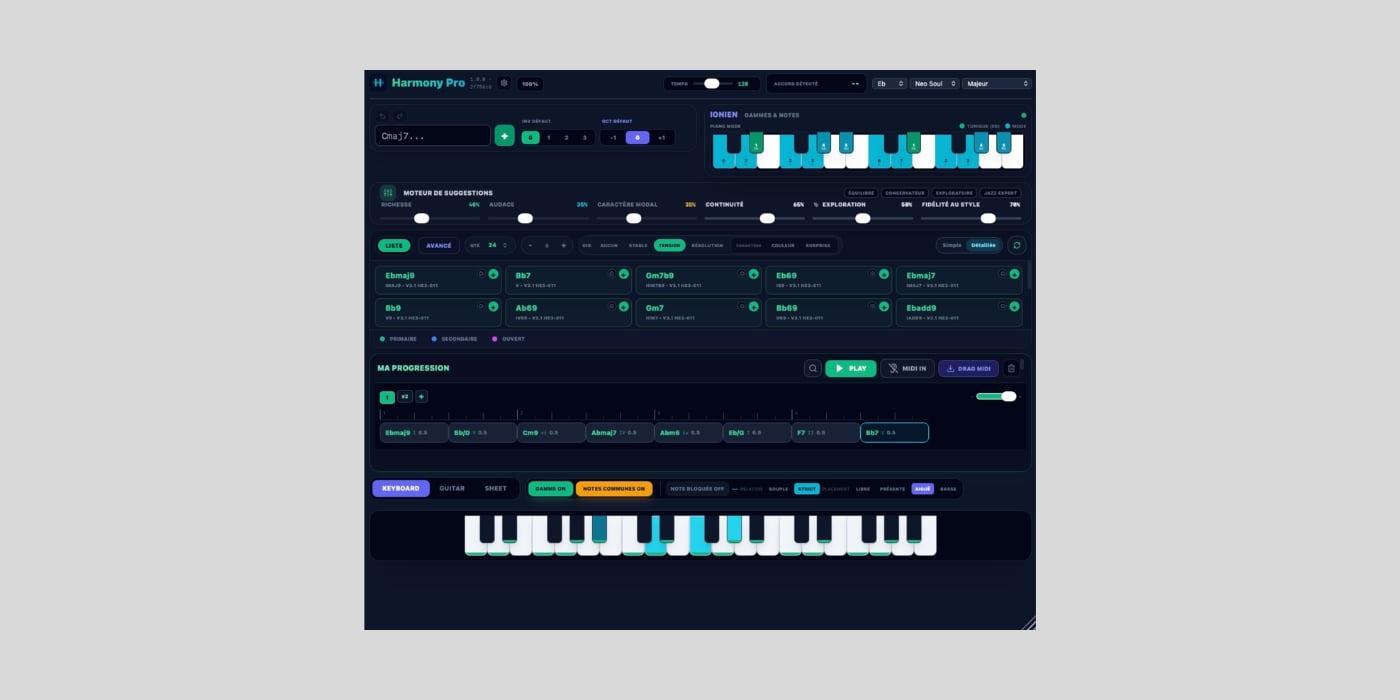
Harmony Lab Audio has released Harmony Pro, a free harmony assistant designed for musicians who want to explore chord progressions and alternative harmonic directions.
First, let’s get the GUI out of the way. It looks very vibe-coded, and since we obviously won’t be living in a world without vibe-coded plugins anytime soon, I hope at least these GUIs will improve. Just my two cents.
If we disregard the looks, Harmony Pro definitely has useful features. Its harmonic engine analyzes the current musical context and proposes chords that can continue or redirect a progression.
It’s also worth noting that this is not a prompt-based song generator. Instead, it suggests harmonically related options and leaves you to listen, compare, edit voicings, and assemble the result.
The developer is also explicit that no generative AI is involved inside the engine. The website sums it up as “No AI in this app. Just harmonic intelligence.”
To get started, you choose a tonic, a mode, and a style, then add or play chords and audition the suggestions. You can play from a MIDI keyboard and drag ideas straight into your DAW.
There are 13 style profiles, including Pop, Rock, Jazz, Neo Soul, Gospel, Lo-Fi Hip-Hop, Cinematic, and Progressive Metal, and the mode menu covers everything from major and minor to Dorian, Phrygian dominant, Hirajoshi, and whole tone.
What I liked is how deeply you can shape the suggestions. The engine has four presets (Balanced, Conservative, Exploratory, and Jazz Expert), plus controls for Richness, Boldness, Modal Character, Continuity, Exploration, and Style Fit.
You can also steer the direction toward Stable, Tension, or Resolution, with Color and Surprise as character choices.
The Locked Note feature is particularly handy. It keeps a melody note fixed while you explore chords that support it, whether that note sits freely, is present in the chord, or lands on top or in the bass. A Common Tones display and soft/strict relation options help you keep track of how chords connect.
Harmony Pro also offers six ways to view harmony. Circle explores chords around the circle of fifths, Map groups possibilities by harmonic role, and Movement shows how voicing, bass movement, and harmonic texture evolve from chord to chord.
The Analysis view explains why a suggestion may work and what gives it its character. The interface can display a keyboard, guitar, or sheet view.
You can try the browser version online before installing anything. The download page links directly to the installers with no account, email signup, or checkout, and the Windows installer handles the required runtimes on its own.
Harmony Pro 1.0.0 is available in VST3 format for macOS and Windows, plus AU on macOS. The installers include an Ableton Live-specific VST3 build, and the site lists compatibility with Logic Pro, Ableton Live, Cubase, Studio One, Reaper, and FL Studio.
Download: Harmony Pro (FREE)
Deal of the day 🔥: Get the VATRA mix finisher plugin by Flame Sound!More:
- Dusk Audio releases Chord Analyzer, a FREE real-time chord detection plugin
- The Freequency releases Bloomer Free, an emotional chord engine plugin
- Higher Plane releases SpaceWalk, a FREE ambient chord progression generator
