



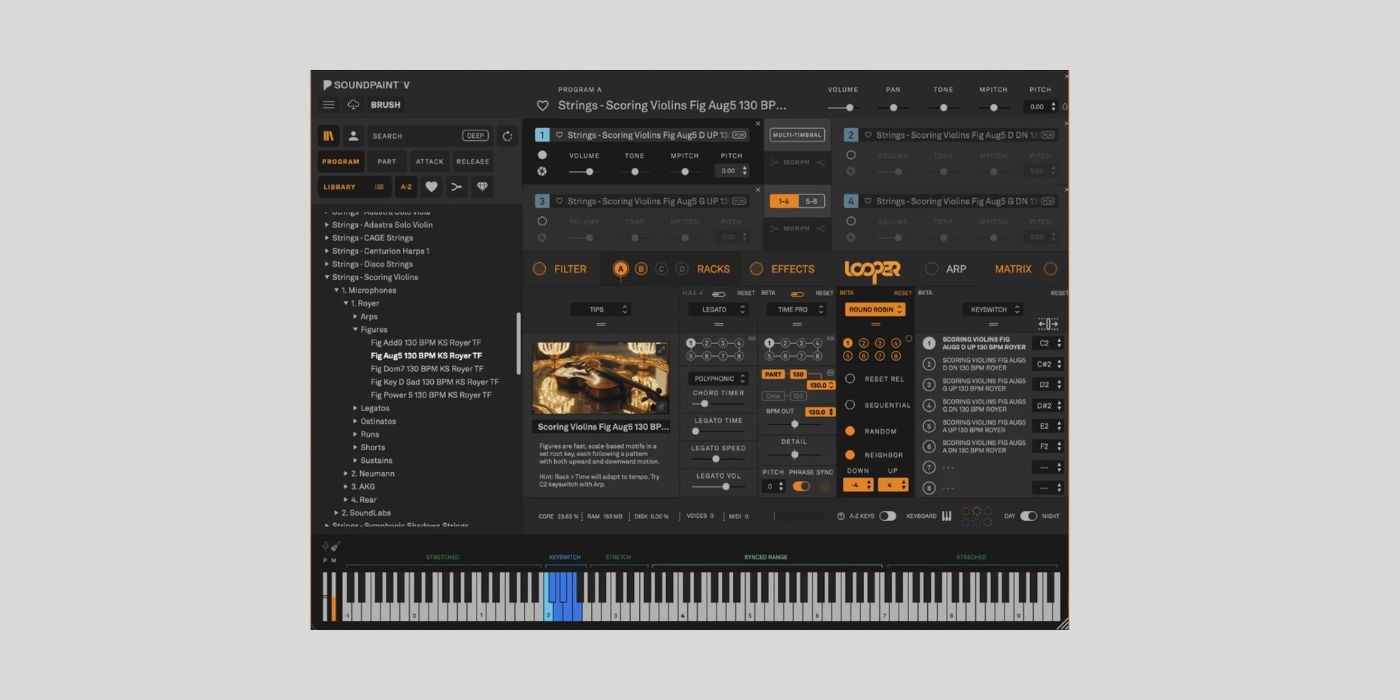
Soundpaint came onto the scene back in 2021 as an ambitious project with a lot of potential.
The free music instrument technology ticked a lot of boxes from the get-go, not least because it comes from the people behind 8dio, the masters of deep sampling.
From the start, it was clear that Soundpaint aims to become the industry standard, not just another free alternative to Native Instruments Kontakt.
It was also clear that Soundpaint had a long way to go, but each update has brought the platform closer to becoming a serious contender.
Soundpaint 5.0 is the most significant update yet, and could be the pivotal moment for 8dio’s creation.

It’s still free!
8dio and Soundpaint
If you’re new to Soundpaint, here’s a brief history of the software.
Troels Folmann and Tawnia Knox founded Soundpaint in 2021.
The pair also founded 8dio a decade earlier, in 2011.
You don’t need to dig too deep to be impressed by the founders’ credentials.
Troells Folmann is a multi-award-winning composer, best known for his work on AAA video games like Tomb Raider: Legend. Troells Folmann is also a co-founder of the now-defunct virtual instrument/sample library developer Tonehammer.
Tawnia Knox is a Tony Award-nominated Broadway producer, music tech expert, member of the Bob Moog Foundation Advisory Board, and much more.
Founder credentials aside, we can look at a long list of 8dio Kontakt libraries that showcase the quality that leads many to call them the best in the business.
I particularly love 8dio’s orchestral and vocal libraries; the downside is that 8dio libraries have historically been quite pricey. I think prices have become more reasonable in general, and Soundpaint libraries start around $19, although many still sit around the $99 mark.
When two founders use world-class sounds for their projects and produce world-class sounds with their company, it makes sense to complete the circle by adding Soundpaint to the mix.
Since the launch in 2021, noteworthy updates have focused on:
- User-imported samples/Hyper Acoustic Legato engine – 2022
- Advanced timbre control/performance efficiency – 2024
- Component-level emulations of vintage hardware synth analogue filters/advanced tagging and search system – 2025
- Per-part time stretching (Time Pro module) and DAW tempo sync – 2025
Those updates take us through versions 1.0 to 4.5; now let’s look at what’s new in Soundpaint 5.0.
New features
Soundpaint 5.0 brings a bunch of new features, some of which could be game-changing for the platform. Here are some of the most exciting additions.
Brush – built-in sample editor
Brush is a multi-format sample editor that makes it easy to tweak one-shots or loops to fit your needs. Editing functions include fade, crossfade, declick, and normalise.
But the really exciting thing about Brush is that it helps you create new instruments from any sample in seconds. You can position or auto-map your sample across the keys to create a playable instrument instantly.
Besides the speedy workflow, you could spend more time crafting these custom instruments and save them as presets (user parts) in Soundpaint for future use. Given the ridiculous amount of samples most of us have lying around, Brush could be the nudge we need to put them to good use.
Next Generation Arp
I love a good arp as much as the next person, but I don’t use them as often as some, so they rarely get near the top of my excitement list; this one might.
On the surface, the redesigned arp offers 128 steps. However, you can subdivide those steps to create arpeggios with up to 2000 steps.
On scale/size alone, it’s already fairly impressive in terms of the complexity and variation you can create in a single pattern. But the additional features make it even more interesting.
New per-step stutter and glue functions are available. The glue function is great; it lets you work with multiple steps faster and keeps the workspace clear.
You also have new swing, inversion, and mirror modes; the swing modes, which you can introduce gradually, feel very authentic. I really like the mirror mode for its gorgeous, contrasting motion.
The arp, in general, is very user-friendly, and basic things, like changing step length, are easy to find and adjust.
Rack Round Robin
The new round robin setup might feel like a fairly standard addition, but it’s one of my favourite things about Soundpaint 5.0, so far.
Four new round robin modes have been added to the Rack FX section: Reset Release, Sequential, Random, and Neighbor.
8dio libraries are typically ultra-realistic, but the organic variation offered by utilising the round robin modes takes it to the next level.
You avoid the common machine-gun-like sound of repeated notes with any sound, but it’s particularly nice on things like orchestral shorts.
Drift and 505
The round robin modes aren’t the only new addition to the Rack FX section; under the Vintage tab, we now have Drift and 505.
Drift recreates the behaviour of old analogue synthesisers. What I like about this new effect is that you can recreate authentic analogue drift or push it further with notes weaving together for a more pronounced effect.
505 brings the character of vintage string machines with four modes: Chorus, Ensemble, Flanger, and Voicer. You can purchase the 505 String Machine library for $49; this new built-in effect lets you add that character to any sound.
Micro Tune and Rack updates
Soundpaint 5.0 offers over 130 tunings from around the world. Tunings are split into categories like Equal Temperaments, Just Intonation, Historical, and Experimental. It’s a nice way to get an authentic sound from a rare instrument library without playing more than a C major scale.
Soundpaint 5.0 also updates some previously added features, like Legato HAL 4 and Time Pro.
The legato engine is now optimised for better performance, from faster patch loading to more realistic articulation.
Time Pro now includes phrase sync.
Diatonic pitch bending and mod-wheel strumming
These are two seemingly small features, but they can have a big impact on your performance.
I like anything that makes performance more tactile and less tedious, and both of these additions do that.
Looper
I can’t say I’m not a little disappointed that Looper isn’t free; it’s a paid feature that costs $99.
At the time of writing, you can grab it at the introductory price of $69, but that offer won’t last long.
Looper is a virtual vintage recording studio inside Soundpaint offering five parallel vintage tape machines. The tape machines are synchronised or drifting against each other.
It provides an alternative to the linear workflow in your DAW, and I can see the benefit of recreating that old-school flow, where the tape keeps rolling.
As for price, I’m not sure I’d make enough of Looper to justify spending the money there instead of on a new library or something else.
But if 8dio launched Soundpaint 5.0 with no mention of Looper, I’d be very impressed, so I can’t complain too much that not everything is free.
Kontakt is king?
There’s no getting away from the fact that Kontakt is deeply entrenched in the daily workflow of musicians and producers of all levels, but it hasn’t always been plain sailing.
I used Kontakt a lot in the early days, then felt Kontakt and Native Instruments libraries were stagnating for a while, and I drifted away from it. Later on, I felt that Native Instruments began to show real promise with Kontakt and its libraries again, before everything went wild at NI.
In short, it’s been up and down, but Kontakt is still the industry standard and offers more libraries than any similar platform.
However, the number of available libraries isn’t a real issue these days because you only need enough, and other platforms offer enough.
I don’t know if Soundpaint will sit atop the pile one day; Kontakt is still a juggernaut, but 8dio’s focus on creating a tactile, fun workspace where we can turn ideas into reality quickly is the right way to go about it.
It doesn’t hurt that some of the libraries are absolutely incredible.
It may be closer to being the best FREE option, though.
Final thoughts
I like 8dio, I like the concept of Soundpaint, and I think 5.0 is an impressive update.
There are around fifteen free instruments right now; some are great, and some aren’t. I’d love to see the free range expand with some serious heavy-hitters so all users can experience Soundpaint’s potential before paying for additional sounds.
Download: Soundpaint (FREE)
More:
