



I tested the best free clipper plugins available in 2026 and ranked the ones actually worth installing below.
A clipper is the fastest way to control peaks and gain loudness. It slices the tips off your transients so a track can hit harder without the pumping you often get from a limiter.
I often reach for a clipper on drums, bass, synths, and the master bus. You will also see these tools called clipper VSTs or clipping plugins, and they all do the same job.
The free options are very good nowadays. They now match paid clippers on sound and oversampling, and several useful ones landed in the last year.
My top pick overall is Venn Audio Free Clip 2, but the right choice depends on whether you are clipping a drum bus, mastering a mix, or chasing a specific analog character.
Quick verdict: Venn Audio Free Clip 2 is the best free clipper plugin in 2026. It is free with no account, runs on Windows, macOS, and Linux, gives you six clipping curves from transparent to warm, and includes up to 32x oversampling.
Top picks at a glance:
- Free Clip 2 — Best Overall. Does everything, on every OS, no sign-up.
- KClip Zero — Best for Mastering. Same engine as the paid KClip 3.
- Kilohearts Clipper — Best for Drums. Per-sample clipping with very low CPU.
- PeakEater — Best Open-Source. Runs everywhere, Linux and CLAP included.
- RazorClip — Best Analog Character. Five circuit models in one plugin.
- Initial Clipper 2 — Best Metering. Soft clipper with a full LUFS meter.
- GClip — Best CPU-Light. Instant, near-zero-CPU hard clipper.
By Tomislav Zlatic · Published July 7, 2026 · Updated July 7, 2026 · Star ratings are my own, based on hands-on testing.
How I tested
I have reviewed most of these clippers individually on BPB as they were released, from the older workhorses to the 2025 and 2026 newcomers. For this guide, I reloaded all 15 on a MacBook Air M1 running Studio One (and cross-checked Windows) to confirm each one still installs, still runs on current systems, and is still free in 2026.
Two names previously listed did not make the ranking because they are no longer free. You will find them, and why, further down. More on our process is on the How We Test page.
Best free clipper plugins (2026)
- Free Clip 2 by Venn Audio
- KClip Zero by Kazrog
- Clipper by Kilohearts
- PeakEater by Vladyslav Voinov
- RazorClip by Analog Obsession
- Initial Clipper 2 by Initial Audio
- GClip by GVST
- KLYP by Voidstar Audio
- Shatter Clip by Golden DSP
- Crispy Clip Light by Yum Audio
- Mesa Lite by Venomode
- KNOCK Clipper by Knock Audio
- SnapClip by NovoNotes
Prefer to keep reading? There is a buyer’s guide on hard vs soft clipping and oversampling, an FAQ, and a note on clippers that are no longer free below.
Free clipper plugin comparison
Here is every clipper on the list at a glance, ranked, with the details that decide which one you load.
| # | Plugin | Best for | Type | Oversampling | OS |
|---|---|---|---|---|---|
| 1 | Free Clip 2 Venn Audio |
All-round, mastering | Hard + 5 soft | Up to 32x | Win · Mac · Linux |
| 2 | KClip Zero Kazrog |
Mastering, loudness | Hard→soft | 2x / 16x | Win · Mac |
| 3 | Kilohearts Clipper Kilohearts |
Drums, percussion | Hard + knee | None | Win · Mac |
| 4 | PeakEater V. Voinov |
Open source, Linux | Digital, 6 curves | Up to 32x | Win · Mac · Linux |
| 5 | RazorClip Analog Obsession |
Analog character | Analog, 5 models | None | Win · Mac |
| 6 | Initial Clipper 2 Initial Audio |
Loudness metering | Soft + saturation | None | Win · Mac |
| 7 | GClip GVST |
Simple, CPU-light | Hard + soft knee | 2x | Win · Mac · Linux |
| 8 | KLYP Voidstar Audio |
Visual, Linux | Soft, ADAA | Up to 8x | Win · Mac · Linux |
| 9 | Shatter Clip Golden DSP |
Visual feedback | Digital + analog | 4x | Win · Mac |
| 10 | Crispy Clip Light Yum Audio |
Clean, simple | Soft/hard morph | None | Win · Mac |
| 11 | Mesa Lite Venomode |
Cross-platform soft | Soft | — | Win · Mac · Linux |
| 12 | KNOCK Clipper * Knock Audio |
Drum character | Hard/soft, warm | Optional | Win · Mac |
| 13 | SnapClip * NovoNotes |
Graph-based curve | Digital, ADAA | Up to 16x | Win 11 · Mac |
*KNOCK Clipper and SnapClip are only free some of the time. KNOCK Clipper is given away during periodic promotions (it normally sells for around $49), and SnapClip was free during its May 2026 launch and now costs around $19. Both are covered below.
Free Clip 2 by Venn Audio
Best Overall · ★★★★★ 4.8/5
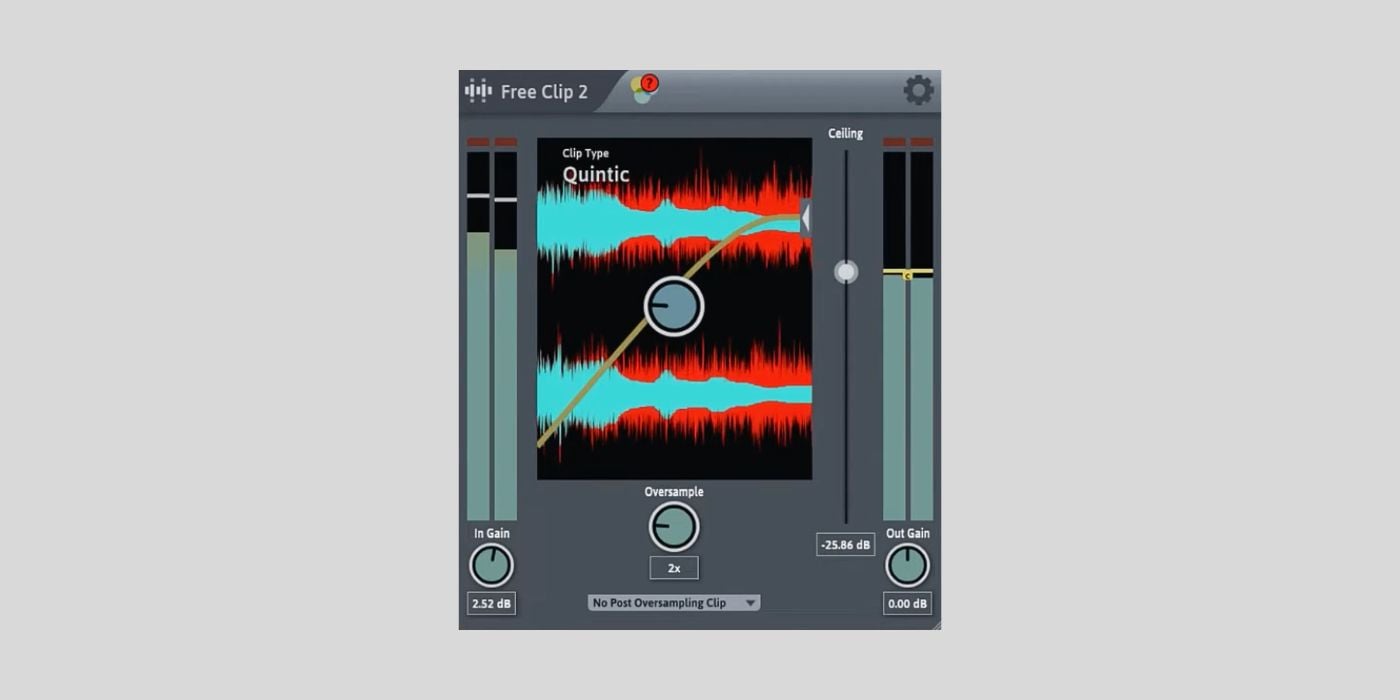
Free Clip 2 is the clipper I load first, and my overall pick for 2026. It ships as part of Venn Audio’s nine-plugin Free Suite, so a single install covers clipping and a stack of other mixing tools.
What makes it an all-rounder is the insane range of clipping curves. You get a transparent Hard Clip for shaving peaks before a limiter, then five progressively softer shapes (Quintic, Cubic, Hyperbolic Tan, Algebraic, and Arctangent) that move from clean to warm.
When you push it hard, the Arctangent curve behaves like a saturator, so the same plugin handles surgical peak control and creative drive.
The interface is the other reason it stays on my template. It resizes, and the zoomable waveform shows exactly how much you are clipping, which makes it easy to set by eye. Oversampling goes up to 32x, with post-oversampling clip options to catch the inter-sample peaks that sneak past on a master.
The main weakness is metering. There is no built-in LUFS or output meter beyond the waveform, so you will want a separate loudness meter for mastering. High oversampling also puts a heavy load on CPU, so 16x and 32x are best saved for the final render rather than for a busy real-time session.
Best for: producers who want one free clipper that does everything, on any operating system, with no sign-up.
Hard + 5 soft curves · Windows, macOS (Apple Silicon native), Linux · VST3, AU, AAX · up to 32x oversampling.
Verdict: the most complete free clipper available, and the one I recommend to everyone first.
Download: Free Clip 2 (Venn Free Suite) (VST3/AU/AAX for Windows, macOS & Linux)
KClip Zero by Kazrog
Best for Mastering · ★★★★★ 4.7/5
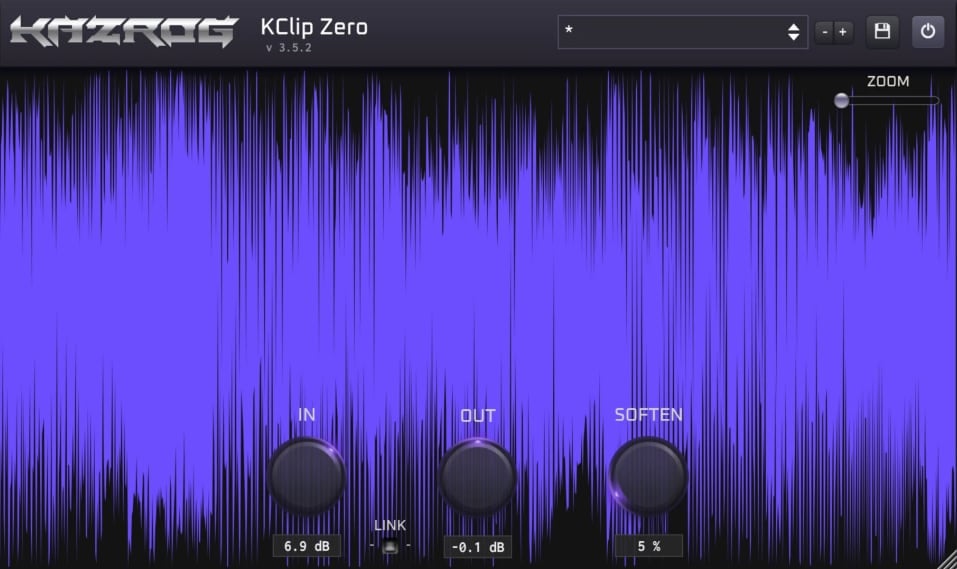
When a master needs transparent peak control, KClip Zero is the free clipper I trust. Kazrog built it on the same core algorithm as its paid KClip 3, then stripped the interface down to a single Soften knob that sweeps from pure hard clipping to a rounded soft clip.
That one control covers most of what mastering asks from a clipper. The real-time visualizer shows how much you are shaving as you go, and the automatic gain compensation keeps levels matched so you judge tone rather than loudness.
My favorite thing is that, on a full mix, it stays clean unless you deliberately push it into distortion territory.
Oversampling runs at 2x while you monitor and jumps to 16x on export, which is where the transparency really shows. There is a catch worth knowing, and it is that you cannot monitor at that full 16x quality in real time, only on the bounce.
The other friction is the download. Kazrog routes it through a $0 checkout that still asks for billing details, which is more hassle than a direct link. It is also Windows and macOS only, with no Linux build.
Best for: mastering-grade, coloration-free clipping from a single knob.
Variable hard→soft · Windows (VST, AAX), macOS (AU, AAX), Apple Silicon · 2x live / 16x on export.
Verdict: the cleanest free clipper for mastering, as long as you are happy with the one-knob approach.
Download: KClip Zero (VST/AU/AAX for Windows & macOS)
Clipper by Kilohearts

Best for Drums · ★★★★★ 4.6/5
Kilohearts released its Clipper as a free part of the Kilohearts Essentials bundle in 2025, and it has become my go-to for drums and percussion. It clips per sample with a Knee control that rounds the corner from hard to soft, so you can tighten transients without the harsh edge a pure hard clip can leave on a snare or a hi-hat.
The controls are deliberately minimal, with the Threshold set on the waveform plus In Gain, Knee, and Out Gain. CPU use is very low, so it is easy to drop on every drum channel.
The cool part is that the same Clipper also works as a Kilohearts Snapin. Load it inside Multipass, and you can split the signal into bands and clip each one separately, which turns it into a free multiband clipper. Multipass itself is a paid host, so that trick costs extra, but the standalone plugin is free in any DAW.
The obvious limitation is oversampling, or rather, the lack of it. There is no oversampling control at all, so on bright, aggressive material, you can hear the aliasing that Free Clip 2 or KClip Zero would clean up. You also need a free Kilohearts account to download it.
Best for: drum bus and percussion clipping where speed and low CPU matter more than mastering-grade polish.
Hard + knee · Windows (VST, VST3, AAX), macOS (AU, AAX) · no oversampling · also runs as a Kilohearts Snapin.
Verdict: the drum clipper I reach for, with a hidden multiband trick if you own Multipass.
Download: Kilohearts Clipper (VST/VST3/AU/AAX for Windows & macOS)
PeakEater by Vladyslav Voinov
Best Open-Source · ★★★★★ 4.6/5
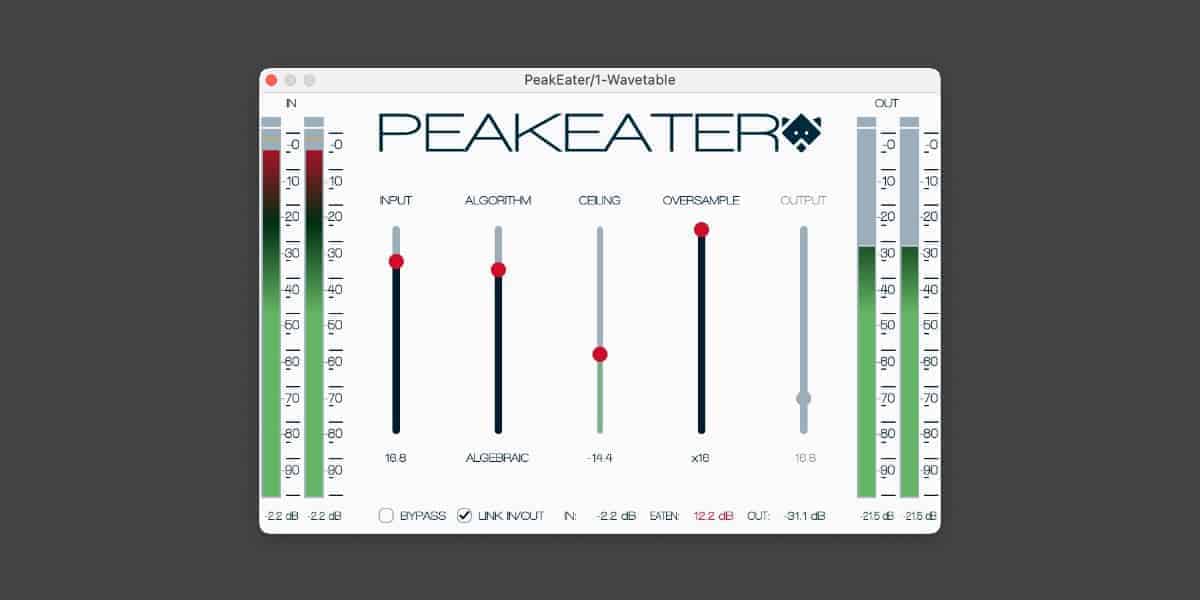
For Linux users and open-source fans, PeakEater is the one I point to. It is a community-developed waveshaper with six clipping curves (Hard, Quintic, Cubic, Tangent, Algebraic, and Arctangent), and it is one of the few quality clippers that ships in VST3, AU, LV2, and CLAP across Windows, macOS, and Linux.
It is a clean tool with no analog coloring, which is the point. On hard clip, it does nothing below the threshold, so it is a peak ceiling you can trust.
The resizable interface has a waveform display and a dry/wet knob, and that blend control makes it handy for parallel clipping or as a rough exciter. The look reminds me of the default Reaper plugins, for better or worse.
The current release moved its oversampler from an IIR to an FIR design, which cleans up the resampling at the cost of about a millisecond of latency at 32x. That is a fair trade for the improved sound, and it also fixed an older comb-filtering bug in the dry/wet path.
The main issue is that there is no AAX build, so Pro Tools users are out. Also, because it is purely digital, you will not find warmth here unless you lean on the blend knob. And it is a one-person project, so updates arrive when they arrive.
Best for: Linux and CLAP setups, and anyone who wants a transparent, verifiable peak ceiling for free.
Digital, 6 algorithms · Windows, macOS (universal), Linux · VST3, AU, LV2, CLAP · up to 32x oversampling.
Verdict: the best free open-source clipper, and the one to grab if you are on Linux.
Download: PeakEater (VST3/AU/LV2/CLAP for Windows, macOS & Linux)
RazorClip by Analog Obsession
Best Analog Character · ★★★★★ 4.5/5
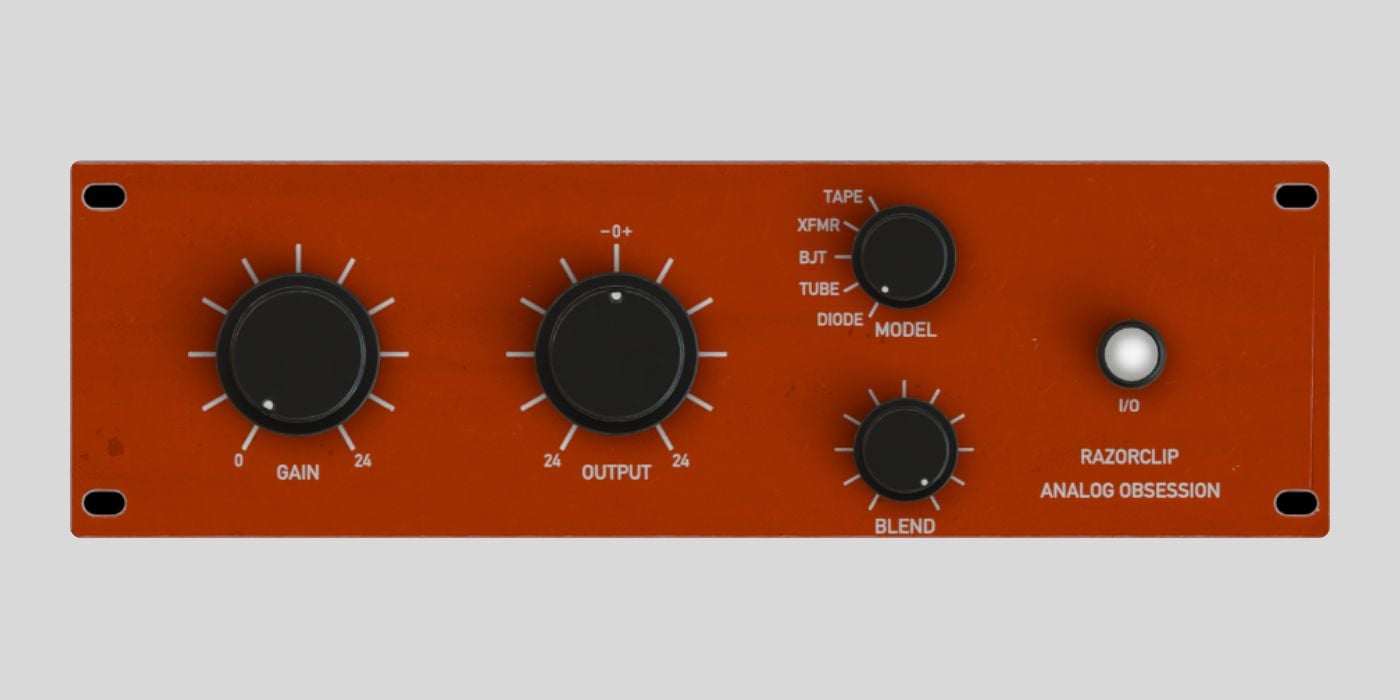
If you want a free clipper that adds character rather than staying invisible, RazorClip is the one. Analog Obsession released it in early 2026, and instead of one clean curve, it models five circuit types (tape, transformer, BJT, tube, and diode), each with its own harmonic signature and transient feel.
That variety is why I use it in a mix rather than on a master. The transformer and tape models thicken a bass or a bus gently, the tube setting has a nice weight on drums, and the diode mode is the most restrained.
The Blend knob runs any of them in parallel, so you can keep the dry punch and add just a little grit on top. I like it as the color stage in a two-clipper chain, with a clean clipper doing the actual peak control.
Unfortunately, there is no oversampling. Driven hard at 44.1 kHz, you can get aliasing, which is why I keep it for character work and switch to a transparent clipper when I need clean loudness.
It is also Windows and macOS only; it needs a Metal-capable GPU on Mac, and the Blend control can let the wet signal poke above 0 dBFS if you are not watching the output.
Best for: adding analog-style warmth and drive to drums, bass, and buses.
Analog, 5 circuit models · Windows and macOS · VST3, AU, AAX · no oversampling.
Verdict: the most characterful free clipper, as long as you treat it as color and not a mastering peak stop.
Download: RazorClip (VST3/AU/AAX for Windows & macOS)
Initial Clipper 2 by Initial Audio
Best Metering · ★★★★☆ 4.4/5
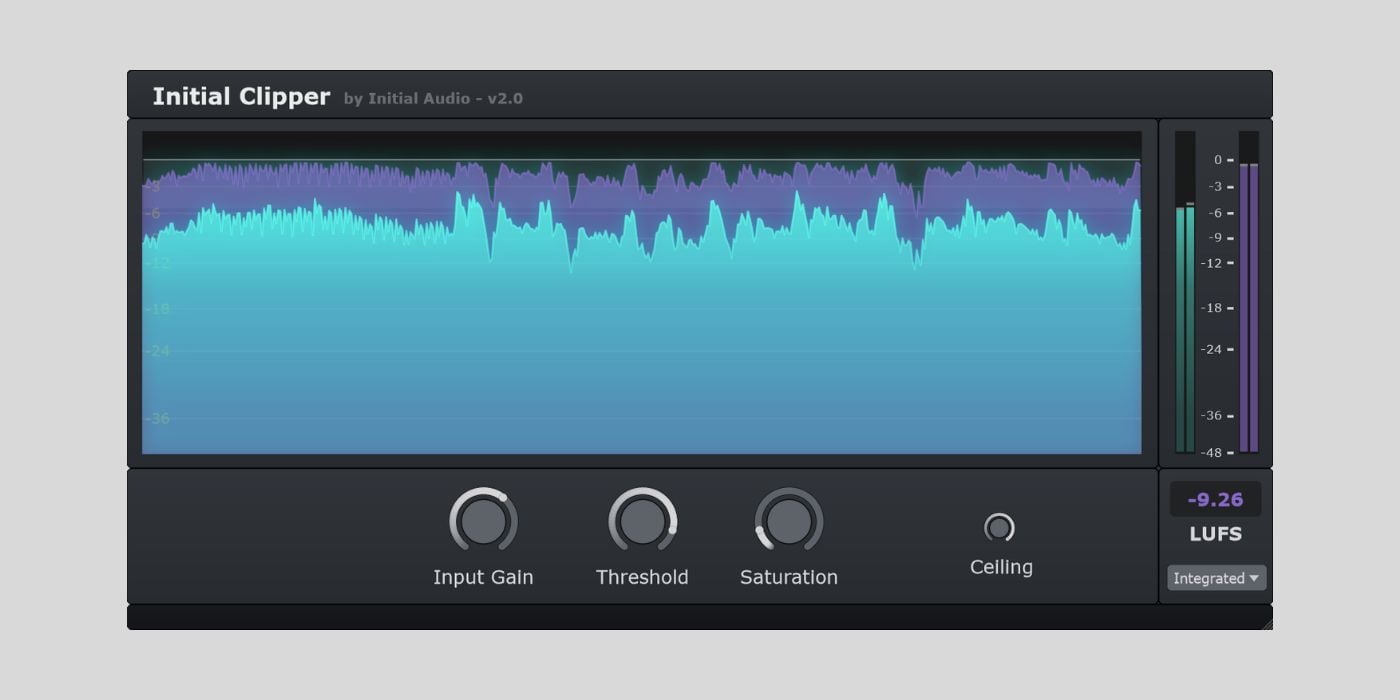
Initial Clipper 2 earns its place with a feature the other clippers here skip, a built-in loudness meter. It pairs a soft clipper with harmonic saturation and a full LUFS readout (Integrated, Short-Term, Momentary, and Loudness Range) right in the interface, so you can chase a streaming target without loading a separate meter.
The Saturation knob is another cool addition. Positive values add odd and even harmonics for warmth, the Ceiling control caps the absolute peak, and a dry/wet blend plus an Auto Level function help you A/B without being fooled by volume.
To me, it sounds more warm than clinical, which suits hip-hop, EDM, and anything where a little grit helps.
There is no oversampling, so pushed hard on bright material, it can alias, and it is a soft clip only, with no pure hard mode for clean peak shaving. The saturation also ramps up quickly, so it rewards a light hand.
Best for: producers who want a soft clipper, some warmth, and loudness metering in one free plugin, especially when mastering for streaming.
Soft clipper + saturation · Windows (VST3, AAX), macOS (AU, AAX) · no oversampling · free with an account.
Verdict: not the most transparent option, but the built-in LUFS meter makes it the most convenient for loudness work.
Download: Initial Clipper 2 (VST3/AU/AAX for Windows & macOS)
GClip by GVST
Best CPU-Light · ★★★★☆ 4.2/5
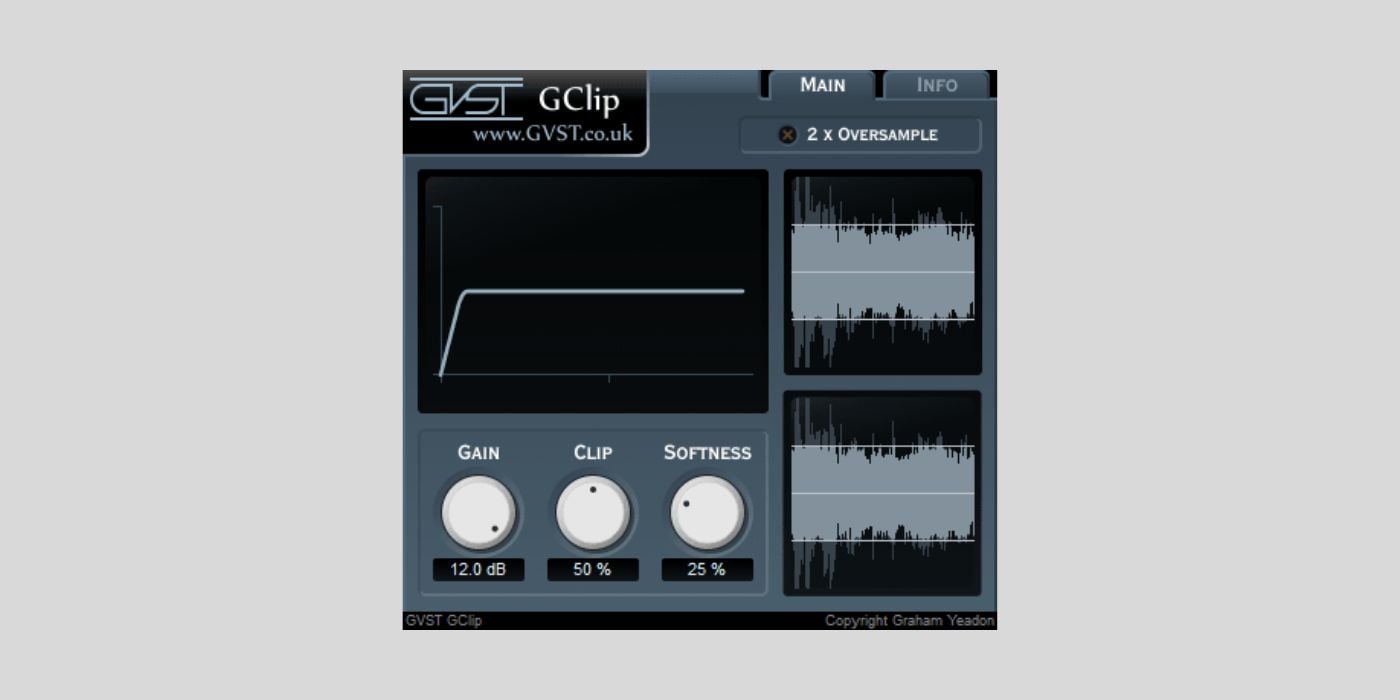
GClip has been around since 2004, and I still keep it installed because it is about as simple and light as a clipper gets. You get a Gain knob, a Clip threshold, a Softness control for the knee, and a 2x oversampling toggle, with a transfer-function graph and a before/after waveform to watch.
At zero softness, it is a pure hard clipper, clean and characterless, which is exactly what you want for quick peak taming on a rough mix. It uses almost no CPU, installs by copying a single file, and runs on Windows, macOS, and Linux.
Its age shows in the format support. GClip is VST2 only, with no AU, so Logic Pro users cannot load it without a wrapper, and there is no VST3 or AAX either. Oversampling tops out at 2x, the threshold is shown as a percentage rather than in dBFS, and the interface is basic, but it grew on me over time.
Best for: Windows and Linux producers who want an instant, near-zero-CPU hard clipper with no setup.
Hard + soft knee · Windows, macOS, Linux · VST2 only · 2x oversampling · last updated 2024.
Verdict: dated and format-limited, but still one of the quickest free hard clippers if your DAW loads VST2.
Download: GClip (VST2 for Windows, macOS & Linux)
KLYP by Voidstar Audio
★★★★☆ 4.4/5
KLYP is a newer soft clipper that impressed me for a first release from a new developer. Voidstar Audio wrote it in Rust and put it out in late 2025 as pay-what-you-want, so you can pay the suggested ten dollars or nothing at all, with no email or account required.
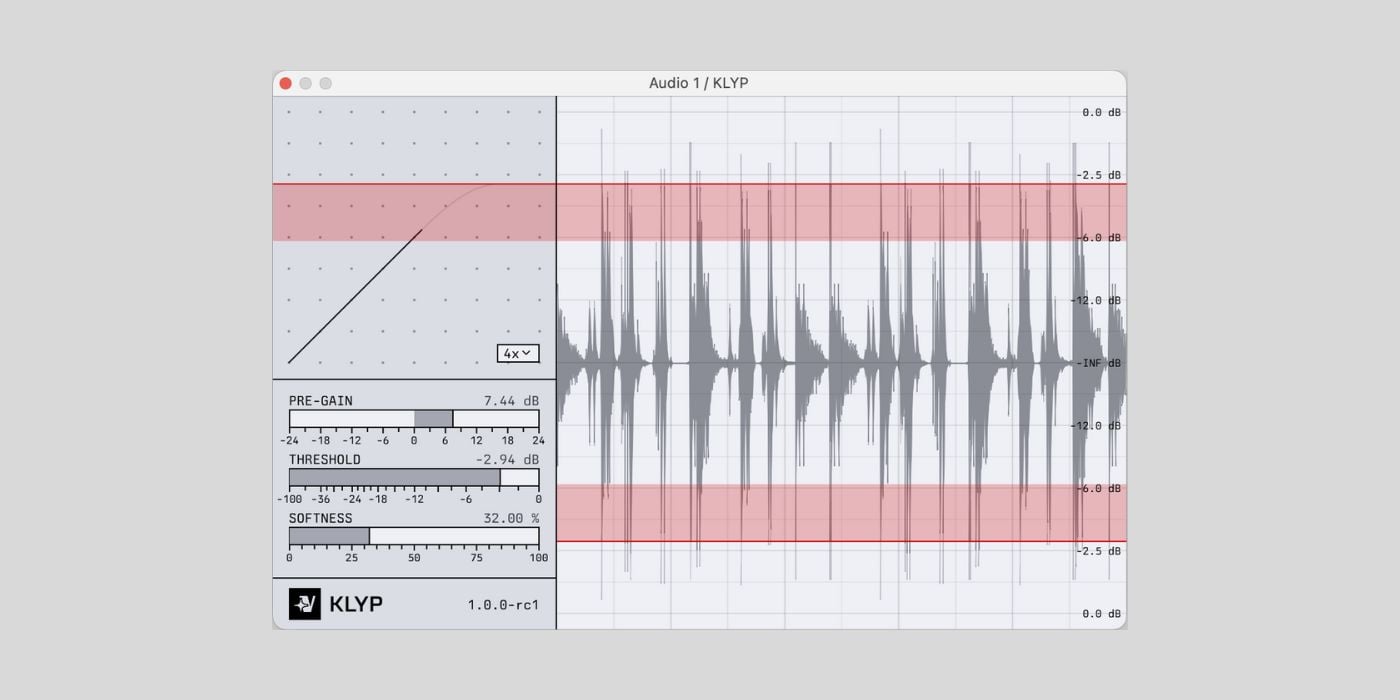
The interface is built around visual feedback. A waveform oscilloscope shows input, output, and the threshold together, and a clipping-curve graph doubles as a peak meter, so you always see what the Softness control is doing.
Under the hood, it offers up to 8x linear-phase oversampling and an optional Antiderivative Antialiasing mode that keeps things clean when you push harder than the oversampling alone would handle.
It shares PeakEater’s cross-platform spirit. There are VST3 and CLAP builds for Windows, macOS, and Linux, which makes it another strong choice for Bitwig and Reaper setups on any OS.
That said, there is no AAX, oversampling stops at 8x rather than the 16x or 32x of some rivals, and it is a brand-new plugin from a solo developer, so long-term support is unproven. It is also a soft clip only, though you can dial Softness down for near-hard behavior.
Best for: producers who want a clean, visual soft clipper for free, and another good Linux and CLAP option.
Digital soft clipper, ADAA · Windows, macOS, Linux · VST3, CLAP · up to 8x oversampling · pay-what-you-want.
Verdict: a polished, honest soft clipper that punches above a first release, especially if you value the scope and ADAA.
Download: KLYP (VST3/CLAP for Windows, macOS & Linux)
Shatter Clip by Golden DSP

★★★★☆ 4.2/5
Released in July 2026, Shatter Clip is the newest clipper here, and its hook is a real-time 60fps oscilloscope that paints the clipped part of the waveform in color as it happens. If you learn by watching what a process does, it is one of the clearest ways to see how much you are shaving off.
Golden DSP gave it three modes (Hard, Soft, and an Analog dual-band setting with a bit of texture) plus 4x oversampling, and it runs at zero latency, so it is fine on both tracking and mix duties. It is a light 5 MB download.
Because it only landed recently, I am ranking it on its design and my first sessions with it, rather than a year of daily use. The specs are modest next to the leaders, with 4x oversampling where PeakEater and Free Clip 2 go much higher, and there is no AAX or CLAP. You also have to join the newsletter to download it.
Best for: producers who want visual, see-it-happen feedback while clipping, and a zero-latency tool that works while tracking.
Digital with an analog mode · Windows (VST3), macOS (VST3, AU) · 4x oversampling · zero latency.
Verdict: a promising, useful visual clipper. Give it a few updates and it could rank higher.
Download: Shatter Clip (VST3/AU for Windows & macOS)
Crispy Clip Light by Yum Audio

★★★★☆ 4.0/5
Yum Audio’s Crispy Clip Light strips the paid Crispy Clip down to the part most people need. You get a Push control for input drive, a Ceiling for the threshold, and a Shape knob that morphs smoothly from soft to hard clipping, plus an analog-style LED meter that reads clip amount at a glance.
It sounds clean and modern rather than colored, which is the design brief. The Shape morph is the highlight, since it lets you find the exact point between a rounded soft clip and a firm brick wall with one control.
The free version’s big omission is oversampling, which the paid Crispy Clip adds along with multiband, a Mix control, and deeper metering. Without it, hard clipping bright material can alias. You download it with an email address rather than a direct link, and there is no dry/wet in the free tier for parallel work.
Best for: producers who want a clean, simple soft-to-hard clipper with a clear meter, and one of the few free clippers with an AAX build for Pro Tools.
Digital soft/hard morph · Windows and macOS · VST3, AU, AAX · no oversampling in the free tier · email required.
Verdict: a tidy, clean clipper held back by the missing oversampling, but useful if you do not push it hard.
Download: Crispy Clip Light (VST3/AU/AAX for Windows & macOS)
Mesa Lite by Venomode
★★★★☆ 4.2/5
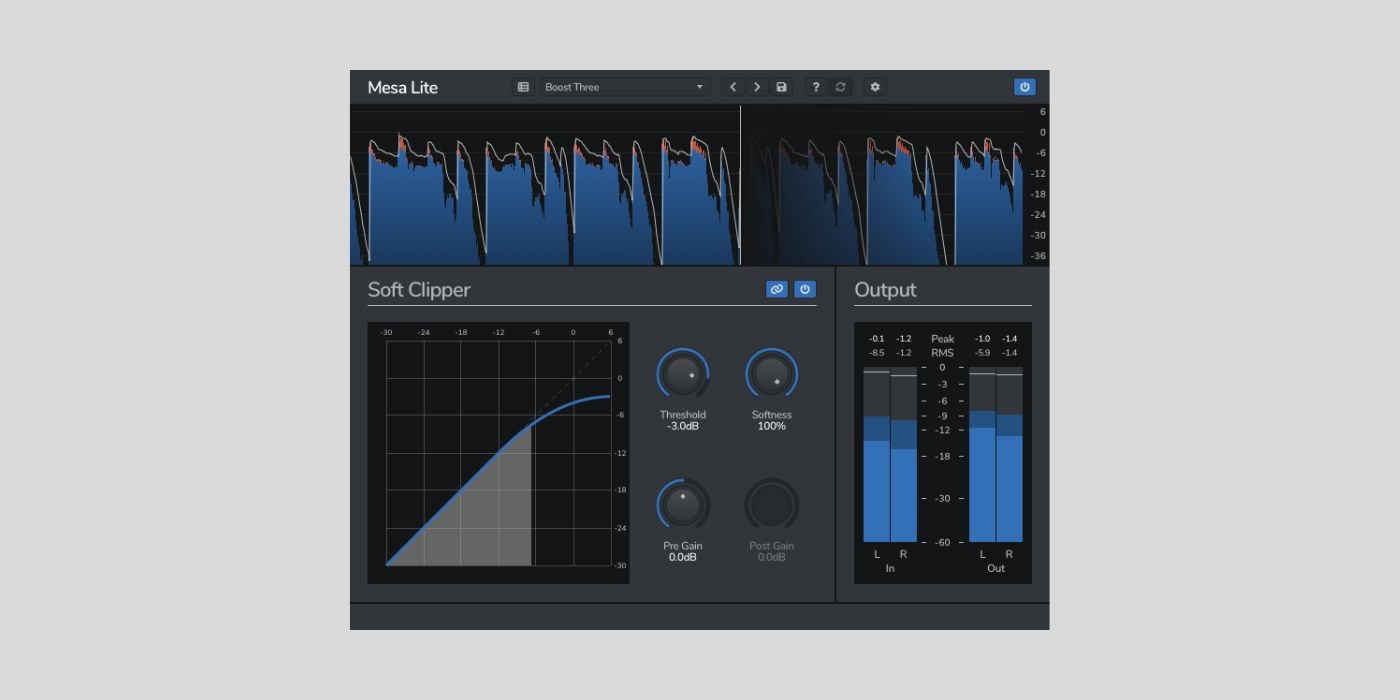
Venomode released Mesa Lite in late 2025, and it is one of the most polished of the newer free soft clippers I tried. Venomode has a track record of clean, sensible plugins, and Mesa Lite follows that pattern with a straightforward soft-clipping workflow and a modern interface.
It is one of the few free clippers with native Windows, macOS, and Linux support, which puts it alongside PeakEater and KLYP for cross-platform setups.
Because it is the free Lite version, it is lighter on features than Venomode’s paid Mesa, so treat it as a capable everyday soft clipper rather than a full mastering suite. I found it more refined and controllable than a lot of the quick freebies floating around, and it is an easy one to leave on a bus.
Best for: producers who want a clean, modern soft clipper that runs everywhere, including Linux.
Soft clipper · Windows, macOS, Linux · free Lite version of the paid Mesa.
Verdict: a well-made, cross-platform soft clipper that is easy to recommend as a daily driver.
Download: Mesa Lite (for Windows, macOS & Linux)
KNOCK Clipper by Knock Audio
★★★★☆ 4.1/5 · free during periodic promotions
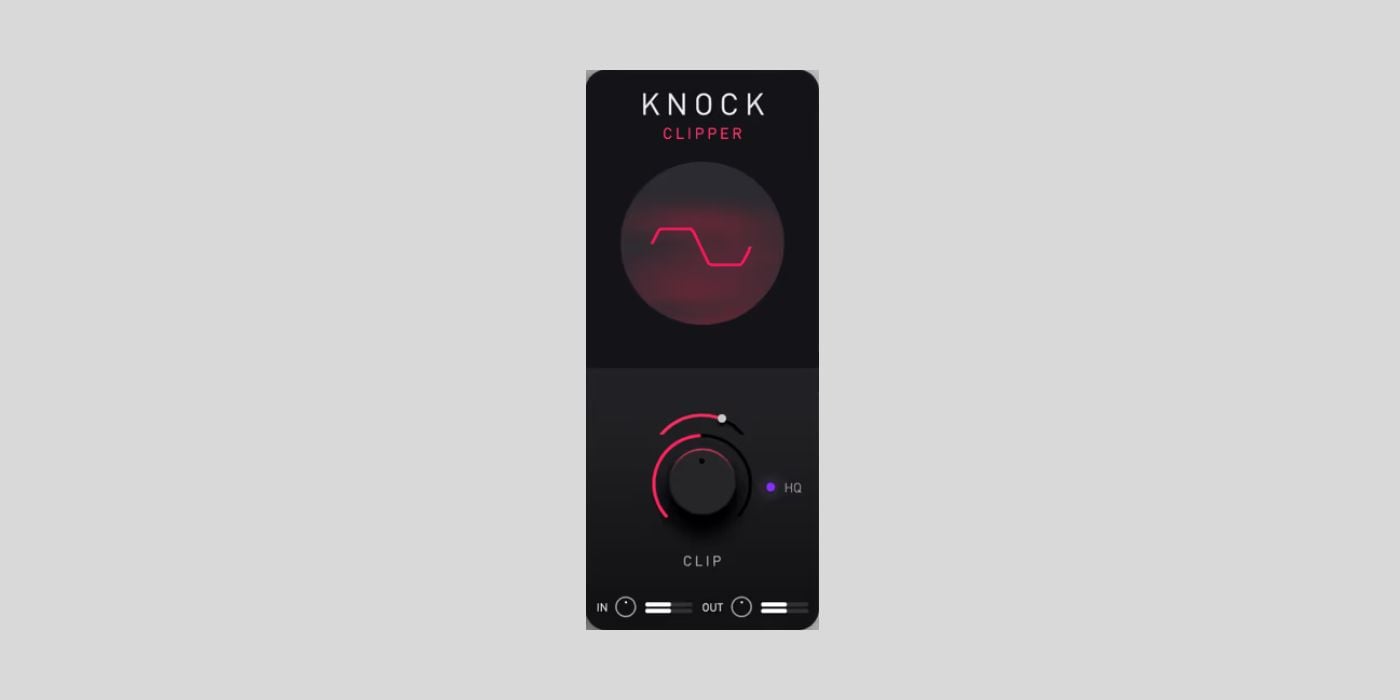
KNOCK Clipper pulls the clipper module out of DECAP’s KNOCK and sells it on its own, and it earns a spot here with a price caveat. It is a hard-and-soft clipper voiced for drums, built around the warm, aggressive “knock” tone from DECAP’s drum sample series, and it blends between hard and soft smoothly with an optional high-quality oversampling mode.
On drums, it does deliver that punchy, slightly saturated character quickly, which is the whole appeal. You can get similar results from other tools with more steps, so what you are really paying for is the shortcut to that specific sound.
Here is the catch. KNOCK Clipper normally sells for around fifty dollars, and it goes free only during periodic giveaways (it was free around Black Friday and again in December 2025).
As of mid-2026, it is not free, so I include it as one to grab when the next promotion comes around. If you claimed it during a free window, the license is yours to keep.
It is also surprisingly heavy for a clipper, needing around 500 MB of disk space and 8 GB of RAM, and the interface is minimal with no waveform display.
Best for: hip-hop and trap producers who want DECAP’s drum character fast, and who catch it during a free promo.
Hard/soft, warm character · Windows and macOS · VST3, AU, AAX · 500 MB · normally around $49.
Verdict: a fun drum clipper worth grabbing when it is free, but not worth $49 when free clippers this good exist.
Download: KNOCK Clipper (VST3/AU/AAX for Windows & macOS)
SnapClip by NovoNotes
★★★★☆ 4.4/5 · was free at launch, now around $19
SnapClip is one of the most capable clippers here, with the same kind of price caveat. NovoNotes released it in May 2026 and gave it away free for its launch window. That window has closed, but plenty of producers grabbed it, and it turns up often enough to be worth covering.
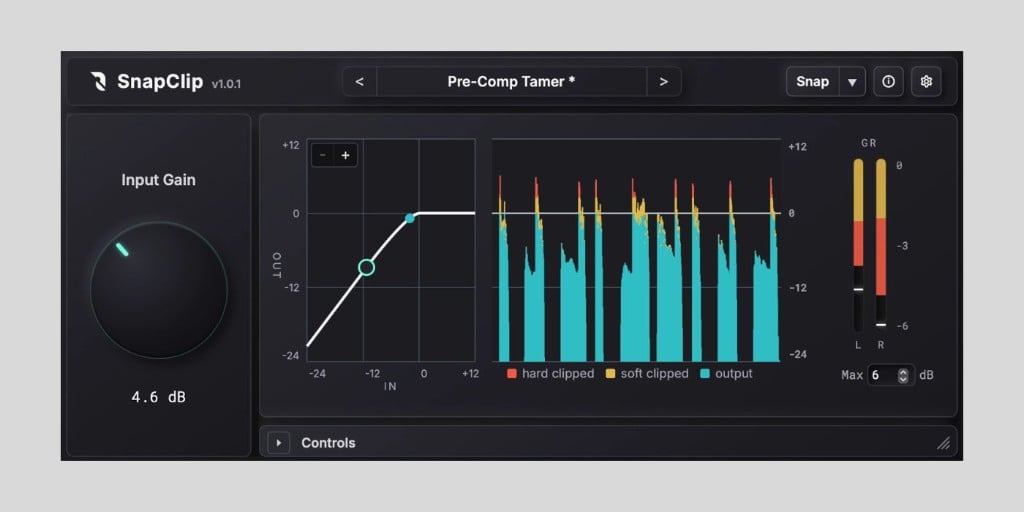
The design is pretty unique. Instead of a single softness knob, you shape the clipping curve directly on a graph, and it combines up to 16x oversampling with Antiderivative Antialiasing, so it stays clean at a lower CPU cost than brute-force oversampling alone. The one-click Snap Adjust sets sensible starting points, and the dry/wet is phase-aligned for parallel clipping.
The catch is availability and price. The free launch offer ended on May 31, 2026, and it now sells for around nineteen dollars, so it is only free if you claimed it in time. Those licenses are the full plugin with no limits. It also requires Windows 11 (Windows 10 is not supported), and there is no CLAP or Linux build.
Best for: producers who caught the free window, or who do not mind paying a little for graph-based curve control and clean ADAA oversampling.
Digital, ADAA · macOS (VST3, AU, AAX), Windows 11 (VST3) · up to 16x oversampling · around $19 now.
Verdict: a superb clipper for the money and a steal at free, but the launch giveaway has ended, so most people will now pay the small price.
Download: SnapClip (VST3/AU/AAX for macOS, VST3 for Windows 11)
Clippers that are not actually free in 2026
A couple of clippers are worth mentioning, even though they are no longer free. Here is their current status, so you do not waste a download.
Voxengo OVC-128
OVC-128 is a superb 128x oversampling clipper, and at aggressive settings, it is the cleanest-sounding option I have used. It is not free, though. It sells for around fifty euros, and the file on the Voxengo site is a demo with limitations rather than a full free version. It is also extremely CPU-hungry and adds noticeable latency, so in practice, it is a render-time tool. Worth the money if you regularly master hot, loud material, but it does not belong on a free list.
LVC-Audio Clipped-MAX (formerly ClipShifter)
LVC-Audio’s ClipShifter is still often cited as a free clipper, but it is no longer available. That plugin has been replaced by Clipped-MAX, a paid plugin whose demo mutes the audio for roughly a minute at a time until you buy a license. It is a powerful, modular tool with multiband and mid/side clipping and very high oversampling, but the free ClipShifter tier people remember is gone. If you see ClipShifter listed as free, that information is outdated.
What to look for in a free clipper plugin
Clippers look simple, and most of them are, but a few details separate one you will keep from one you will delete. Here is what matters.
Hard clipping vs soft clipping
A hard clipper slices the peak off flat at the ceiling. That is the most transparent way to gain loudness in small amounts, and it keeps transients punchy, but pushed hard, it can sound harsh.
A soft clipper rounds the corner instead, which sounds smoother and adds harmonic warmth at the cost of a little transient snap. Most of the plugins here do both on a single knee or softness control, so you can slide between them.
I recommend reaching for hard clipping on a master where you want clean peak control, and soft clipping on drums or a bus where a bit of warmth helps.
Oversampling and aliasing
When a clipper creates sharp new peaks, it also creates high harmonics. Above a certain frequency, those fold back down into the audible range as aliasing, which sounds like a thin, digital fizz on cymbals and bright synths.
Oversampling runs the clipping at a higher internal sample rate to move that aliasing out of the way, then filters it out. More oversampling means cleaner results when you clip hard, and it is the single biggest quality difference between the free clippers here.
Free Clip 2 and PeakEater go up to 32x and KClip Zero reaches 16x on export, while Kilohearts Clipper, RazorClip, and Initial Clipper 2 have none, so save those for gentler amounts or coloring.
Clipper vs limiter
A clipper and a limiter both stop peaks, but they do it differently.
A limiter turns the loud parts down with fast automatic gain reduction, which stays clean but can dull transients and pump when you push it. A clipper cuts the peak off instantly, which adds a touch of distortion but keeps the hit intact.
The common approach is to clip first to shave the sharpest transients, then let a limiter set the final ceiling with less work to do. If you want a related free loudness tool to pair with a clipper, our JS Inflator write-up covers one worth having.
Gain staging a clipper
Most clippers work by driving the input harder into a fixed ceiling, so the Input or Gain knob is really your clip-amount control. Push it until you see a decibel or two of clipping on the meter, then use the output to bring the level back.
Start subtle, since a little clipping goes a long way, and trust your ears over the numbers. On a master, clip before your true-peak limiter, not after it.
Frequently Asked Questions
What does a clipper plugin do?
A clipper cuts off the peaks of an audio signal at a set ceiling instead of turning them down. This lets you raise the overall level of a track without the volume pumping you often hear from a limiter. Producers use clippers on drums, bass, synths, and the master bus to add loudness and control transients.
What is the best free clipper plugin in 2026?
Venn Audio Free Clip 2 is the best free clipper plugin for most producers in 2026. It runs on Windows, macOS, and Linux, needs no account, offers six clipping curves from transparent hard clip to warm saturation, and includes up to 32x oversampling. KClip Zero by Kazrog is the closest alternative for transparent mastering.
Is there a free soft clipper?
Yes. Several soft clippers are completely free, including Venn Free Clip 2, Initial Clipper 2, PeakEater, KLYP, and Venomode Mesa Lite. A soft clipper rounds the peaks gradually instead of chopping them off sharply, which sounds smoother and adds a little harmonic warmth.
What is the difference between a clipper and a limiter?
A clipper cuts the peaks off instantly at a fixed ceiling, which adds harmonic distortion but keeps transients punchy. A limiter turns the peaks down using fast automatic gain reduction, which stays cleaner but can dull transients and pump when pushed hard. Many producers clip first to shave the sharpest peaks, then use a limiter for the final ceiling.
What is the best free clipper for mastering?
KClip Zero is the best free clipper for mastering because it uses the same algorithm as the paid KClip 3 and offers 16x oversampling on export. Venn Free Clip 2 in hard clip mode with oversampling enabled is an equally clean choice. Both stay transparent when you only shave a decibel or two.
What is the best free clipper for metal and aggressive mixes?
Venn Free Clip 2 in its Arctangent mode is my pick for metal and aggressive mixes because the soft curves add grit when driven hard. Analog Obsession RazorClip is the other strong option, since its transformer and tube models bring analog-style bite to guitars and drums.
The verdict: which free clipper should you download?
Venn Audio Free Clip 2 is the best free clipper plugin in 2026 for most producers. It is free with no account, runs on every operating system, offers six clipping curves, and includes the oversampling you need for clean work, which makes it the easiest one to recommend without caveats.
From there it comes down to the job. For transparent mastering, use KClip Zero. For drums and percussion, Kilohearts Clipper is the fast, low-CPU choice. For analog character on a mix, reach for RazorClip. If you are on Linux or want open source, PeakEater and KLYP are the picks, and for built-in loudness metering, Initial Clipper 2 has you covered.
Grab whichever fits your next session. If you want more free tools to go with it, our free compressor plugins roundup and the main Free VST Plugins hub are good places to start.
Return to our Free VST Plugins page for more freeware plugins and instruments.
This page was written by Tomislav Zlatic on July 7, 2026.
The author, Tomislav Zlatic, is the founder and editor-in-chief of Bedroom Producers Blog (BPB). Since starting BPB in 2009, he has tested and reviewed hundreds of VST plugins.