



I tested every free compressor VST plugin worth installing in 2026 and picked the 20 best ones for this list.
A compressor is the second plugin most producers learn (after EQ) and the one that takes the longest to feel confident about. The good news is the free tier has gotten strong. There are mastering-grade transparent compressors, faithful LA-2A emulations from Tokyo Dawn Labs and other respected developers, multi-band creative tools, and even the original Universal Audio LA-2A and 1176, both completely free with no hardware required.
I’ve grouped the list by what each plugin actually does, so you can skip to the section you care about. If you only want a single download, get TDR Kotelnikov — it’s still the best free compressor for mixing and mastering, and it covers most of what producers reach for on a daily basis.
Best free compressor VST plugins in 2026
- TDR Kotelnikov
- Woodstock Audio Waveform Compressor
- Klanghelm DC1A
- Cockos ReaComp
- UAD Teletronix LA-2A (UAD Explore)
- Klanghelm MJUC jr.
- Analog Obsession LALA
- Goodhertz LA-210
- Variety of Sound ThrillseekerLA mkII
- VladG Molot
- TDR Molotok
- BPB Dirty LA
- Audio Tools Leveling Tool
- Kiive Audio XTMax
- Xfer OTT
- ZL Audio ZL Compressor
- MeldaProduction MCompressor
- D16 Group Frontier
- Airwindows Compressors
- Audio Damage Rough Rider Pro (legacy, Windows only)
Free compressor plugin comparison
Here’s a quick look at each plugin’s character, supported systems, and what it’s actually best for.
| Plugin | Type | Best for | OS | Format |
|---|---|---|---|---|
| TDR Kotelnikov | Transparent / mastering | Mix bus, mastering | Win / Mac / Linux | VST, VST3, AU, AAX |
| Waveform Compressor | VCA + Optical (visual) | Learning, transparent control | Win / Mac | VST3, AU, AAX |
| Klanghelm DC1A | Two-knob character | Vocals, fast workflow | Win / Mac | VST, VST3, AU, AAX |
| ReaComp | Utility / surgical | Sidechain, low CPU | Win / Mac / Linux | VST |
| UAD LA-2A (Explore) | Optical / tube | Vocals, bass, leveling | Win / Mac | VST3, AU, AAX |
| Klanghelm MJUC jr. | Variable-mu | Mix bus, vocal warmth | Win / Mac | VST, VST3, AU, AAX |
| Analog Obsession LALA | Optical / LA-2A | Vocals, parallel comp | Win / Mac | VST3, AU, AAX |
| Goodhertz LA-210 | Opto + clip + tape | Channel-strip color | Win / Mac | VST, VST3, AU, AAX |
| ThrillseekerLA mkII | Optical character | Synths, guitars, bus | Win | VST |
| VladG Molot | Character / bus | Drum bus, aggressive glue | Win (Mac 32-bit legacy) | VST |
| TDR Molotok | Character / bus | Drum bus, character glue | Win / Mac | VST, VST3, AU, AAX |
| BPB Dirty LA | Optical / LA-2A | Drums, vocals, synths | Win / Mac | VST3, AU, AAX |
| Leveling Tool | Optical / LA-2A | Vocals, instruments | Win / Mac | VST, AU |
| Kiive XTMax | Distressor-style | Drum bus, room mics | Win / Mac | VST3, AU, AAX |
| Xfer OTT | Multiband upward | EDM synths, density | Win / Mac | VST, VST3, AU |
| ZL Compressor | Multi-mode (4) | Mixing, sidechain shaping | Win / Mac / Linux | VST3, AU, LV2, AAX |
| MCompressor | Flexible / custom curve | Mixing, mastering | Win / Mac | VST, VST3, AU, AAX |
| D16 Frontier | Limiter / dynamics | Loudness, soft clip | Win / Mac | VST, VST3, AU, AAX |
| Airwindows Compressors | No-GUI utility / character | Mix bus color, tape feel | Win / Mac / Linux | VST, VST3, AU |
| Rough Rider Pro | Aggressive / parallel | Drums, pumping FX | Win (legacy) | VST, VST3, AAX |
What to look for in a free compressor plugin
A compressor reduces the dynamic range of an audio signal by attenuating peaks once they cross a threshold.
Now, that’s the textbook explanation, but the right compressor depends on what you’re putting it on and what kind of sound you want out.
Compressor types. Most free compressors fall into one of a few topologies, and each behaves differently:
- VCA (voltage-controlled amplifier) — fast, clean, and predictable. TDR Kotelnikov, ReaComp, and Waveform Compressor’s Regular mode behave like VCA designs. They’re good for surgical control, mix bus glue, and mastering.
- FET — fast attack, aggressive character, exaggerated harmonics. The 1176 is the most famous example. Kiive XTMax and ZL Compressor’s Classic mode are FET-flavored.
- Optical (opto) — slow, program-dependent response. The LA-2A is the reference. Most “LA-style” free compressors (LALA, BPB Dirty LA, MJUC jr.’s slower mode) sit in this family.
- Variable-mu — tube-based, harmonically rich, smooth on full mixes. Klanghelm MJUC jr. is the best free example.
- Multiband — splits the signal into frequency bands and compresses each independently. Xfer OTT is the standard in this category.
Bus vs channel. A bus compressor works on groups (drums, vocals, full mix). It catches level swings gently and helps the elements feel like one performance. A channel compressor handles a single source with tighter, often more aggressive settings. TDR Kotelnikov and MJUC jr. are very good on buses; DC1A and BPB Dirty LA work great on individual channels.
Sidechain HPF. Almost all the plugins on this list have one. It tells the compressor to ignore bass content when deciding how hard to clamp down, which prevents kick drums from triggering the compressor on the full mix. Look for it on every comp you reach for on a bus.
Parallel compression (mix/wet knob). Blends the compressed signal with the dry source. It’s a fast way to add density and punch without flattening transients. The plugins on this list with a built-in mix knob (DC1A, BPB Dirty LA, LALA, Rough Rider Pro, XTMax, and a few others) save you from setting up a parallel routing on every track.
Which free compressor should you choose?
Best for mix bus and mastering: TDR Kotelnikov. Transparent, mastering-grade, runs everywhere.
Best for learning what a compressor actually does: Waveform Compressor. It shows you the input, output, threshold line, and gain reduction in real time.
Best for vocals and bass leveling: UAD Teletronix LA-2A via UAD Explore.
Best for quick, no-thinking compression: Klanghelm DC1A. Only two knobs, and it always sounds musical to my ears.
Best for drum bus: Kiive XTMax for character and parallel smash.
Best for EDM and synth density: Xfer OTT.
Best for analog warmth and saturation: MJUC jr. for variable-mu glue, Goodhertz LA-210 for a free channel-strip vibe.
Best for advanced mixing features without paying: ZL Compressor. Four modes, 8-band sidechain EQ, oversampling, Linux support.
Transparent and clean compressors
TDR Kotelnikov
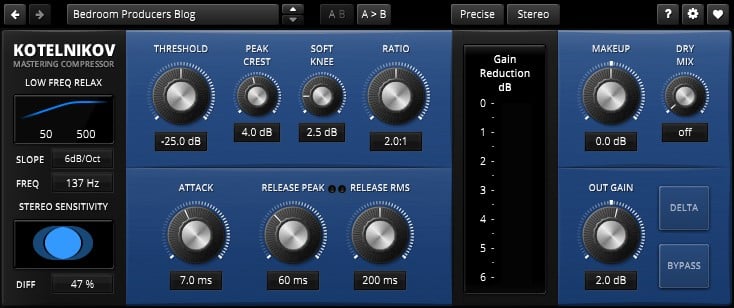
TDR Kotelnikov by Tokyo Dawn Labs is the free compressor I’d download first if I had to start over with an empty plugin folder.
Tokyo Dawn built it as a wideband dynamics processor that controls the level while remaining incredibly transparent. It’s not trying to imitate analog hardware, and that’s the point. The signal path is oversampled and clean, and you can apply real compression while the timbre and attack of the source stay intact.
The standout technical feature is the dual-release control. Peaks and RMS content release at independent rates, with a Crest Factor knob defining where one hands off to the other.
On a drum bus, the fast peak release preserves transient snap while the longer RMS release sits on the body of the kit. I still reach for it on almost every mix bus I touch.
It also includes a sidechain HPF with adjustable slope, stereo linking with a sensitivity control, and latency-compensated bypass for A/B comparison. The paid Gentleman’s Edition adds frequency-dependent ratio and equal-loudness workflows, but the free version covers the vast majority of mixing and mastering work.
More info: TDR Kotelnikov (VST, VST3, AU, AAX for Windows, macOS, and Linux)
Woodstock Audio Waveform Compressor
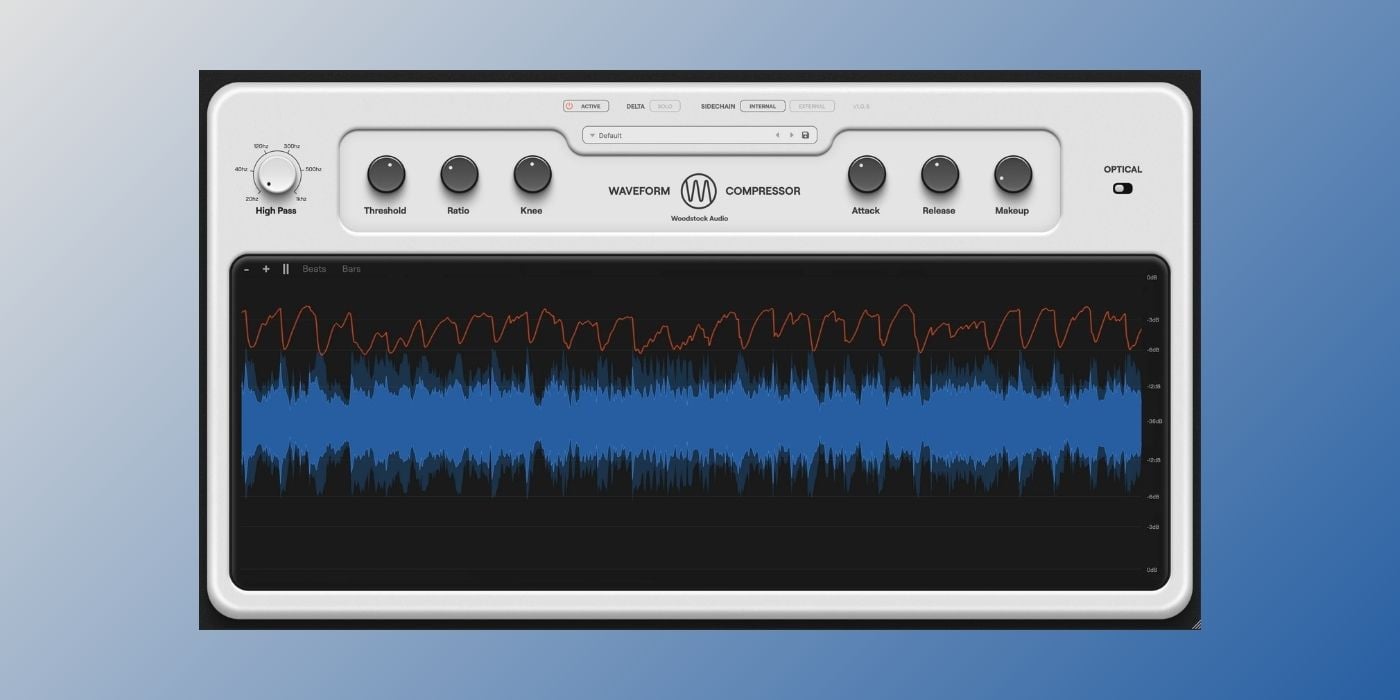
Waveform Compressor by Woodstock Audio is the free compressor I’d hand to anyone who is still trying to figure out what compression actually does to a signal.
The interface is built around a GPU-accelerated waveform view that shows the input and output signals on top of each other, with a gain reduction line and a threshold line that moves as you turn the threshold knob.
You can see which peaks are going to get caught before you commit, and the Delta Solo button lets you listen to only the part of the signal the compressor is removing. That feature alone is a serious learning shortcut because you can hear exactly what the compressor is removing.
The plugin offers two modes.
Regular is a feedforward VCA design with full control over threshold, ratio, attack (down to 20 microseconds), release, and knee.
On the other hand, optical mimics the program-dependent response of LA-style hardware. The attack speeds up as the signal stays hot, and the release runs in stages.
The sidechain section has a built-in HPF and accepts an external trigger. You also get ten presets that cover analog character, mix bus, and mastering starting points.
More info: Waveform Compressor (VST3, AU, AAX for Windows and macOS, Apple Silicon native)
Klanghelm DC1A
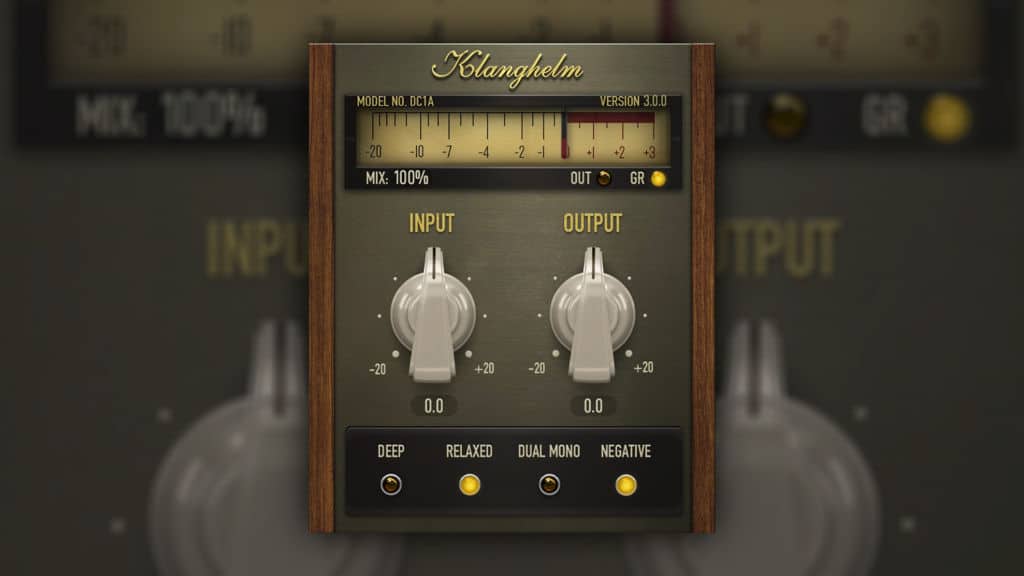
DC1A by Klanghelm is the free compressor I open more often than any other dynamics tool in my collection.
Two knobs handle everything, and that’s why I love using it. Input drives the signal into the compression algorithm, and Output trims the result. That’s the main part of the interface, and it can’t get any easier than that.
Hidden behind a small toggle are extras for more advanced users (negative compression for creative over-pumping, dual-mono mode for independent channel compression, parallel compression with the mix slider, and a high-pass filter for the detector).
There’s also a Relaxed switch that softens the attack into a more RMS-style response.
The compression character comes from Klanghelm’s paid DC8C, specifically its Punch mode. It’s program-dependent, which means it adjusts its behavior based on what you feed it.
I use it all the time on vocals, where it sounds smooth and natural. It’s also nice on drums or a synth bus for adding density without choking transients.
For producers learning compression, DC1A removes almost every way to get it wrong. But it’s equally suitable for experienced engineers, because it’s so quick to use.
More info: DC1A (VST, VST3, AU, AAX for Windows and macOS, Apple Silicon native)
Cockos ReaComp
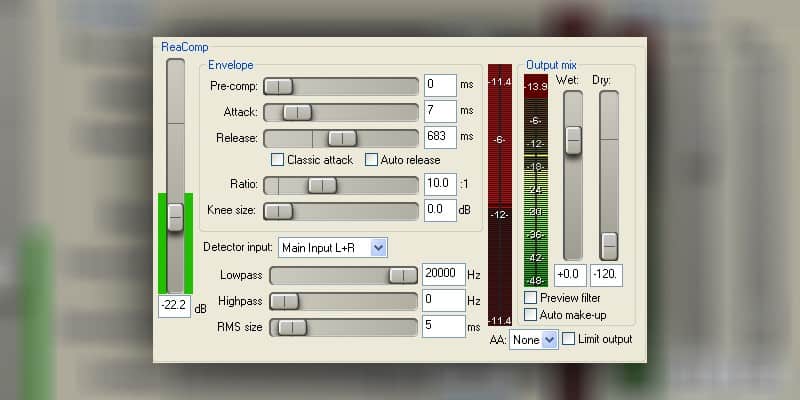
ReaComp is Cockos’ native compressor for REAPER, packaged in the free ReaPlugs bundle that runs in any VST host.
You don’t need to use REAPER to install or use it. ReaPlugs is a separate free download that puts all of REAPER’s internal effects into your plugin folder, and ReaComp is the most useful of the bunch for daily mixing work.
It’s more of a workhorse than a character compressor. The feature set covers feedback compression, soft-knee support, oversampling, auto-release, and auto makeup gain, a sidechain input with filtering, lookahead, and detailed gain reduction metering.
The interface is plain, and the CPU footprint is so light you can put it on every channel of a 60-track session without noticing.
I reach for ReaComp when I need a clean compressor with no surprises. It’s useful for sidechaining without pumping, surgical channel compression, and utility leveling on stems.
More info: ReaPlugs (ReaComp) (VST for Windows and macOS)
Vintage, optical, and analog-style compressors
UAD Teletronix LA-2A Tube Compressor (via UAD Explore FREE)
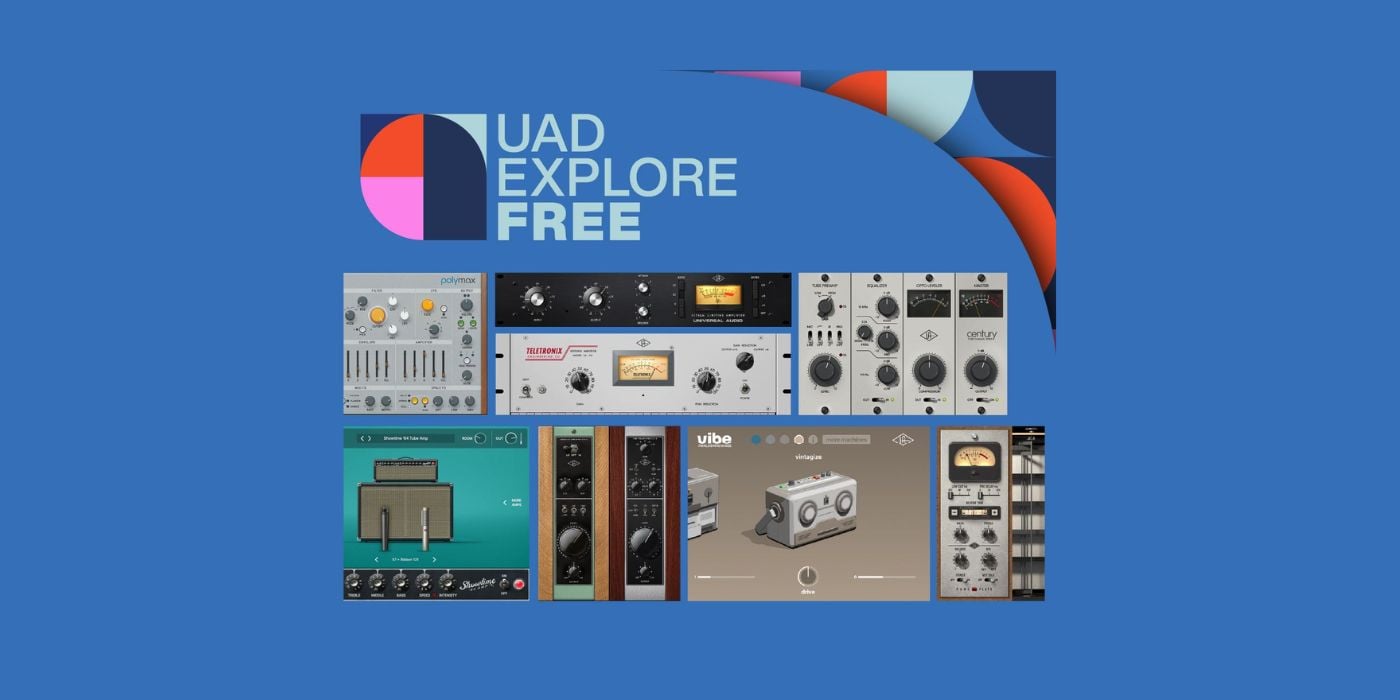
UAD Teletronix LA-2A is the most surprising freebie of 2026. Universal Audio’s emulation of the iconic Teletronix LA-2A tube limiting amplifier is now permanently free as part of the UAD Explore FREE bundle.
This is the actual UAD LA-2A plugin, not a stripped-down lite edition. The bundle also includes the UA 1176 Classic FET Compressor, the UA 610 Tube Preamp, Pure Plate Reverb, and a few more.
If you do the math, you’re getting the two most-recommended hardware compressors in recording history for zero dollars.
The catch (if you can call it that) is that you need a free Universal Audio account, a free iLok account, and the UA Connect app to download and activate the plugins.
No physical iLok dongle is required (licenses can be activated on up to three local machines since the 2025 system update), but it’s still more steps than grabbing a plugin from Klanghelm or Tokyo Dawn. There’s also a 90-day window from account creation to redeem the bundle.
The LA-2A itself is exactly what you’d expect from a UAD emulation of the original. You get two knobs (Peak Reduction and Gain), a Limit/Compress switch, and the program-dependent optical character that makes vocals and bass guitar feel glued in place without any obvious processing.
It’s the cleanest sounding LA-2A you can get for free.
More info: UAD Explore FREE (VST3, AU, AAX for Windows and macOS, Apple Silicon native)
Klanghelm MJUC jr.

MJUC jr. is Klanghelm’s free variable-mu compressor and one of the most musical-sounding compressors you can get for free.
Variable-mu is the topology behind the Fairchild 670 and similar tube units. The compression reacts organically to the program material, and the saturation and harmonic content shifts with the dynamics. It’s basically the opposite of a clinical VCA.
MJUC jr. captures that behavior in a streamlined form factor. There’s a large Compress knob, a Makeup knob, and a three-position Fast/Slow/Auto timing switch. That’s it.
What makes it work so well for me is what’s hidden behind that timing switch. The setting doesn’t just change attack and release. It also reshapes the interstage transformer simulation and saturation character, so each mode is essentially a different vibe.
Slow is my favorite for mix bus glue and acoustic guitars. Auto runs program-dependent timings that work surprisingly well on full mixes.
This is a character compressor, so if you’re after surgical dynamics control, look at Kotelnikov or Waveform Compressor instead. But if you want something that adds warmth and density to a bus or vocal channel with two knobs, MJUC jr. is hard to beat at any price.
More info: MJUC jr. (VST, VST3, AU, AAX for Windows and macOS, Apple Silicon native)
Analog Obsession LALA
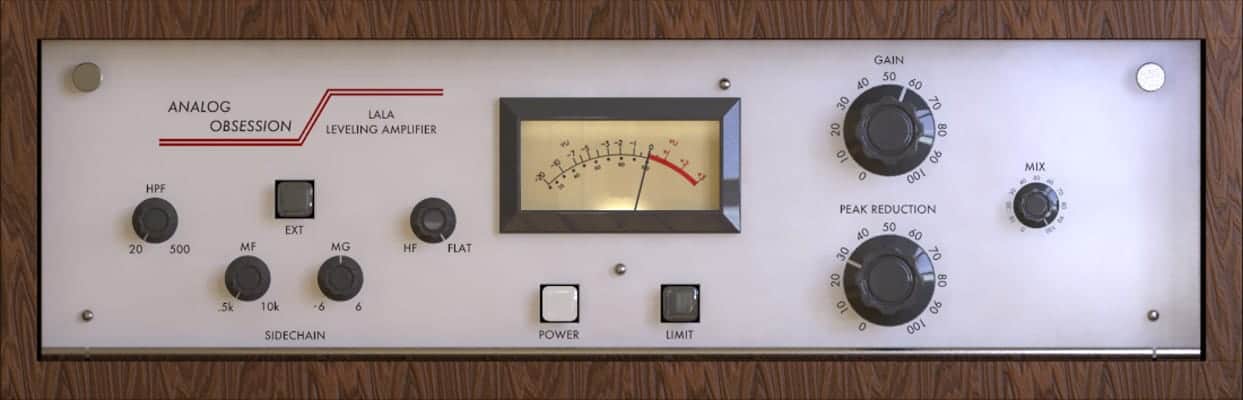
LALA by Analog Obsession is a free LA-2A-inspired optical compressor. It captures the slow, program-dependent leveling behavior of the original hardware and adds a few things the LA-2A never had.
The three-band sidechain filter (HPF plus mid- and high-sensitivity controls) lets you shape how the compressor responds to different frequencies. There’s an external sidechain input, a dry/wet Mix knob for fast parallel compression, and a 4x oversampling toggle.
I used LALA a lot for backing vocals and bass guitars. The Mix knob is the main reason. Most LA-2A emulations don’t include one, which means you have to set up a parallel routing manually.
One thing to know before you use it on serious projects is that Analog Obsession plugins sometimes change their internal plugin ID with updates, which means a new version might register as a different plugin in your DAW.
Updating LALA mid-project can break sessions that reference an older version. Print or freeze tracks before updating, or hold off until the project that you’re working on is finished.
The plugin is available for free on Patreon. The page is publicly viewable, and the plugin is free to download with no pledge required. A small monthly pledge supports the developer if you find yourself using the catalog often.
More info: LALA (VST3, AU, AAX for Windows and macOS, Apple Silicon native)
Goodhertz LA-210
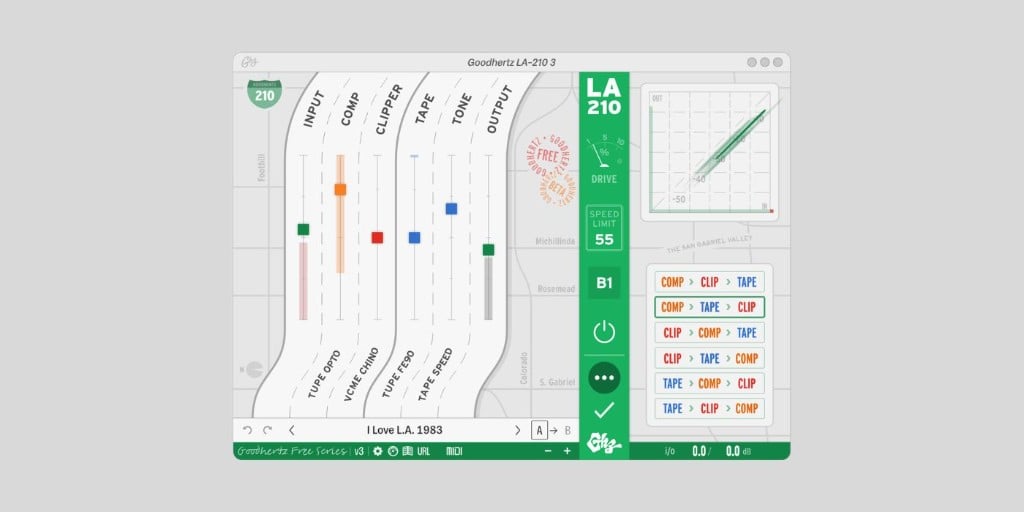
LA-210 by Goodhertz is a free saturation and dynamics plugin. It combines an opto compressor, a soft clipper, and a cassette tape model into a single interface that looks like a Southern California freeway map.
It’s basically a “greatest hits” plugin built from sections of three existing Goodhertz processors. The opto compressor comes from Tupe, the Chino soft-clip mode comes from VCME, and the FE90 tape model and tape speed control come from Tupe Wow.
It has a brickwall limiter on the output and sliders for Input, Comp, Clip, Tape, Tone, and Output. There’s also a Speed Limit toggle (25, 65, or 99 mph) that scales the overall amount of processing.
Calling LA-210 a “compressor” undersells it, to be honest. It works better as a channel strip than as an isolated dynamics tool.
For example, you can drop it on a vocal or a drum bus, push the Tape and Clip sliders, set the Speed Limit to 99 for maximum drive, and you get a Goodhertz-flavored analog vibe that touches the signal in three different ways at once.
The Historical preset section is a nice touch, with named sessions like Stax 1967 Otis Redding and The Record Plant 1977 Fleetwood Mac.
LA-210 is currently in Beta 1, but Goodhertz says it will stay free even after the final release. It’s part of the Goodhertz Free Series alongside Midside Matrix and Loudness. You need a free Goodhertz account to download.
More info: Goodhertz LA-210 (VST, VST3, AU, AAX for Windows and macOS)
Variety of Sound ThrillseekerLA mkII
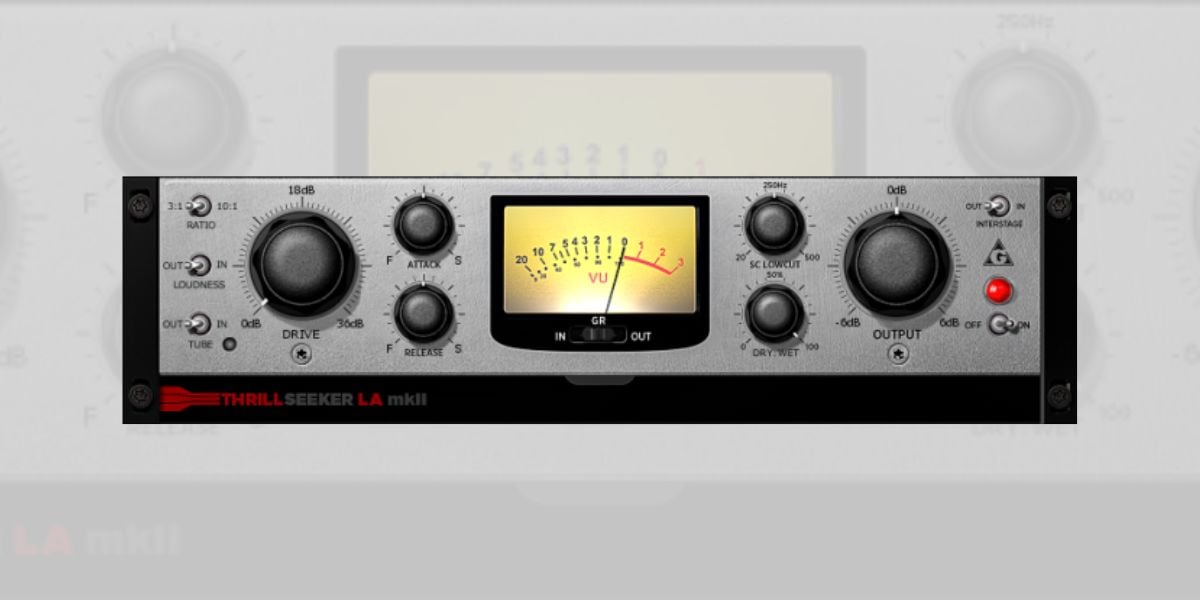
ThrillseekerLA mkII is a freeware optical compressor by Variety of Sound (Bootsy), built around the behavior of LA-style hardware but with a far more aggressive saturation algorithm than the original units ever offered.
The mkII update came roughly a decade after the original ThrillseekerLA and rewrote the core compression action.
The saturation can be switched off if you want a transparent response, but I tend to leave it on. It’s the main reason to reach for this plugin over the other LA-style compressors on the list. The harmonics it adds are dense without becoming distorted.
Two ratios are available. To simplify, the 3:1 ratio handles peak taming on individual tracks, and 10:1 turns the compressor into a fast limiter, which works well on stereo buses where you want to keep aggressive level control under the saturation.
Attack and release are user-adjustable, which is unusual for an LA-style design and gives you more flexibility than something like LALA or the UAD LA-2A.
The catch is that this is a Windows VST only. Mac users have to go elsewhere. For producers on PC, this is one of the best free LA-style compressors I’ve used, and the saturation alone makes it worth keeping in the chain.
More info: ThrillseekerLA mkII (VST for Windows)
VladG Molot
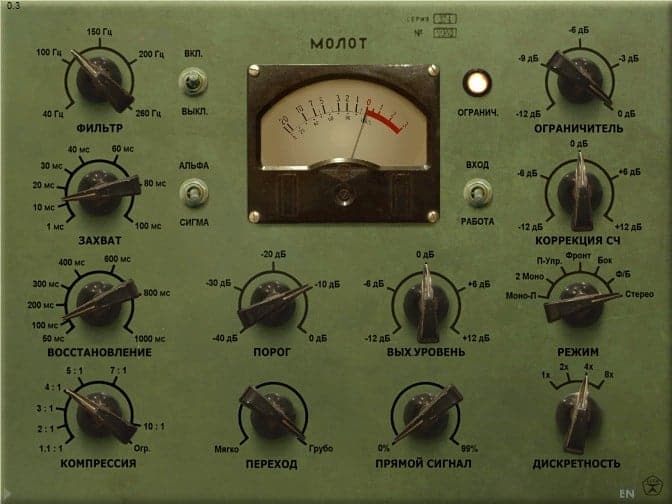
Molot by Vladislav Goncharov (VladG) is the original character compressor from the early 2010s, with a GUI styled after a Soviet military instrument and a sound to match.
It’s not an emulation of any specific hardware. Goncharov compares its character to a Neve 33609 on drums, a Tube-Tech CL 1B on vocals, and a Fairchild 670 on the master bus.
But in my experience, it really does its own thing. The signal can be pushed through even-harmonic saturation, dithering for “air,” and a non-linear-phase oversampling filter for low-end weight. All of those can be switched off if you want a cleaner response.
There’s also a built-in limiter section and a mid-color stage that lets you brighten the midrange.
I love using this one on a drum bus, because it grinds in a way that few free compressors can. It can also work as a subtle saturator on the master bus.
I highly recommend reading the manual at least once. The controls aren’t standard, and a lot of what makes Molot special is hidden in non-obvious places.
A note for Mac users. The original Molot only has a 32-bit Mac build, which is effectively unusable in modern macOS DAWs. If you’re on Mac, go straight to TDR Molotok below. Windows users have full 32/64-bit VST support and can keep using the original Molot in 2026.
More info: VladG Molot (VST for Windows; legacy 32-bit AU for macOS)
TDR Molotok
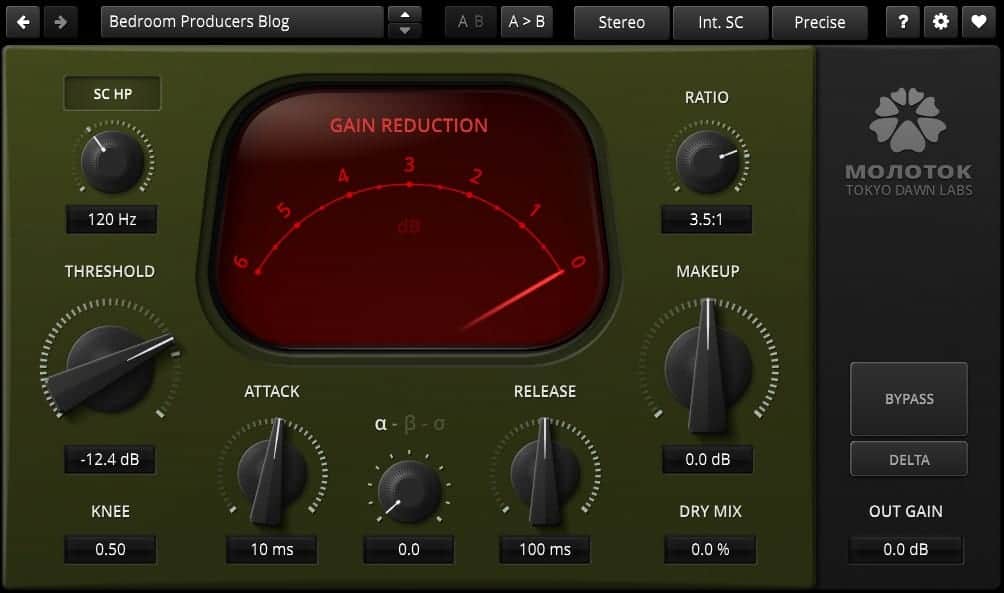
TDR Molotok is Tokyo Dawn Records’ modernized take on the original Molot, released in 2020 alongside the paid TDR Molot GE.
The DNA is the same (aggressive character compression with a distinct grit), but the codebase is rewritten, and the workflow is polished.
The GUI is now resizable, the bypass switch is properly latency-compensated, and the plugin runs natively on Apple Silicon. If you’re on macOS or a modern 64-bit Windows DAW, this is the version of Molot to install.
Molotok is intentionally stripped down compared to the original. The built-in limiter section is gone, the mid-color saturation control is gone, and there are no mode variants. Those features live in the paid Molot GE (€50).
The free Molotok gives you the core character without the sculpting tools, which is fine for most users. I tend to use it on the drum bus or as a final character stage on synth and guitar buses, and I never miss the limiter section in that context.
Of the two Molot releases, this is the one I’d install first. If you fall in love with the sound and want the limiter and mid-color sections back, Molot GE is the upgrade path.
More info: TDR Molotok (VST, VST3, AU, AAX for Windows and macOS, Apple Silicon native)
BPB Dirty LA
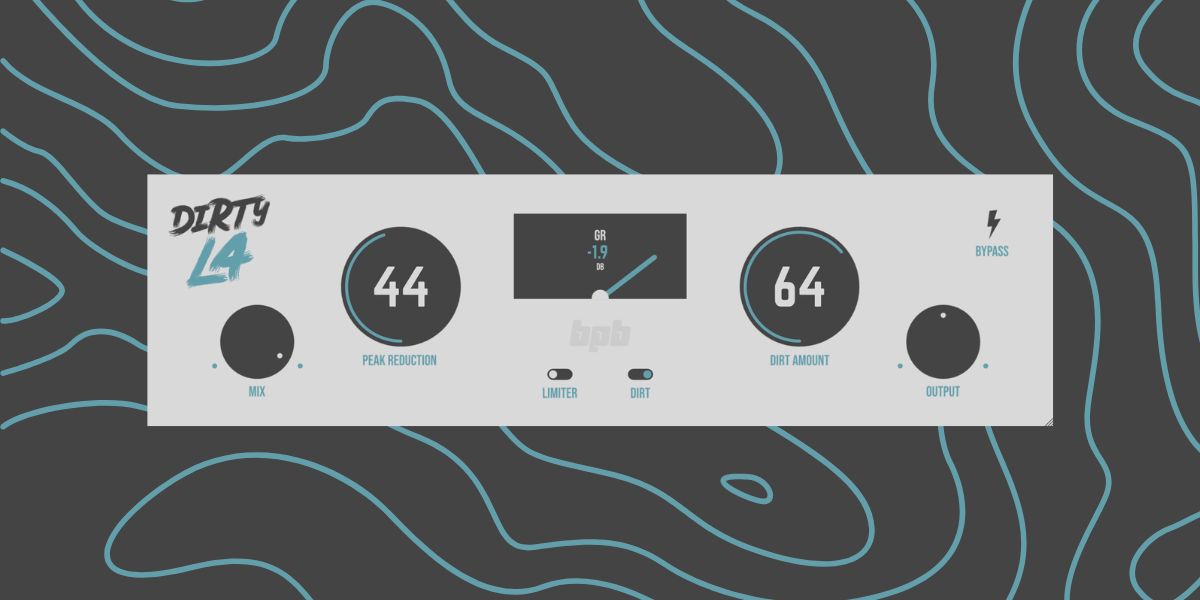
BPB Dirty LA is BPB’s own freeware compressor, designed to be easy to use and to sound musical without much fuss.
It’s inspired by the LA-2A limiting amplifier, but with a few additions that the original hardware never had.
The Peak Reduction knob does most of the work. You can simply set the amount of compression you want, and the algorithm handles attack, release, and ratio automatically. The Mix knob blends the compressed signal with the dry source for fast parallel compression.
We also included a Limiter mode switch that swaps the gentle leveling behavior for a faster response, which is useful on the master bus or drum bus when you need tighter peak control.
The Dirt algorithm simulates the analog saturation of vintage limiting amplifiers. When engaged, the plugin internally switches to 4x oversampling to keep things clean.
You can use it sparingly on drums for body, or push it on synths and vocals for character. With Dirt off, the plugin runs at the standard sample rate to save CPU.
Download: BPB Dirty LA (VST3, AU, AAX for Windows and macOS)
Audio Tools Leveling Tool
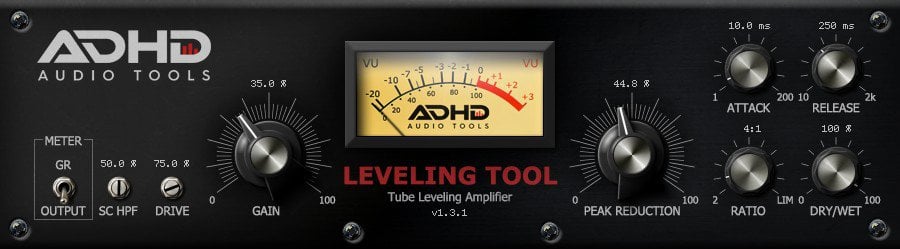
Leveling Tool by AdHd is another LA-2A-inspired freeware compressor and one of the best LA-style plugins you can get for free.
It expands on the classic leveling amplifier concept with adjustable Attack and Release times and a gain-reduction ratio that can be dialed in to taste. There’s also a sidechain HPF, an external sidechain input, a drive knob, and a dry/wet control for instant parallel compression.
Two metering modes (input volume and gain reduction) let you watch what’s happening on the way in or on the way out.
The compression character is smooth and forgiving, so it reminds me of optical compressors. It works well on vocals, bass, and instrument channels, and the drive knob is the secret weapon for adding analog-style harmonics along the way.
The interface is simple, and the workflow is fast. There’s no preset manager, but the controls are obvious enough that I haven’t missed it.
More info: Leveling Tool (VST, AU for Windows and macOS)
Drum bus and aggressive compressors
Kiive Audio XTMax

XTMax by Kiive Audio is a free Distressor-inspired compressor and the strongest free drum smasher I’ve used in the last few years.
It’s the little sibling to Kiive’s paid XTComp (which itself is distributed through Plugin Alliance), and the developer describes XTMax as the Nuke mode of a Distressor in a focused interface.
As for the controls, you get Input and Output gain, a three-position Attack switch, three release modes, a Knee control, sidechain HPF, AutoGain, oversampling up to 16x, and a mix knob for parallel compression.
The three release modes let you customize the compression. Fast is snappy and modern, ideal for tight rooms and pumping snare bus work. Medium is the sweet spot for most drums. Slow gives you the more relaxed sound that, for me, gets closest to a Distressor pushed into its more aggressive territory.
The cool thing is that switching between modes feels like swapping in three different compressors. There’s a lot of flexibility here for such a relatively simple plugin.
Account registration is required to download. XTMax is delivered via a free Shopify checkout on Kiive’s site, so you’ll need to provide an email address.
More info: Kiive Audio XTMax (VST3, AU, AAX for Windows and macOS, Apple Silicon native)
Multiband and creative compressors
Xfer Records OTT
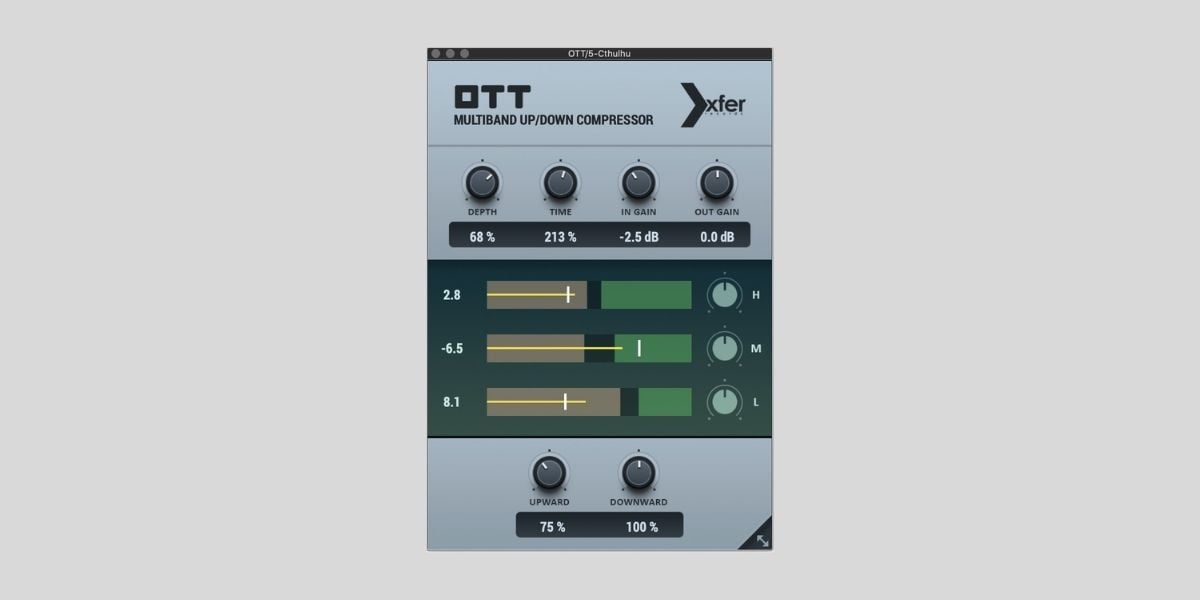
OTT by Xfer Records is the multiband compression standard for EDM, future bass, hyperpop, and anything else that needs to sound dense and louder than it has any right to.
It’s a three-band compressor with upward and downward compression. Basically, quiet content gets pushed up, and loud content gets pushed down, all simultaneously across low, mid, and high bands.
The result is the hyper-detailed sound that is often heard on synth leads, supersaws, vocal layers, and drum buses in modern electronic music. The Depth knob scales the overall amount of processing from subtle enhancement to “over the top,” which is exactly where the OTT name comes from.
The interface is minimal but usable. You get three band level controls, a global Depth knob, a Time knob for attack and release across all bands, upward and downward compression amounts, and input/output gain. The recent UI refresh made it resizable.
This is one of the most-installed free plugins in the history of music production, and for good reason. I’ve covered OTT in detail on a dedicated page. See the OTT page for more free alternatives.
More info: Xfer OTT (VST, VST3, AU for Windows and macOS)
Flexible and multi-mode compressors
ZL Audio ZL Compressor

ZL Compressor by ZL Audio is the most feature-packed freeware compressor, with a control set that looks more like a paid mastering plugin than a freebie.
Four operating modes cover most compression flavors.
Clean is a transparent VCA-style mode. Classic is a feedback FET response with edge and bite. Optical is a smooth opto behavior closer to LA-2A territory. Lastly, Vocal is purpose-tuned for vocal dynamics and works well as the default for the vocal channel.
On top of mode selection, you get threshold, ratio, attack, release, makeup, knee, and curve controls, plus Pump and Smooth knobs that reshape the attack and release behavior beyond standard timing.
For me, the standout feature is the 8-band sidechain EQ. You can shape what the detector hears band by band, with an interactive spectrum display, which is a level of sidechain control most paid compressors don’t offer.
Oversampling runs up to 8x. It is useful for bouncing, but the manual specifically warns against automating it because it can cause clicks and shift latency mid-playback. There’s also a lookahead control for catching tight transients.
The plugin is open-source under AGPLv3, and the installers cover macOS, Windows, and Linux on x86-64 and ARM64.
More info: ZL Compressor (VST3, AU, LV2, AAX for Windows, macOS, and Linux, Apple Silicon native)
MeldaProduction MCompressor
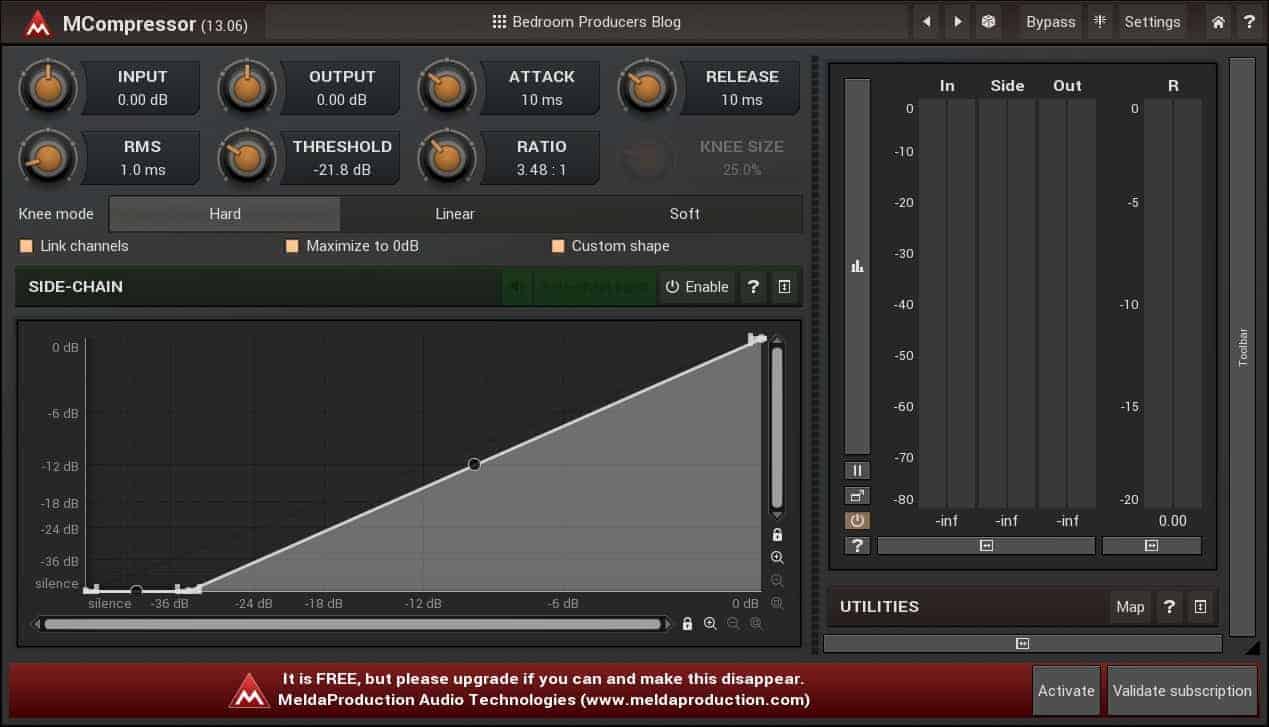
MCompressor by MeldaProduction is a flexible freeware compressor with one feature I haven’t seen in any other free plugin: a freely drawable compression curve.
Most compressors let you set a threshold and a ratio, which together define a fixed compression slope. MCompressor lets you draw the entire transfer curve by hand, which means you can build response shapes that mimic upward compression, expansion, soft saturation, and combinations of all three in a single plugin.
It’s an unusual feature for a free tool, and it opens up sound design possibilities most other compressors can’t reach.
MCompressor also offers standard linear, hard, and soft knee modes, an external sidechain input, threshold, ratio, attack, and release controls, plus an oversampling option for cleaner output. The interface has multiple color schemes, a built-in preset manager, and detailed metering with both peak and RMS readings.
One thing to keep in mind before you download it is that MeldaProduction uses an all-in-one installer that ships every plugin in their catalog. You can deselect what you don’t want, but the default download is around 250 MB and includes dozens of additional freeware plugins like MAutoPitch and MCharmVerb.
If you only want MCompressor, that’s a lot of extra plugins to install or skip past.
More info: MCompressor (VST, VST3, AU, AAX for Windows and macOS, Apple Silicon native)
D16 Group Frontier
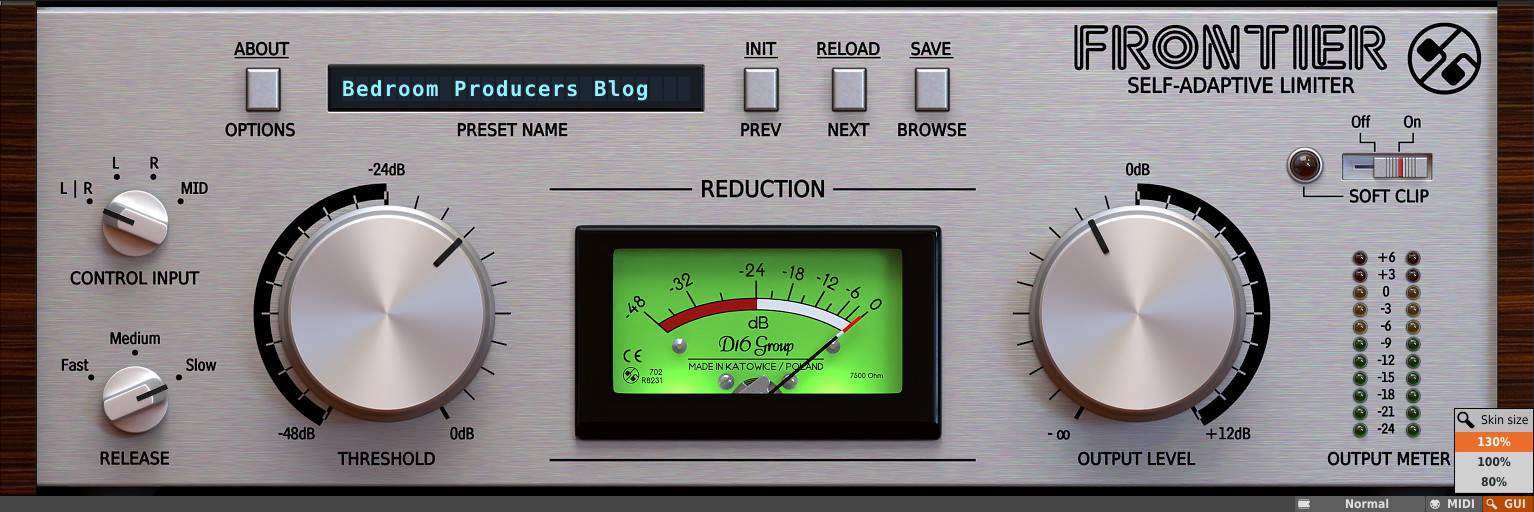
Frontier by D16 Group is primarily a limiter, but it’s versatile enough to handle compression duties in plenty of situations.
The interface is simple. Threshold and Output Gain take center stage, with an auto-gain feature that self-adjusts makeup based on how hard you push the threshold. The soft clipping circuit on the output adds harmonic saturation and additional dynamic control when you drive the level above 0 dB. There’s also an L/R/M/S detection mode switch for more advanced routing.
I use Frontier most often on individual tracks where I want fast peak control. The slow release setting works well on drum buses and stereo groups where you want to even out the level without flattening transients.
Pushing the output into the soft clip turns it into a creative tone shaper rather than a pure limiter.
For producers still learning compression, Frontier is a useful gateway plugin. A limiter is essentially a compressor with a fast attack and a 10:1 (or higher) ratio, so getting comfortable with threshold, release, and auto-gain on Frontier directly translates to skills you’ll use on more complex compressors later.
More info: Frontier (VST, VST3, AU, AAX for Windows and macOS)
Airwindows Compressors
Airwindows is Chris Johnson’s hand-coded plugin catalog, and it includes well over fifty free dynamics processors that don’t get the attention they deserve.
The catch is that none of them have a GUI — Airwindows plugins ship as a list of generic parameter sliders inside your DAW’s plugin window, with the actual character described in the manual rather than shown on screen.
For compressors specifically, two are worth installing first.
Pressure4 is a character compressor with an organic, slightly compressed feel that Chris explicitly says is not based on analog modeling. It still ends up sounding warm and full in a way that works well on drums, bass, and full mixes. Try it on a drum bus and resist the urge to add anything else.
ButterComp is a smoother, more transparent design. It features four totally independent compressors per channel with a slow response, and the compression character is buttery — exactly as the name suggests. Use it on mix buses and stereo groups where you want gentle, almost invisible leveling.
These are easy plugins to overlook because the no-GUI presentation is jarring at first. But, they’re definitely worth the slight workflow friction.
The full Airwindows catalog also has dozens of other dynamics tools, and the developer has spent twenty years refining them.
More info: Airwindows (VST, VST3, AU for Windows, macOS, and Linux)
Legacy plugins (still worth knowing about)
Audio Damage Rough Rider Pro
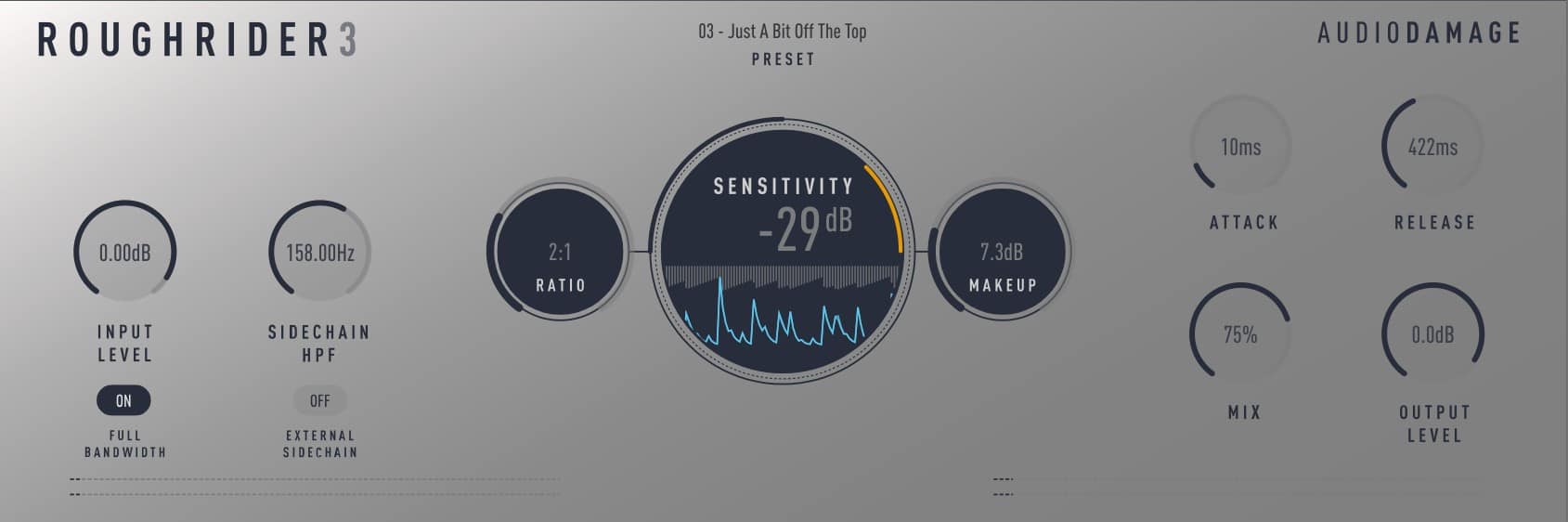
Rough Rider Pro by Audio Damage used to live near the top of every free compressor list, and on Windows, it still earns the spot.
It is a high-ratio, program-dependent compressor purpose-built for aggressive compression and parallel processing. The ratio knob is logarithmic and runs from 1:1 to 1:1000, with anything past noon entering what Audio Damage calls “atom bomb squish” territory.
Pushed hard with a fast attack, it crushes drums in a way that feels musical rather than digital. I overused this almost too many times in my early days, but I still love the sound.
The Pro version’s built-in mix knob handles parallel compression without external routing, and the external sidechain input opens the plugin up to ducking and pumping effects.
The reason it’s at the bottom of the list rather than alongside XTMax is that Audio Damage has moved Rough Rider Pro to the legacy plugins section of their website. It’s no longer actively supported, and it’s not compatible with recent macOS releases.
The Windows build still works fine, though. If you’re on PC and want a drum smasher with a different character than XTMax, it’s still worth downloading. Mac users should skip this one and reach for XTMax or the optical compressors above.
More info: Rough Rider Pro (VST, VST3, AAX for Windows; legacy, no longer supported)
Frequently asked questions
What is the best free compressor VST plugin in 2026?
TDR Kotelnikov is the best free compressor VST plugin in 2026 for mix bus and mastering work. It offers transparent, mastering-grade compression with a dual-release control for peak and RMS content, a sidechain high-pass filter with adjustable slope, and stereo linking with sensitivity control. It runs on Windows, macOS, and Linux in VST, VST3, AU, and AAX formats.
Is there a free version of the UAD LA-2A compressor?
Yes. Universal Audio’s Teletronix LA-2A Tube Compressor is permanently free as part of the UAD Explore FREE bundle, which also includes the UA 1176 Classic FET Compressor, UA 610 Tube Preamp, Pure Plate Reverb, and a few other UAD plugins. A free Universal Audio account and a free iLok account are required to activate the bundle. No physical iLok USB dongle is needed.
What is the difference between VCA, FET, optical, and variable-mu compressors?
VCA compressors are fast, clean, and predictable, ideal for surgical control and bus glue. FET compressors are faster still with an aggressive character — the 1176 is the famous example. Optical (opto) compressors are slow and program-dependent, like the LA-2A, and work well on vocals and bass. Variable-mu compressors are tube-based with rich harmonic content and smooth response on full mixes — the Fairchild 670 is the reference.
Can free compressor plugins hold up in professional mixes?
Yes, for the majority of production and mixing work. TDR Kotelnikov is used on professionally released records, the UAD LA-2A and 1176 (now free via UAD Explore) are the most-used hardware emulations in commercial mixing, and Klanghelm MJUC jr. delivers variable-mu warmth that competes with paid options. Paid compressors become worth the upgrade when you need specialized features like multiple algorithm modes in a single plugin, sidechain EQ on every channel, or specific hardware emulations beyond what the free tier provides.
Which free compressor plugin is best for vocals?
For transparent vocal leveling, the UAD Teletronix LA-2A (free via UAD Explore) is the gold standard. Analog Obsession LALA is a faster-to-install alternative with a similar character and a built-in mix knob for parallel compression. Klanghelm DC1A handles vocals with two knobs when you want a fast, musical result. For modern vocal production with sidechain EQ control, ZL Audio ZL Compressor’s Vocal mode is purpose-built for the task.
Return to our Free VST Plugins page for more freeware plugins and instruments. For multiband compression specifically, see our Free OTT Plugins guide. If you’re also looking for pitch correction tools, our Free Autotune VST Plugins roundup is a good companion read.
This page was last updated by Tomislav Zlatic on May 18, 2026.
The author, Tomislav Zlatic, is the founder and editor-in-chief of Bedroom Producers Blog (BPB). Since starting BPB in 2009, he has tested and reviewed hundreds of VST plugins.