



I tested every free OTT VST plugin available in 2026 and compared them in this article.
OTT stands for “Over The Top,” and it refers to a specific style of multiband compression that applies both upward and downward compression simultaneously.
It’s a pretty cool concept. The upward compression boosts quiet details, while the downward compression tames peaks. And what we get is the over-the-top, punchy, and loud sound that became a staple of modern electronic music production.
The effect originated as a preset in Ableton Live’s Multiband Dynamics device, created by Claes Johanson.
Around 2012, Steve Duda of Xfer Records recreated it as a free standalone plugin so that producers using other DAWs could access the same sound, and it was an instant hit. That plugin became one of the most widely used free effects in music production history.
Fast-forward to 2026, and there are now seven standalone OTT-style plugins to choose from, plus the original Ableton preset.
Some are straightforward clones of the original OTT; others reimagine the concept with more bands, better visual feedback, or additional processing such as distortion and clipping.
I’ve tested all of them, and this page covers what each one does differently and which one might work best for your setup.
Free OTT plugins in 2026
- Ableton Live OTT Preset
- Xfer Records OTT
- Cramit by Sixth Sample
- Dynastia by Outobugi
- 8TT by Discreet Signals
- Squash by Minimal Audio
- Evil Otto by Audio Damage
- Polarity-MD by Polarity
Free OTT plugin comparison
Here’s a quick overview of each plugin’s features to help you decide which one to try first.
| Plugin | Developer | Bands | OS | Formats | Standout feature |
|---|---|---|---|---|---|
| Ableton OTT Preset | Ableton | 3 | Win / Mac | Ableton device (not a plugin) | Full control over crossovers, attack/release per band |
| Xfer Records OTT | Xfer Records | 3 | Win / Mac | VST, VST3, AU, AAX | Industry standard, universal DAW support |
| Cramit | Sixth Sample | 3 | Win / Mac | VST3, AU, AAX | 7 distortion types (pre/post compression) |
| Dynastia | Outobugi | 3 | Win only | VST3 | Stereo width per band, M/S processing |
| 8TT | Discreet Signals | 1–8 | Win / Mac | VST3, AU | Up to 8 bands, drag-and-draw interface |
| Squash | Minimal Audio | 4 | Win / Mac | VST, VST3, AU, AAX | X/Y pad interface, phase-safe mix knob |
| Evil Otto | Audio Damage | 3 | Win / Mac / Linux / iOS | VST3, AU, AAX, CLAP, LV2 | Visual metering, sidechain with listen mode |
| Polarity-MD | Polarity | 4 | Win / Mac / Linux | VST3, AU, CLAP, LV2 | Linear phase crossovers, per-band clippers, open-source (beta) |
Ableton Live OTT Preset
This is where it all started. The OTT preset lives inside Ableton Live’s Multiband Dynamics device and is the original sound that every plugin on this list is trying to recreate.
It’s not a plugin you can download or use in other DAWs. It’s simply a preset that ships with Ableton Live Standard and Suite.
But if you’re already working in Ableton, this is technically the most powerful OTT option available. You get full control over crossover frequencies, individual attack and release times for each band, and separate upward and downward compression thresholds. None of the standalone plugins offer that level of tweakability.
The trade-off is workflow. The Multiband Dynamics device is more complex than dropping a dedicated OTT plugin onto a track and turning one knob.
I use it when I want precise control over the compression behavior, but for quick results, I usually reach for one of the standalone options below.
More info: Ableton Live Multiband Dynamics (Ableton Live Standard / Suite)
Xfer Records OTT
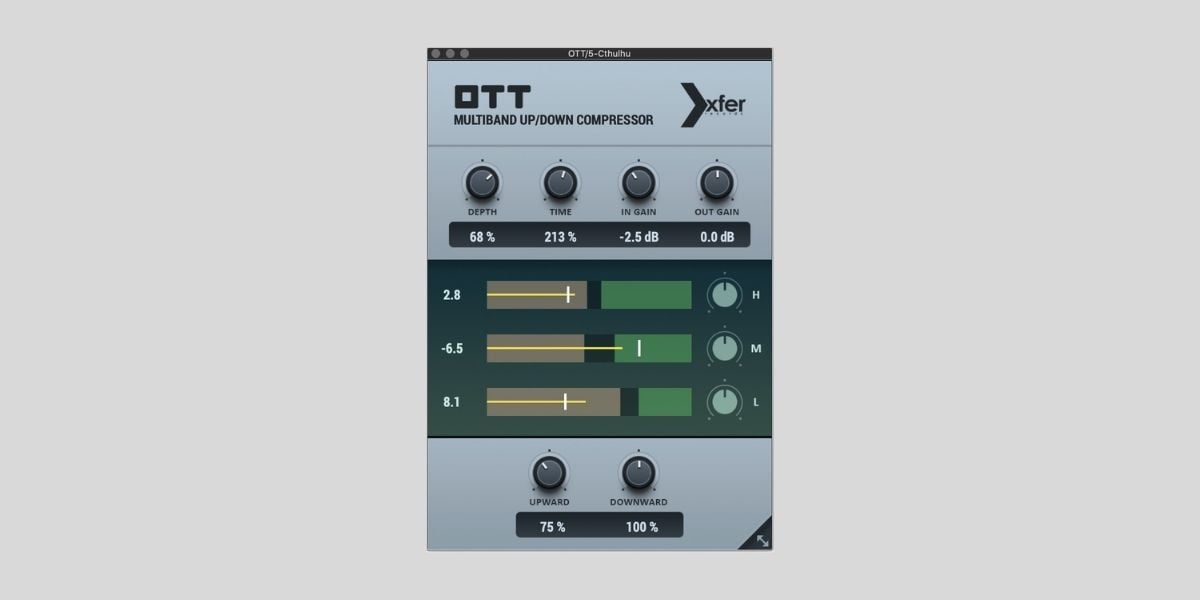
This is the plugin that made OTT compression accessible to everyone. Steve Duda released this as a free standalone recreation of the Ableton preset, and it quickly became one of the most used free effects in electronic music.
The interface is brutally simple for such a widely used tool. A Depth knob controls how much compression is applied, a Time knob adjusts attack and release behavior, and three band sliders let you balance the low, mid, and high frequency ranges.
That’s about it. You can get results in seconds, which, I’m pretty sure, is a big part of why it caught on.
That said, the Xfer OTT has some known limitations. The crossover filters introduce phase cancellation, which can be tricky, especially in bass-heavy mixes.

I also found that the high-mid range can sound harsh at higher settings. And compared to the Ableton original, you have less control (no adjustable crossover frequencies, no per-band attack/release).
It also runs slightly louder than the Ableton preset, which can make it seem like it sounds “better” when it’s really just a volume difference.
Even with those caveats, it remains the default OTT plugin for most producers. If you’ve never used OTT compression before, this is the one to start with.
More info: Xfer Records OTT (VST/VST3/AU/AAX for Windows & macOS)
Cramit by Sixth Sample
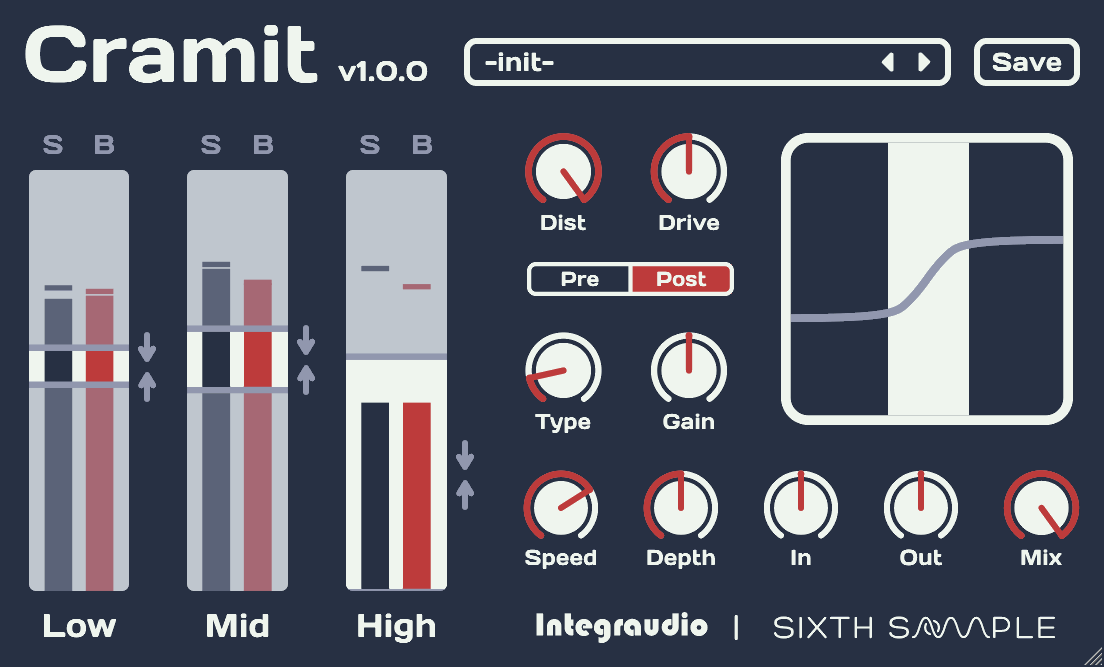
Cramit takes the OTT concept and adds a multi-type distortion section on top. I use it a lot for making SFX sound more dramatic in my cinematic sound design workflow on Flame Sound.
You get seven distortion algorithms that can be placed before or after the multiband compression stage, and this opens up a lot of tonal options that a standard OTT plugin can’t touch.
The interface offers separate Drive and Dist controls to handle the saturation, while In, Out, and Mix knobs manage levels. Oversampling (2x and 8x) was added in a post-launch update alongside adjustable crossover frequencies and per-band output gain sliders.
The catch is that Cramit’s most interesting feature, linear phase mode, is locked behind the paid Cramit PE version (€19.95). The free version uses the same crossover filters as Xfer OTT, so it doesn’t solve the phase cancellation issue.
If you want OTT with added harmonic color and don’t mind the standard-phase crossovers, the free version is a solid option. If phase coherence matters to you, I’d say the paid upgrade is worth considering.
More info: Cramit (VST3/AU/AAX for Windows & macOS)
Dynastia by Outobugi
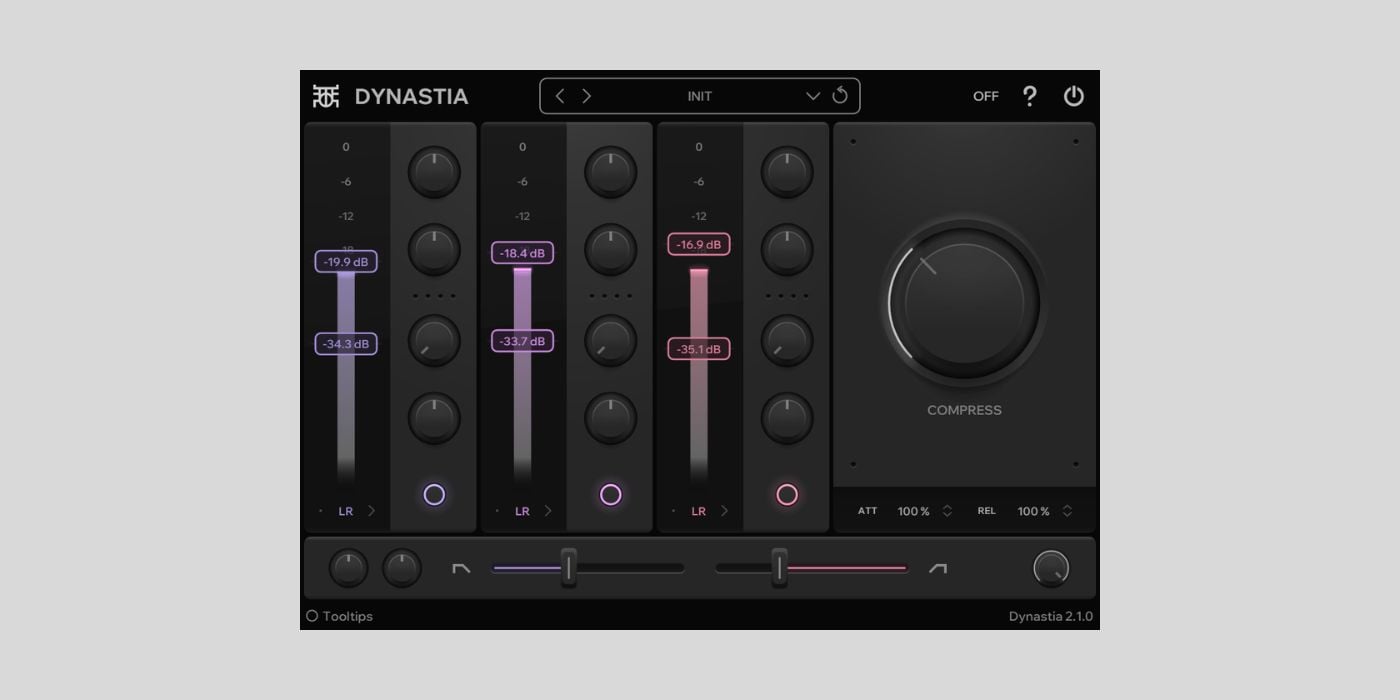
Dynastia has a couple of features that none of the other free OTT plugins offer: per-band stereo width controls and Mid/Side processing modes.
You can independently widen or narrow the low, mid, and high bands, which is pretty useful for keeping the low-end mono while widening the highs.
The plugin also includes per-band distortion (called Excite), separate upward and downward thresholds for each band, a real-time visualizer, and oversampling up to 4x. Version 2.0 rebuilt the crossover filters to reduce phase-cancellation issues present in the original release.
Unfortunately, the big limitation is platform support. Dynastia is Windows-only as of March 2026.
The developer (a solo hobbyist from Finland) has mentioned that Mac versions “will probably be available in the future,” but there’s no timeline.
If you’re on Windows and want stereo imaging tools built into your OTT plugin, Dynastia is the only free option that does this. Mac users will have to look elsewhere.
More info: Dynastia (VST3 for Windows)
8TT by Discreet Signals
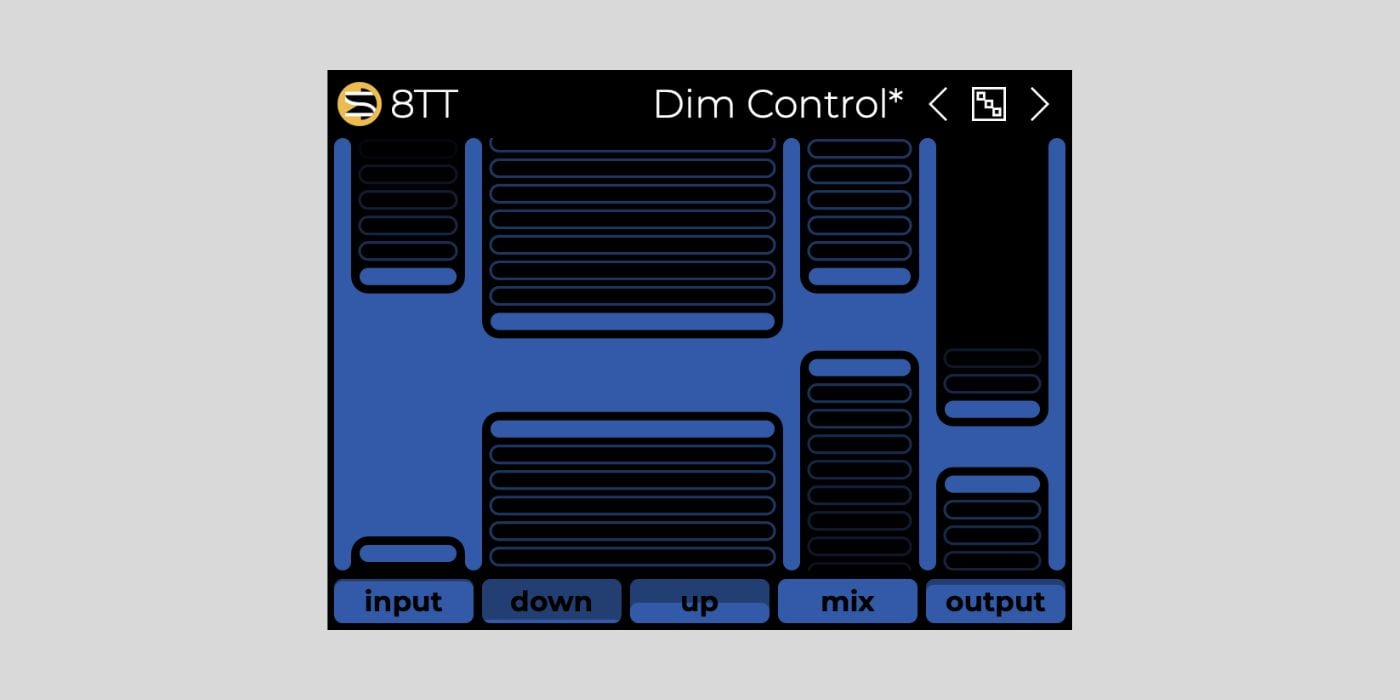
8TT was one of my favorite free plugin releases of 2025. Where most OTT plugins give you three bands, 8TT lets you work with up to eight.
You can also scale it down to a single band or split the spectrum into as many as eight independent compression zones, which gives you far more precision over how the effect shapes your sound.
The interface is built around a drag-and-draw system. You can double-click to split a band, drag horizontally to adjust crossover points, and draw compression amounts directly on the display. It’s pretty intuitive once you get the hang of it, even though the minimalist design initially caught me a bit off guard.
8TT also includes sidechain input, oversampling up to 8x, an output limiter, a fun little randomizer for creative experimentation, and a preset library with starting points for drums, synths, and vocals. That’s quite a lot for a free plugin.
I typically reach for 8TT when I need more surgical control than a standard three-band OTT can provide. It delivers a smoother sound than what I was previously getting from other OTT-style plugins.
More info: 8TT (VST3/AU for Windows & macOS)
Squash by Minimal Audio
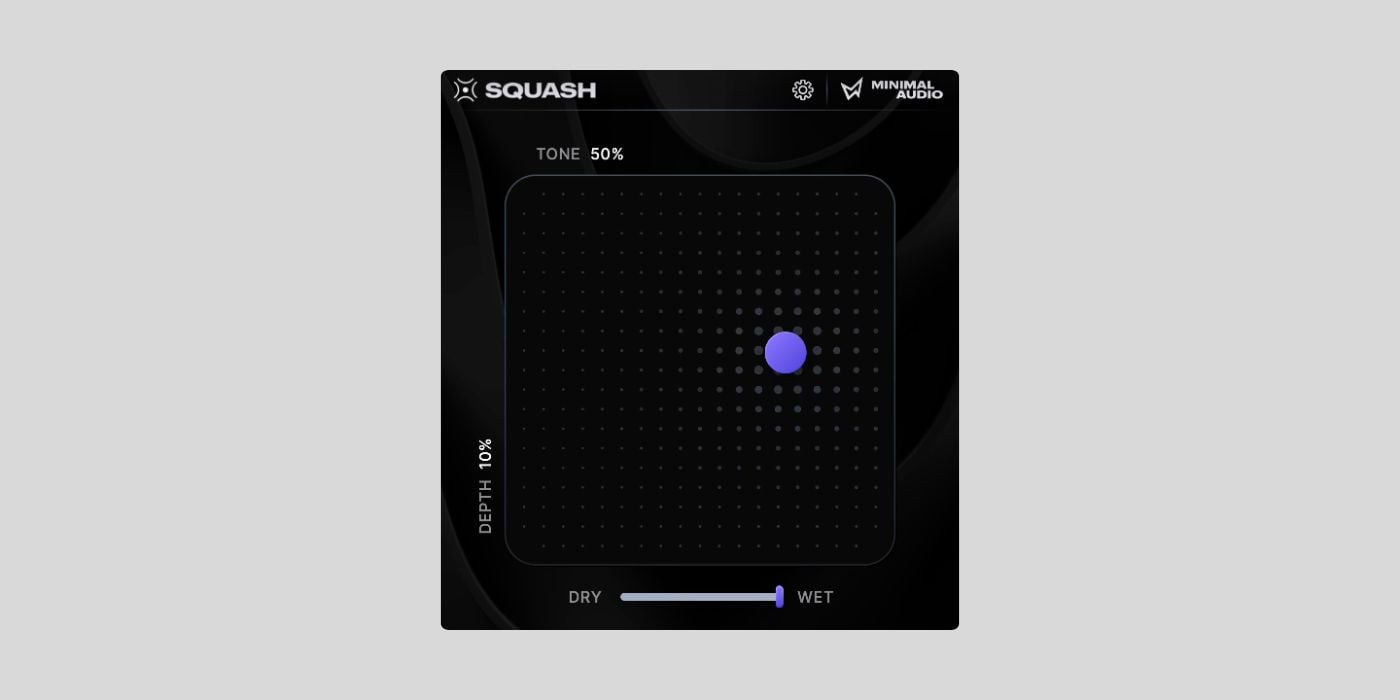
Squash takes the opposite approach to 8TT. Instead of giving you more bands and more controls, it strips the OTT concept down to an X/Y pad.
It sounds too simple, but I love how it works in practice. You can drag the dot horizontally to adjust the tone and vertically to control the depth. That’s the entire workflow.
Minimal Audio describes it as “OTT reimagined” rather than an OTT clone, and the 4-band architecture does sound a bit different from the classic three-band Xfer version. The mix knob is phase-coherent, which means blending the compressed signal with the dry signal doesn’t introduce the phasing artifacts that plague most OTT plugins when you back off the depth.
The downside is that you have almost no visibility into what’s happening. There’s no frequency display, no band visualization, and no metering.

For better or for worse, it’s entirely an ears-only experience. Power users who want per-band control will probably find Squash frustrating, but that’s clearly not who it’s designed for.
I like Squash for quick results when I don’t want to think about settings. It’s super fast, and the phase-safe blending is a huge advantage when working with bass.
More info: Squash (VST/VST3/AU/AAX for Windows & macOS)
Evil Otto by Audio Damage
Evil Otto is the newest plugin on this list, released in March 2026. Audio Damage built it from the ground up rather than cloning the Xfer version, and it works much more like a mixing tool than a one-knob enhancer.
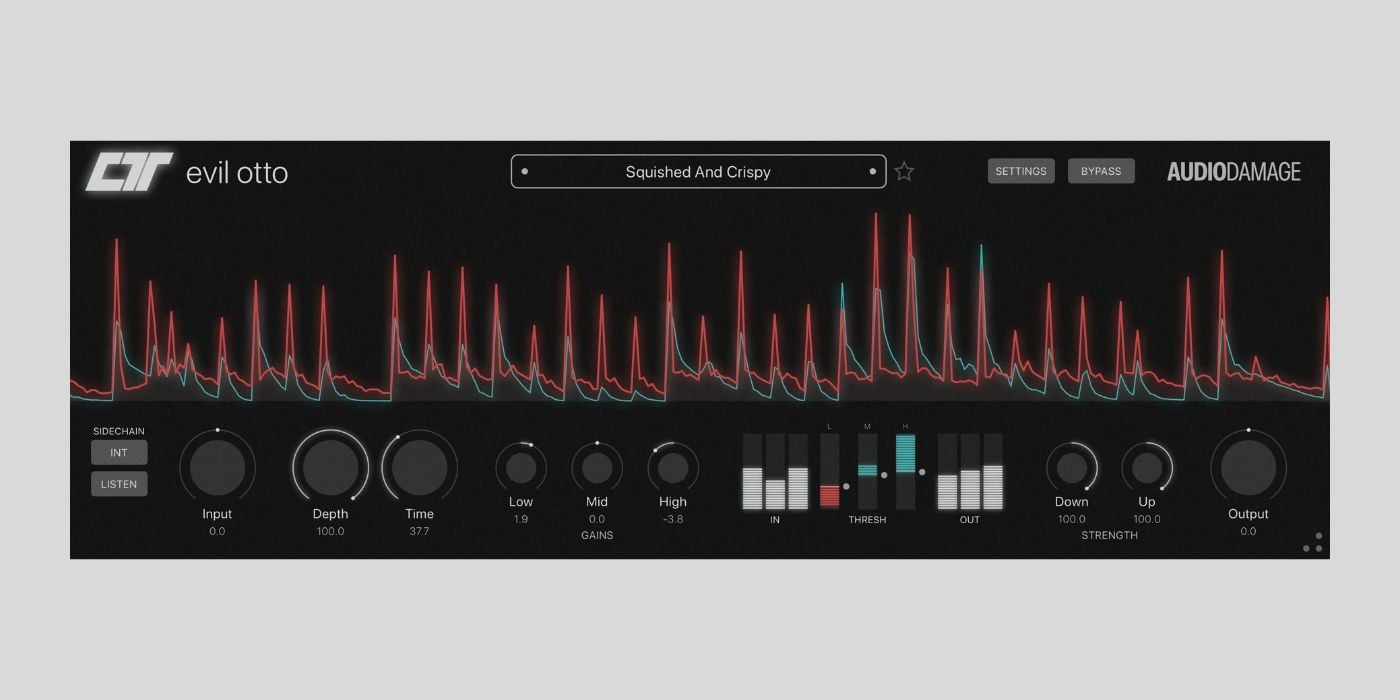
What I love about Evil Otto is the visual feedback. The interface shows a scrolling waveform display that overlays input and output signals in real time, with draggable threshold regions for each of the three bands.
You can see exactly how the compression is shaping your signal. This makes it much easier to dial in the right amount compared to the original OTT’s minimal display.
The controls are more granular than Xfer’s version, too. Separate Down Amount and Up Amount knobs let you independently control peak-taming and detail-boosting compression. There’s also a sidechain input with a listen mode, so you can verify your routing before committing.
Platform support is superb: VST3, CLAP, and AAX on Windows; VST3, CLAP, AU, and AAX on macOS; and VST3, CLAP, and LV2 on Linux. The desktop versions are free (mailing list sign-up required). There’s also a paid iOS version ($2.99) for mobile production.
More info: Evil Otto (VST3/AU/AAX/CLAP/LV2 for Windows, macOS & Linux)
Polarity-MD by Polarity
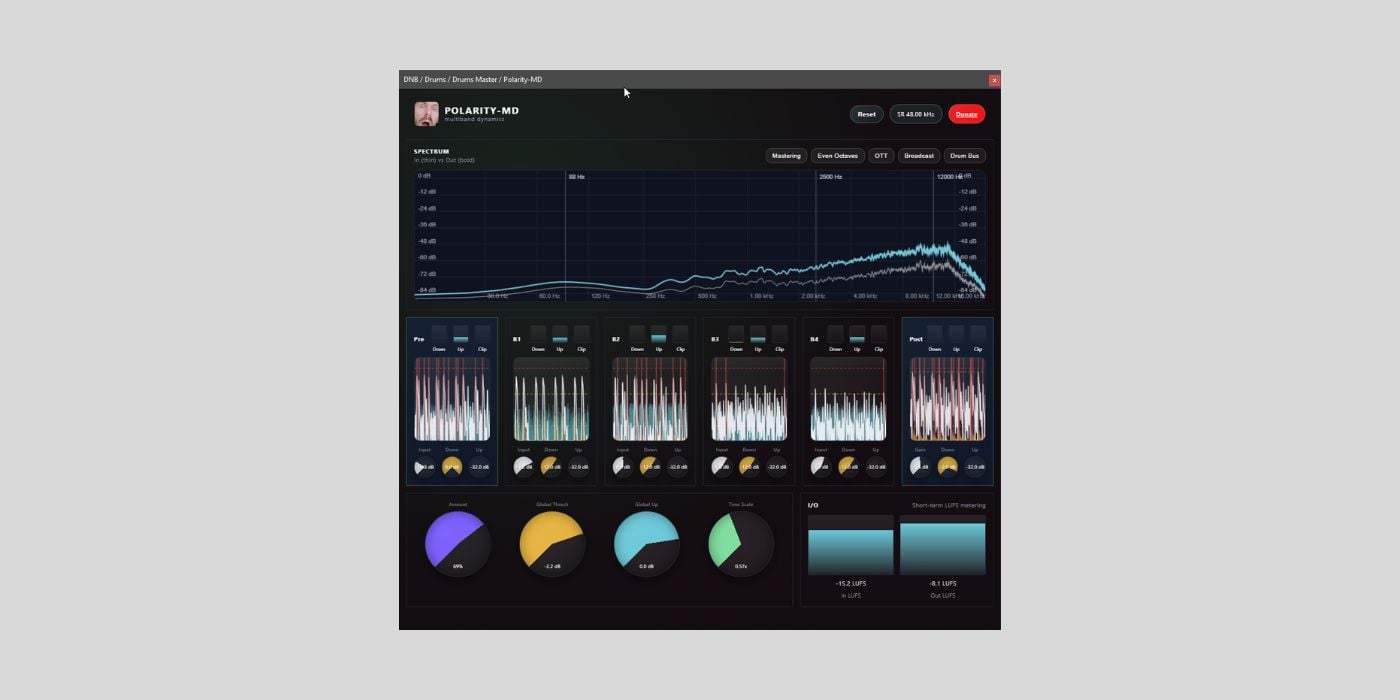
Polarity-MD is the most feature-packed option on this list, but it’s still in beta. Built by Berlin-based Bitwig educator Polarity, it’s an open-source 4-band multiband dynamics processor with features that go well beyond standard OTT compression.
The headline additions are linear phase crossovers (addressing the phase cancellation issue that affects most OTT plugins), per-band clippers, pre- and post-compression stages, LUFS metering, a spectrum analyzer, and per-band waveform graphs.
The “Pro View” mode unlocks per-band attack and release controls. There’s also a normalization feature based on a pink-noise curve that compensates for the perceived loudness boost created by OTT processing.
The GUI is built in HTML/CSS for cross-platform compatibility, which makes it look and feel a bit different from typical plugin interfaces. I found it a bit unstable, and scaling behavior can vary depending on your DAW and OS. It’s a trade-off for the Linux-native support and open-source development model.
Polarity-MD is free, requires no sign-up, and is available on Windows, macOS, and Linux. Keep in mind that it’s officially in beta, so you can expect occasional bugs that might get fixed in future updates. No AAX format, so Pro Tools users are out of luck.
More info: Polarity-MD (VST3/AU/CLAP/LV2 for Windows, macOS & Linux — beta)
Which free OTT plugin should you use?
Best for beginners: Xfer Records OTT. It’s the industry standard, works in every DAW, and the Depth knob gets you 90% of the way there. If you’re new to OTT compression, start here and branch out later.
Best for simplicity: Squash. If you want OTT results without touching a single parameter beyond an X/Y pad, Squash is the fastest path from “no plugin” to “sounds good.” The phase-safe mix knob is a bonus.
Best for precision and control: 8TT. The 8-band architecture and drag-and-draw interface give you far more control over how the compression affects different frequency ranges. This is the one I reach for when three bands aren’t enough.
Best visual feedback: Evil Otto. The real-time waveform overlay and draggable per-band thresholds make it the easiest OTT plugin to understand visually. Audio Damage’s design makes a real difference when you’re trying to learn what OTT compression actually does to your signal.
Best for Linux users: Evil Otto or Polarity-MD. Both offer native Linux builds with LV2 format support. Polarity-MD has more features; Evil Otto has a more polished, stable interface.
Best for Ableton users: The built-in OTT preset in Multiband Dynamics. You already have the most flexible version of OTT available. The standalone plugins are useful if you want a simpler workflow or need to match settings with collaborators on other DAWs.
Most feature-rich: Polarity-MD. Linear phase crossovers, per-band clippers, LUFS metering, open-source, and free. The beta status is the only real caveat.
Best for adding harmonic color: Cramit. The seven distortion types with pre/post placement give you tonal options that no other free OTT plugin offers.
Frequently asked questions
What does OTT stand for?
OTT stands for “Over The Top.” It refers to a style of aggressive multiband compression that applies both upward and downward compression simultaneously, boosting quiet details while taming peaks. The name comes from the original preset in Ableton Live’s Multiband Dynamics device.
Is the OTT plugin free?
Yes. The original Xfer Records OTT plugin is completely free to download and use, with no restrictions or sign-up required. Several alternatives are also free, including 8TT by Discreet Signals, Squash by Minimal Audio, Evil Otto by Audio Damage, Cramit by Sixth Sample, Dynastia by Outobugi, and Polarity-MD.
Which OTT plugin is closest to the Ableton original?
Xfer Records OTT is the closest standalone recreation of the Ableton preset, though it runs slightly louder and offers less control over crossover frequencies and per-band timing. For the most faithful OTT experience, the built-in preset in Ableton Live’s Multiband Dynamics device remains the most flexible option.
Can I use OTT plugins in FL Studio?
Yes. All standalone OTT plugins on this list are available in VST3 format, which FL Studio fully supports. Xfer Records OTT, 8TT, Squash, Evil Otto, Cramit, and Polarity-MD all work in FL Studio without issues. The only option that doesn’t work in FL Studio is the Ableton Live OTT preset, which is exclusive to Ableton.
What is the difference between OTT and a regular multiband compressor?
A regular multiband compressor typically applies only downward compression, reducing the volume of sounds that exceed a threshold. OTT-style compression applies both upward and downward compression simultaneously across multiple frequency bands. The upward compression boosts quieter elements while the downward compression controls peaks, resulting in a much more aggressive and “in your face” sound than standard multiband compression.
Are there free OTT plugins for Linux?
Yes. As of 2026, Evil Otto by Audio Damage and Polarity-MD both offer native Linux builds with LV2 format support. Polarity-MD also supports CLAP and VST3 on Linux. These are the only two free OTT-style plugins with official Linux versions.
Return to our Free VST Plugins page for more freeware plugins and instruments.
This page was last updated by Tomislav Zlatic on March 25, 2026.
The author, Tomislav Zlatic, is the founder and editor-in-chief of Bedroom Producers Blog (BPB). Since starting BPB in 2009, he has tested and reviewed hundreds of VST plugins.