



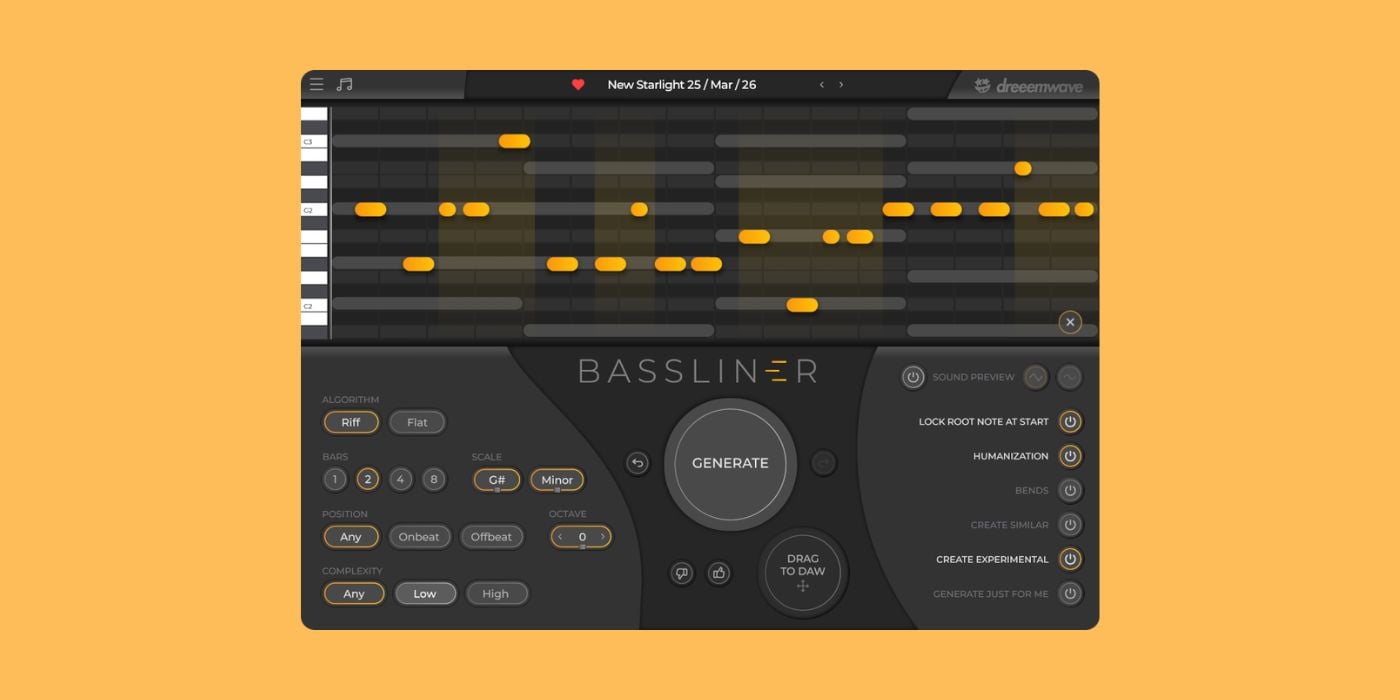
We first covered Bassliner during its open beta stage in late 2024.
It’s been a while since then; Bassliner is now a fully fledged commercial plugin, and I’ve been putting it to the test over the last couple of days.
What is Bassliner?
Bassliner (25% off using the promo code “BPB25”) is a MIDI bassline generator, available in AU and VST formats for macOS and Windows.
It’s primarily aimed at modern electronic music.

Like any MIDI generator (ABYZOR, Fantamidi, etc.), Bassliner delivers speedy results when you’re going through a creative block or when time is of the essence.
The MIDI FX plugin generates basslines at the click of a button, based on various adjustable parameters or a MIDI reference track.
You can then use the generated MIDI to trigger any virtual instrument.
Bassliner costs €24, but BPB readers can claim a 25% discount using the promo code BPB25.
No AI
MIDI generators have been around for a long time, and the recent trend is to go down the AI-powered, machine learning path.
Instead, Bassliner is rooted in years of extensive research on algorithmic music generation.
Without getting into the AI is the end/AI is the future conversation (we’ve probably all exhausted our thoughts on that), there are a few things to consider.
No AI means completely royalty-free with no potential issues down the line, unless a random pattern generation closely mirrors a copyrighted work.

AI-powered MIDI generation is still pretty janky, to put it mildly.
Bassliner is still hit or miss, of course, like any similar product, but it generally comes down to whether you like the pattern or not, rather than extremely unrealistic results that you sometimes get from AI.
Bassliner seems to have more solid foundations.
Cableguys
For anyone who hasn’t encountered Bassliner before, it’s worth highlighting the collaboration with Cableguys, who supplied the beta UI and assisted with server communication.
Features
Here’s a rundown of Bassliner’s main features.
- One-click bassline generation
- Up to eight bars
- Key/Scale selection (major, minor, or phrygian)
- Riff and Flat algorithms
- On or off the beat patterns
- Complexity variation
- User Input Awareness
- Piano Roll
- Locked zones
- Articulation variants (humanise, bends)
- Create similar/experimental
- Create just for me and Offline mode
- Drag and drop MIDI
- Bassline Library
The Riff and Flat algorithms are, as expected, a case of more movement versus steady repeated notes. It’s worth noting that Flat doesn’t automatically mean anchored to a single note; it will sometimes suggest harmonic patterns by moving through several root notes.
The complexity variation (Any, Low, High) can produce drastically different results, but I’ve found that even the complex patterns are generally sensible enough. When a pattern is too busy, you can easily make adjustments (note length/position) or add/remove notes from the piano roll.
In addition to creating similar patterns, you can create one or more Lock Zones on the piano roll to preserve certain notes before generating new ones, and that’s very useful.
Lock zone image.
User Input Awareness is when Bassliner creates patterns relative to a MIDI file you drop into the plugin as a reference. It uses it as a guide to follow chord progressions, etc. You can use this in pretty creative ways, too.
The Create Experimental function doesn’t always produce what you need, but that’s the point. The thing I really like about it is that it often uses wide intervals, over an octave, and creates nice glitchy patterns through note length variation.
Experimental Image
Bassliner allows you to submit feedback on patterns (thumbs up/down), and will often deliver popular patterns (according to feedback). If you don’t want to risk getting a repeated pattern from the feedback pool, turn on Generate Just for Me.
You need to be online to use all features, but there’s a limited Offline Mode; it’s something, but not as customizable as the online experience.
Lastly, in terms of features, the Bassline Library lets you save and recall patterns you like by name, scale, length, and date. But, unless I’m missing something painfully obvious, it seems you can’t change the automatically assigned name, which is a nightmare if you have a growing collection.
Simplicity
If the features mentioned above seem very straightforward, it’s because they are, and that’s one of Bassliner’s strengths.
You can generate patterns instantly and make quick adjustments without getting bogged down with convoluted or needless options.
Developers are sometimes tempted to throw everything but the kitchen sink at a plugin, especially a paid product, and sacrifice quality for quantity.
Dreeemwave has kept it simple by choice, and it suits the plugin’s purpose.
Sensible suggestions
I mentioned that even the complex patterns are generally sensible, and I just want to expand on that a little.
Bassliner does some good things, like utilising common target notes and intervals for basslines (roots, thirds, fifths, sevenths, octaves) with colour tones in between.
But. I’d expect it to do that. What impressed me more was that it shows deeper musicality by using concepts like descending basslines, rather than the almost copy-and-paste-style patterns that some plugins produce.
Descending Bassline Image
It’s not all about the bass
Although a bassline generator, Bassliner is a handy tool for generating melodic patterns in any range. It’s great for little synth ostinatos through a verse.
Harmonies
I mentioned using the User Input Awareness feature in creative ways, and using one generated pattern (click and drag it to the piano roll) to generate a harmonically fitting second pattern is one of the best things about Bassliner.
It’s something the developer encourages in his demo videos, and it’s ideal for creating interwoven patterns (in any range) with lovely little chordal elements throughout.
User Input Awareness Image
Hit me on the one
I found that Bassliner tended to generate offbeat patterns more often than onbeat when set to Any and complexity set to High.
It even generated offbeat patterns when set to Onbeat with High complexity.
I’m not sure if my experience is a strange coincidence or if it leans more that way because much electronic music favours offbeat basslines. It’s easily remedied, but it seemed a little odd.
Final Thoughts
Bassliner is one of those plugins that does exactly what it says on the tin, and that’s what it should be.
The simplicity that I like about it probably means the hard work it took to create the plugin could be overlooked, but it shows in how the musical patterns can be.
It’s reasonably priced for its niche, too, which isn’t always the case these days.
This article contains affiliate links, which means BPB may earn a commission if you purchase through those links at no extra cost to you.
Get the deal: Bassliner (€24 – 25% off for BPB readers using the promo code “BPB25”)
