



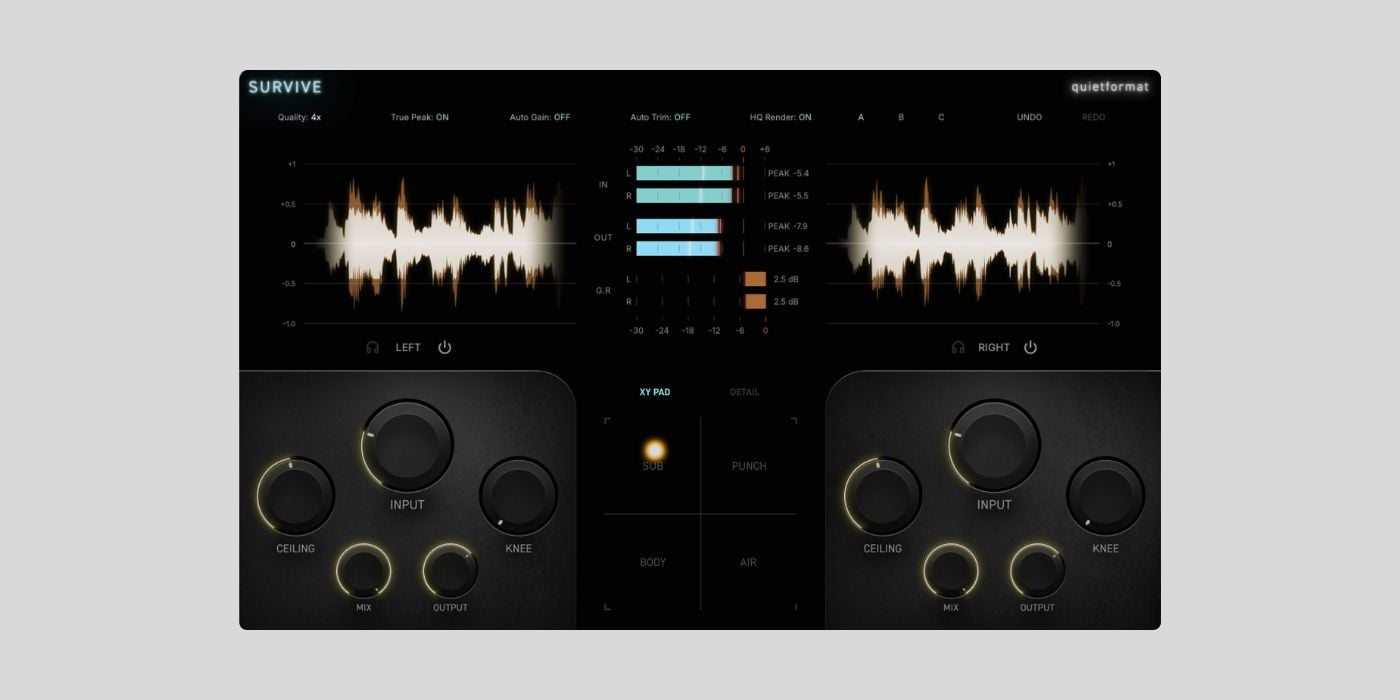
quietformat has released SURVIVE, a free clipping processor plugin for macOS and Windows.
To get SURVIVE for free, you need to enter your email address on the product page and agree to receive the quietformat newsletter. The newsletter signup is not optional, but the plugin itself is free once you complete the form.
I have mentioned before that clippers are probably one of the most widely available plugin types right now. There are many excellent free ones already (we recently featured Beheader), so a new clipper needs to do something beyond the usual input/ceiling workflow to stand out.
SURVIVE is one of the more feature-packed free clippers I have seen lately. It still starts with the familiar Input and Ceiling controls for setting the clipping amount, but then adds several ways to shape the result and see what is happening to the signal.
The interface feels a little busy at first glance, but it is nicely laid out and easy to figure out once you spend a moment with it. I also like that it gives you plenty of metering options, including a gain reduction meter and a live waveform display.
The most interesting feature is the XY Pad, which lets you move the processing priority between SUB, BODY, PUNCH, and AIR. In practice, that gives you a quick way to steer the clipping toward low-end weight, midrange density, transients, or high-frequency openness.
The waveform display is especially useful because SURVIVE shows the input and processed waveforms on the same timeline, while highlighting the regions affected by clipping. That makes it easier to judge how hard you are pushing the signal and how much of it is actually being clipped.
You also get independent Left/Right and Mid/Side processing. You can keep the channels linked for matched adjustments or unlink them to use separate Input, Ceiling, Knee, Mix, and Output settings on each side of the selected mode.
The main controls cover Input, Ceiling, Knee, Mix, and Output, while the Detail section adds Texture, Tone, Shadow, Shadow Time, Width, and Clean Sub. There are also three comparison slots, plus Undo and Redo, which should make it easier to test different clipping settings without losing your previous version.
On the technical side, SURVIVE combines filtered oversampling with ADAA in the nonlinear clipping stage. It includes 2x, 4x, and 8x oversampling modes, True Peak detection and ceiling control, HQ Render mode for offline export, and 65 samples of real-time processing latency.
SURVIVE is available for macOS 11 or later and Windows 10 or later. The macOS version includes AU and VST3 formats, while the Windows version is VST3 only.
Download: SURVIVE (FREE)
Deal of the day 🔥: Get the VATRA mix finisher plugin by Flame Sound!More:
