



In this review, I’ll be focusing on TkDelay, but if you haven’t already, you should definitely go check out our review of their wonderful Moodal resonator effect.
TkDelay has earned plenty of high praise in the last two years – and rightly so! It’s an approachable yet powerful delay plugin with a clean, streamlined GUI, simple, intuitive controls and a feather-light CPU hit. I can’t say enough positive things about Tritik’s elegant design choices, not just for TkDelay, but with all of their plugins, including Krush, a free bitcrusher effect released earlier this year…
The Review
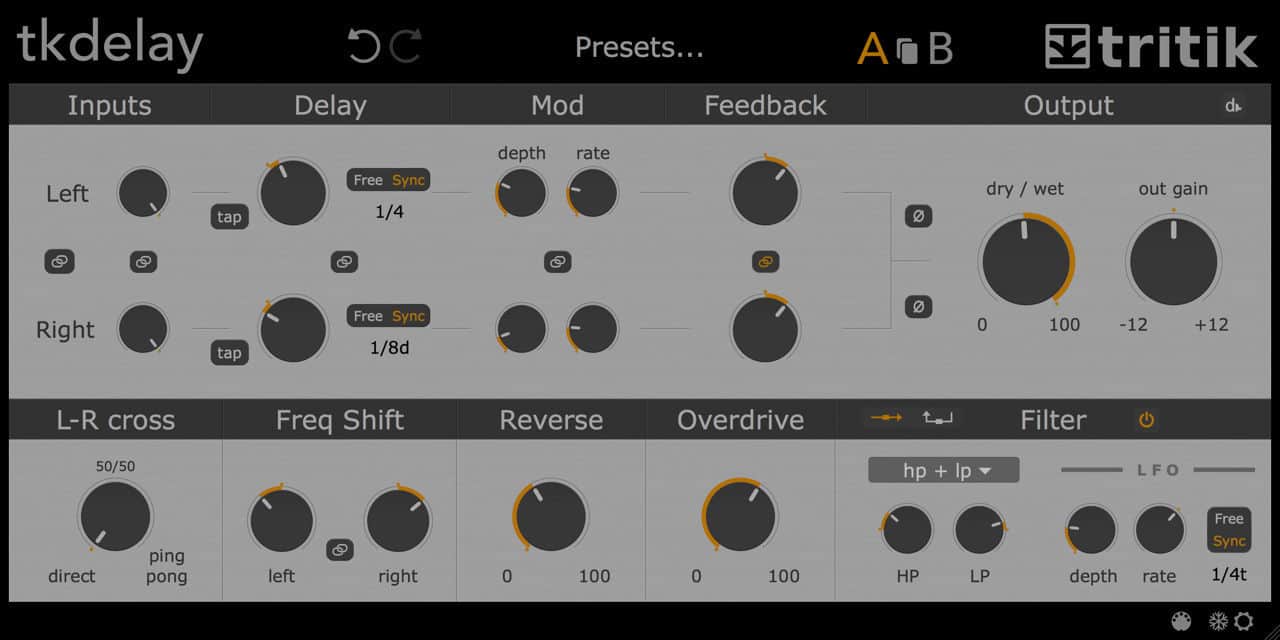
TkDelay has two parallel delay lines with linkable controls for delay time, modulation, feedback and both left & right “Freq Shift” parameters in Hz – yeah, there’s even a frequency shifter! You can also link all of the delay parameters at once with a single button if you so chose, or invert the phase of either of the two signals prior to the Output section with basic output level and dry/wet crossfader controls. Don’t overlook the Ducking controls tucked away in a cleverly hidden subsection within the Output panel, with ratio and threshold knobs and a simple attack & release envelope.
See also: Free Krush Bitcrusher/Filter VST/AU Plugin By TritikAlso, there’s a cross-feedback control in the “L-R Cross” section for ping-pong delays, which are more noticeable with one of the stereo channels completely turned down, so you get the full panoramic effect. I’ve already mentioned the “Freq Shift” section, with linkable/independent frequency controls for both stereo channels, which can produce eerie pitched effects in tandem with high feedback settings.
Another major selling point is the “Reverse” knob, which allows you to crossfade between the reversed and unreversed signal, a feature that isn’t always available in delays that include reverse algorithms; I have a DigiTech Hardwire DL-8 pedal with a reverse delay setting, but there is no dry signal output.
There are four basic filter types: low-pass, high-pass, band-pass and an “HP+LP” combo that will change the Cutoff and Resonance controls to “LP” and “HP” controls. At the top of the Filter section, there’s a toggle button that allows you to place the filter inside or outside the feedback loop. You can modulate the filter frequency (in milliseconds or tempo-synced values) with the depth and rate controls in the filter LFO. There are no additional waveforms I’m afraid, which isn’t a complete deal-breaker, although might I suggest a small handful of LFO waveforms in a forthcoming update?
There’s a tempo-tap button for each of the delay time parameters, and also depth and rate knobs in the Modulation section that allow you to modulate the delay time in milliseconds, which is especially useful for creating chorus – and if you crank the feedback knob – flanger effects.
In the bottom-right corner of the GUI, there are additional options available in the Preferences menu, such as a “Dark” theme (which I love to tears) a “Freeze Parameter” menu with a checklist of parameters that won’t be changed when loading presets, and a MIDI Learn button with a hidden menu that will appear when selected, providing a brief list of options, such as sixteen available MIDI input ports and also the ability to save and load your own MIDI banks in the MIDI Presets Browser.
The Verdict
In all honestly, this is one of the best delay plugins I know of, for no other reason than it being so approachable! It’s also fun to use, which is such an important thing that developers often forego. While many plugins are obsessively focused on reproducing the exact frequency response of vintage hardware, I just wish there more plugins I genuinely enjoy using. This is one of them.
More info: TkDelay (€49)
More articles:
- Krush Is A FREE Bitcrusher VST/AU Plugin By Tritik
- Tritik KrushPro Review
- Tritik Echorus Review
- Tritik Moodal Review
Last Updated on March 27, 2020 by Tomislav Zlatic.
Tritik TkDelay Review
TkDelay is one of the best delay plugins that we know of. Apart from being very approachable, it is also fun to use, which is such an important thing that developers often forego.
-
Features8
-
Workflow10
-
Performance10
-
Design10
-
Sound8
-
Pricing9
