
Close Menu
Bedroom Producers Blog
  • Home
  • Favorites
    • Free VST
    • Free DAW
    • Free Autotune
    • Free Drum Kits
    • Free Music Production Software
    • Black Friday Deals
  • Reviews
  • Tutorials
  • Gear
  • Samples
  • 💬 Community
  • News
    • Software News
    • Soundware News
    • Deals
  • Black Friday 2025
Connect
  • About Us
  • Our Team
  • Privacy Policy
  • Advertise
  • Contact Us
Download
BPB Saturator Plus
Bedroom Producers Blog releases FREE BPB Saturator Plus analog saturation plugin
BPB Bassaturator
BPB Bassaturator is a FREE Bass Booster Plugin
BPB Dirty VHS
BPB Dirty VHS (FREE VHS Tape Plugin)
BPB Dirty Filter Plus
BPB Dirty Filter Plus (FREE Dual Filter Distortion)
BPB Dirty LA
BPB Dirty LA (FREE Vintage Limiting Amplifier)
  • Free VST
  • Free DAW
  • Free Autotune
  • Music Software
  • Drum Kits
  • Black Friday 2025
YouTube Instagram Facebook X (Twitter) RSS
Bedroom Producers Blog
  • Home
  • Reviews
  • Tutorials
  • Gear
  • Samples
  • Downloads
  • Community
  • News
    • Software News
    • Soundware News
    • Deals
SUPPORT BPB ❤️
Bedroom Producers Blog
You are at:Home»News»Waves Audio Releases FREE StudioRack Plugin Chainer
News

Waves Audio Releases FREE StudioRack Plugin Chainer

May 29, 2020By Bedroom Producers Blog6 Comments
Waves Audio Releases FREE StudioRack Plugin Chainer

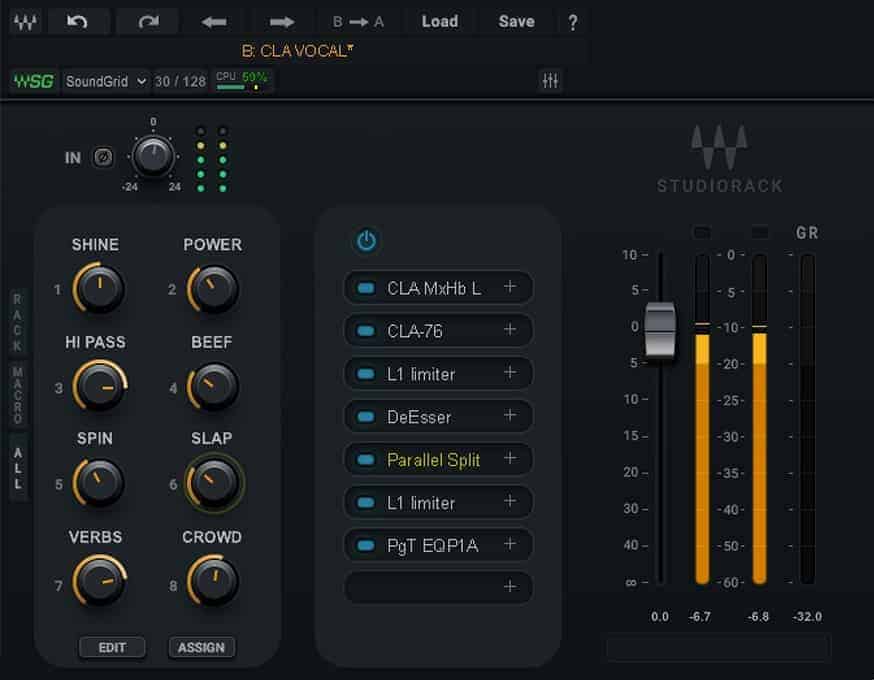
Waves Audio released StudioRack, a freeware virtual rack plugin for connecting multiple Waves Audio plugins (third-party plugins are NOT supported).

StudioRack implements the popular approach of unifying several plugins from the same developer within a single plugin instance, similar to what we’ve seen in the Soundtoys Effect Rack. The virtual rack acts as a flexible studio rack for building custom plugin chains with advanced routing and macro controls. It’s a workflow enhancement more than anything, but a welcome one, for it simplifies effects chains and plugin organization in your DAW session.

See also: Best FREE Mastering Software

StudioRack can chain up to eight Waves plugins per instance and offers up to eight macro controls per plugin chain. Different parameters from different plugins can be combined into convenient quick-access controls. With a bit of customization and clever routing, users can turn their favorite Waves plugin chains into bespoke custom plugins, so to speak.

Another helpful addition to the familiar rack concept is the use of routing modifiers, such as the parallel processing modules and multi-band splitting, as well as macro controls dedicated to specific user-defined
functionality. Waves StudioRack is capable of all that.

The ability to save and recall FX chains as presets, complete with internal audio routing, is a given. So is the plugin search function that lets you type and search inside your Waves plugin library. Should you need to home in on a specific plugin, it is still possible to open it inside its own floating window for a complete GUI overview.

Finally, Waves StudioRack supports the developer’s SoundGrid Studio technology to let you offload plugin processing to a SoundGrid server. Thanks to the offloading feature, your computer’s CPU no longer dictates how much effects processing you can do in a single DAW session.
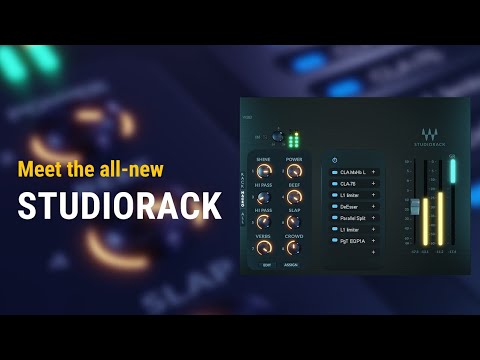
YouTube video

While Waves StudioRack is free and ownership of Waves plugins is not obligatory to get it, you will still need to pair StudioRack with a bunch of paid Waves plugins to get any meaningful functionality out of it. Thankfully, Waves always has some kind of sale going on. Currently, you can get a free plugin or two, respectively, when you spend $50 or $100 in the Waves webshop. Furthermore, enter the coupon code CREATIVE40 for a 40% OFF discount.

StudioRack is available in VST, VST3, AU, and AAX plugin formats for digital audio workstations on PC and Mac. Only 64-bit plugin hosts are supported. StudioRack can only host other Waves Audio plugins (there is no third-party plugin support).

More info: Waves Audio (use coupon code CREATIVE40 to get 40% OFF your purchase)

More articles:

  • Uhhyou Plugins Releases Free LatticeReverb Effect
  • Free Quarantine Piano Sample Library Released By Marco Belloni
  • SaschArt Releases FREE ReverseDelay VST Plugin
  • Waveshaper Releases Free VCO Drums VOL1 Sample Pack

Last Updated on May 29, 2020 by Tomislav Zlatic.

Free Software Mac Windows
Bedroom Producers Blog
  • Website

This is a sponsored article.

Subscribe
Notify of
6 Comments
Newest
Oldest Most Voted
Inline Feedbacks
View all comments
📬 BPB Newsletter
GET FREE STUFF - Receive the latest FREE plugins in your inbox every week.
Latest
Humble Bundle offers Make Music, Change Lives bundle starting at $1
January 16, 2026
IK Multimedia showcases ReSing (FREE) and a new expansion pack
January 17, 2026
Canvas Audio releases 8K console-style saturation and EQ plugin, FREE for two days
January 16, 2026
DsgDnB offers multiple FREE plugins for macOS, Windows, and Linux
January 15, 2026
DEALS
Deal of the day 🔥: Get the UA Moog Minimoog for only $29 + FREE gift!

Featured
How to Prepare A Song For Mixing
September 6, 2024
A Guide To Mixing Music For Music Producers
April 13, 2024
The Best FREE Drum Kits in 2025
February 12, 2025
Free Kontakt Libraries
January 28, 2025
COMMUNITY

🔥 Deals & Freebies Thread – January 2026

January 9, 2026615

🤝 Plugin Exchange Thread – January 2026

January 1, 2026155
aHow to Prepare A Song For Mixing
9 Mins Read
How to Prepare A Song For Mixing
How To Make Beats: A Quick Beat Making Guide For Beginners
10 Mins Read
Beat Making 101: How to Make a Beat for Beginners
Browse
# Music Production Software
# Free VST Plugins
# Digital Audio Workstations
# Video Editing Software
# Free Mastering Software
Download

# BPB Dirty Filter Plus
# BPB Dirty VHS
# BPB Dirty LA
# BPB Dirty Spring
# BPB Saturator

Community
# BPB on YouTube
# BPB on Facebook
# BPB on X (Twitter)
# BPB on SoundCloud
# BPB on Instagram
Subscribe
Subscribe to our mailing list to receive the latest music freeware news. We also have an RSS Feed.
Click to subscribe
© 2009 - 2026, Bedroom Producers Blog.
  • About Us
  • Our Team
  • Privacy Policy
  • Advertise
  • Contact Us

Type above and press Enter to search. Press Esc to cancel.