



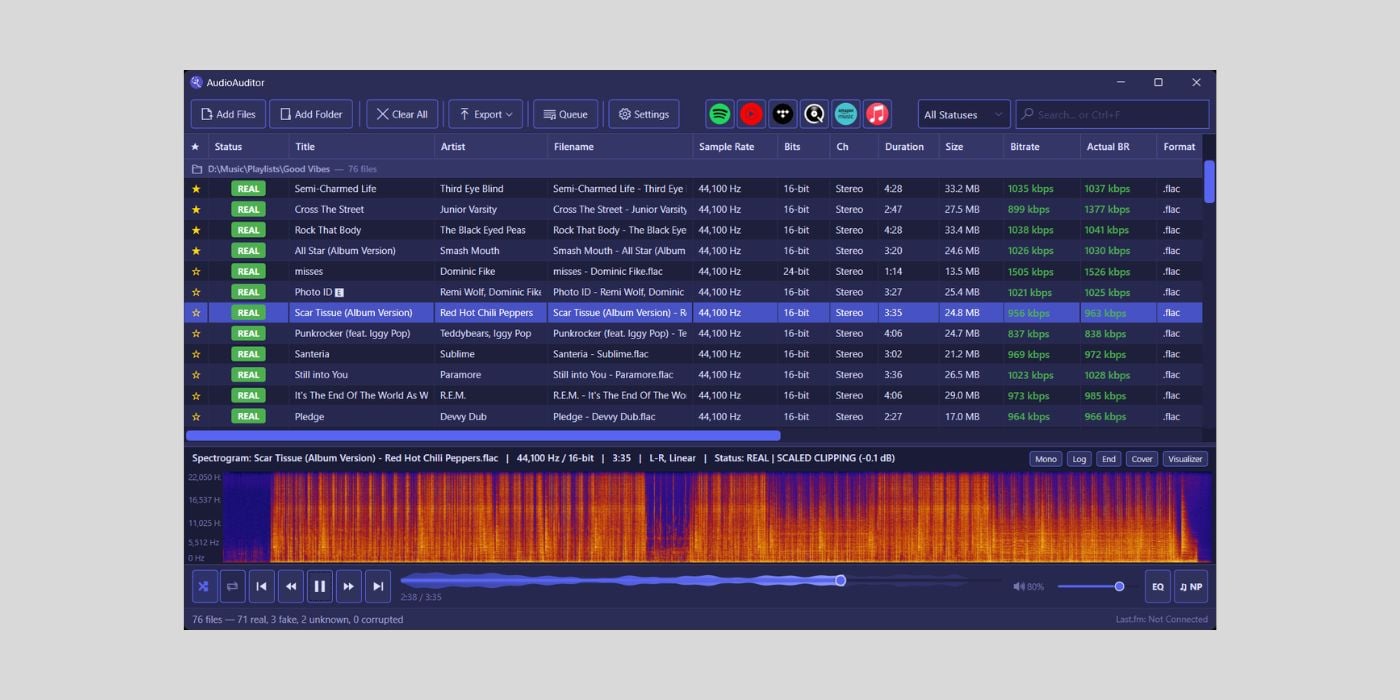
It’s always cool to see a free and open-source tool that offers a more comprehensive feature set than some paid alternatives, and that seems to be what we have with AudioAuditor.
The desktop and Command Line Interface app offers an all-in-one toolkit for analyzing and listening to music.
What is AudioAuditor?
AudioAuditor is a free, open-source app that combines the expected features of a music playback platform/app and an audio analysis engine, with some interesting extras.
The app is aimed at music producers and music lovers alike.
At the moment, the desktop app is only available for Windows 10 or later.
The CLI version is available for Windows and Linux, with macOS support coming soon.
Developer Angel2mp3 built AudioAuditor using the Microsoft .NET 8 framework/platform.
A full analytical toolkit
I mentioned that AudioAuditor seems to offer a more comprehensive feature set than some paid alternatives (Fakin’ The Funk, for example), and, if the stats are correct, it offers significantly more than many.
Here’s a list of what’s on offer from the audio analysis engine:
- Full metadata with editor
- Advanced spectral analysis
- Fake stereo detection
- Fake lossless detection
- MQA detection
- AcoustID fingerprinting
- Loudness and dynamics
- Digital/Scaled clipping detection
- Silence gap detection
- AI Detection (beta)
As you can see, there are quite a few identification and detection tools implemented in AudioAuditor, so I’ll expand on a few highlights.
I don’t want to spend much time on metadata, but I know it can be a tedious area, so I wanted to highlight the batch metadata GUI that allows you to extract missing tags from MusicBrainz. The MusicBrainz database, along with AcoustID, can be used to identify unknown tracks.
Metadata includes the typical artist/song info, sample rate/bit depth, size/bitrate, BPM, and True Peak/LUFS data.
Batch tools extend to metadata stripping, duplicate detection, playlist import, and auto-name from tags. So, if you need to tidy up your playlist, which can be another tedious area, there are some timesavers in place.
Spectral analysis comes from a full-resolution, multi-mode spectrogram with up to 20X zoom. The spectrogram also offers a few handy features that you don’t get for free everywhere.
In addition to logarithmic and linear frequency scaling, AudioAuditor provides a left/right difference view that highlights any stereo differences.
The app utilizes a 4096-point Hanning-windowed FFT setup to provide accurate frequency insights.
Since there’s no macOS support yet, I’ve not been able to test AudioAuditor, and I’m not certain if you can configure your own compromise between precision detail and timing by adjusting the number of points (like you would with something like iZotope’s RX), but it seems to be a fixed number.
However, a Hi-Fi mode offers a Blackman-Harris-windowed 16384-point FFT option.
Additionally, this app offers a feature that you won’t see on all similar alternatives: a multi-mode waveform/spectrogram comparison. There are three modes: Stacked, Overlay, and Wipe.
You can export (individually or in batches) spectrograms as PNG files.
The fake lossless detection is a handy feature for identifying upsampled audio. Some other freebies limit the number of detections before you have to pay.
The silence gap detection could be interesting, too, and a timesaver for podcasters and video editors. Although I’m not sure what sort of tools, if any, are applicable with this detection; for example, the option to truncate those gaps.
As always, until we have macOS support, I appreciate Windows users sharing their experience in the comments.
AI Detection
With AI music being everywhere just now, unfortunately, the AI detection feature might interest many of you.
There are various tools available that detect AI-generated music, like the Deezer AI Music Detector, SubmitHub AI Song Checker, and a host of browser-based options.
I checked out some of the free browser-based options, and they work fairly quickly, but they don’t supply much information, not in the free tiers at least.
If AudioAuditor displays findings in more detail after checking files for AI watermarks, byte patterns, etc., it could be a worthwhile alternative to paying for a service.
However, it still has a long way to go before the results are rock solid.
From the dev: “AudioAuditor’s AI detection tries its best to use verifiable evidence; however, that being said, these results can be inaccurate.”
The sad part is that by testing some of those free options, I did something I never thought I’d do; I used a free AI music generation platform, and I have to tell you, it didn’t feel good.
As an audio player
The built-in (native 96/192kHz) audio player is more than a token widget with some transport controls.
The basics include standard transport controls, along with shuffle, queue, and loop modes.
Beyond the basics, you have a ten-band parametric EQ with factory presets, customizable crossfade, and peak-based audio normalization.
I’m not the most up-to-date with current audio/media players; I know there are options like MusicBee and Foobar2000 for Windows.
I peaked with early versions of Winamp, back in my Windows days.
One of the things I remember about those days is the customization, which was relatively limited at the time.
AudioAuditor offers ten color themes and eleven animated playbar themes.
You also get six visualizer modes: Bars, Mirror, Particles, Circles, Scope, and VU meter.
Other visual elements include a statistics dashboard, a now playing screen, and a floating mini player.
All major audio formats are supported.
You can go deeper than an average audio player with third-party integration. There are six music service slots where you can add platforms like YouTube Music or Spotify to search for music and scrobble to various services simultaneously.
You can even share what you’re listening to on Discord. If I’m honest, sharing what I’m listening to and integrating services doesn’t really appeal to me; all I ever wanted from an audio player was to organize and play the mess of audio files I’d have everywhere, and that’s probably all I’d want now.
But everyone’s different, and I get the desire to create an all-in-one app to save users from looking elsewhere.
Other features that may appeal to some are Karaoke Mode and Lyric Translation, both in beta.
If you ever wanted to impress that special someone by singing a karaoke version of Enrique Iglesias’ Hero in Spanish, this could be your chance!
(Disclaimer: doing so may result in a temporary break in your relationship or a full-blown separation).
No telemetry
One thing I’m sure everyone can get on board with is an app with no telemetry.
There is no internet activity unless you use the music service integration search/scrobble, and an offline mode that turns off all connections.
The app doesn’t track or share your usage at all, and nothing you play/analyze is ever used for generative AI training.
Final Thoughts
Until a macOS version is available, I can’t say whether AudioAuditor is a bona fide one-stop solution or is trying to do too much, but if you already use any other app or service, it’s worth having a look.
My final-final thought is to remind you not to miss out on getting iZotope’s VEA for free from iZotope Japan (the offer ends on July 31, 2026).
Download: AudioAuditor (FREE)
More:
