



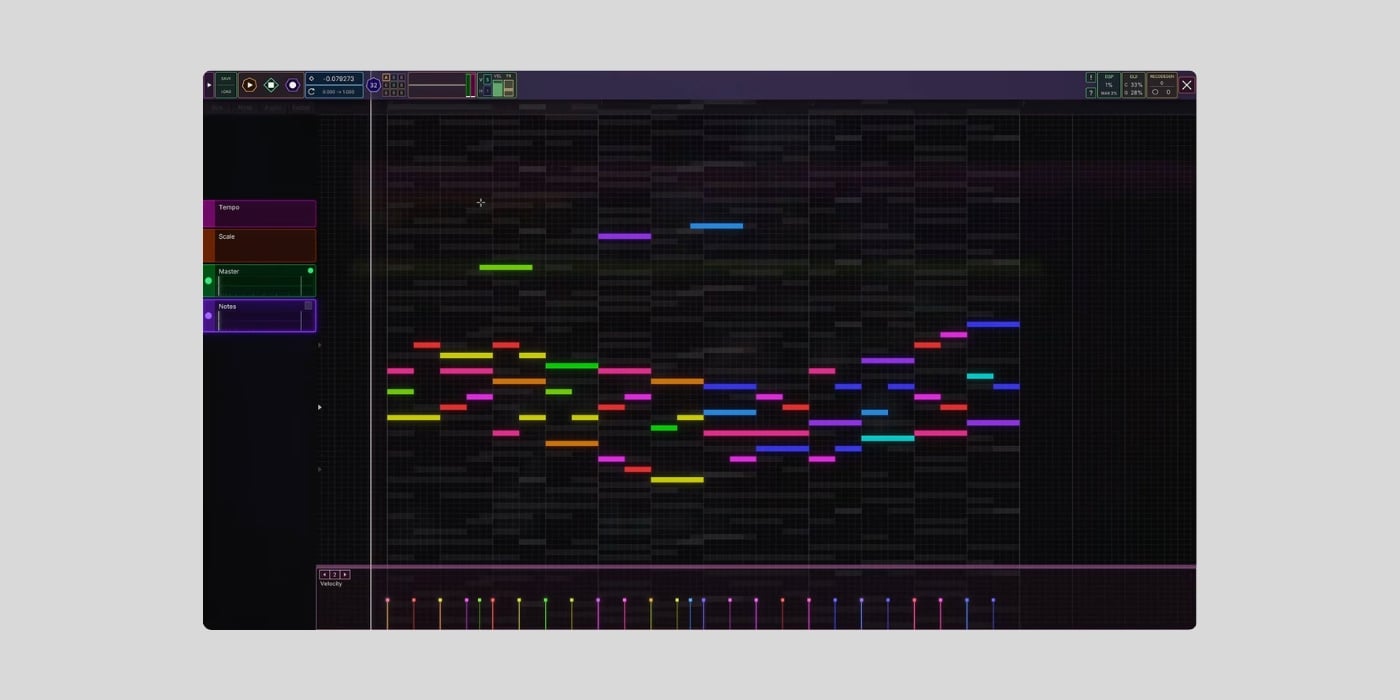
Unlike anything you’ve seen before, Septabee is a free DAW for Windows and Linux.
Even though well-established software like Tracktion’s Waveform Free often dominates the free DAW conversation, more options keep popping up constantly.
Check out our top free DAWs; there’s something to suit everyone, whether you’re a complete beginner or looking for a professional feature set.
Additionally, DAWs like Zrythm (v2 alpha) are on the horizon, then there’s the browser-based OpenDAW, and Audacity 4 tiptoeing slowly toward DAW territory.
However, none of those DAWs leaves you feeling like you’re living in some dreamlike amalgamation of Alice in Wonderland, Fear and Loathing in Las Vegas, and Monty Python.
So, buckle up and get ready for the world of Septabee.
What is Septabee?
Septabee is the merging of septagon and bee, and I can’t be any clearer than that!
Joking aside, Septabee (early access) is a free DAW for Windows and Linux from the developer Lost Robot.
Lost Robot has invested over 20,000 hours in this work in progress so far, and changes will keep coming thick and fast.
Septabee combines typical DAW elements with experimental features, a quirky layout, and a strong focus on audio quality and CPU efficiency.

The DAW features a modular DSP engine that lets you create unique instruments and effects. Users will be encouraged to share their creations, which is a practical way to build a community and an ever-growing toolset.
Despite my whimsical introduction, with no macOS version, I won’t be venturing all the way down the rabbit hole just yet.
That said, you only need to watch any of Lost Robot’s videos to feel like you’ve had an experience.
The interface
Before you even get to the interface, you’ll see a setup screen labelled “Septabee setup window thingamabob.”
You’ll also see a settings box with the header “I hope this works.”
It’s immediately obvious that the playful/informal approach isn’t solely because the DAW is far from finished; it’s the developer’s personality. There’s a mad scientist vibe from the get-go.
If you watch the tutorial video, the node-based interface can feel a little overwhelming at first. Because the modular framework doesn’t restrict you to a fixed architecture, and you have unlimited oscillators, the workspace can get really busy fast.
Before you know it, you’ve got modules, nodes, and patch cables everywhere, and nodes are called pomegranates; why wouldn’t they be?
Once you get past the initial what’s going on here phase, you’ll spot some familiar elements.
There are standard transport controls, a timeline with tempo/beats/bars, a list of keyboard shortcuts, and a neatly arranged Module browser.
Modules include Visualizer, Wavetable, SineDemo, SF2Player (microtonal), Filter, Limiter, and more.
Oh, and Pomegranates, of course.
You also have an infinite microtonal piano roll.
You don’t have third-party plugin support, and, honestly, that seems fitting for Septabee. It means that you’ll rely on effects that you create yourself or those shared by others, and won’t sound attractive to some users; I believe others will embrace the ground-up workflow.
I think the interface will seem less intuitive than a traditional DAW for some users, but for others, it will be a breath of fresh air (or like a hit from the bong).

To infinity, and beyond!
Lost Robot rather casually states that he created a new programming language, B++.
Septabee isn’t open-source, and even if it were, I’m not a coder, but I know B is better than C, so I’m all for it.
The efficiency that Lost Robot claims thanks to this new language means everything runs faster, smoother, and with a lower CPU hit than expected.
Lost Robot created a code generator that writes/rewrites code in real-time to provide the lowest possible CPU usage for your hardware and synthesis setup.
In addition to the optimised performance, Lost Robot suggests that Septabee is “crash immune,” and that you can never lose any data.
I mentioned that you can have unlimited oscillators, and building on that potential, Septabee allows you to easily create feedback loops and boasts audio rate modulation.
Any module can modulate another at full audio rate.
The developer talks about how it’s impossible for the audio quality to be any better, and, on paper, it’s an ambitious project, albeit with a long way to go.
The website
I imagine the website will delight and frustrate in equal measure.
I have mixed feelings; I like that the website is a fair reflection of how eccentric Septabee is, and I love the nostalgia. It reminds me of early 2000s Flash soundboard websites that we’d use for prank calling restaurants as Jack Nicholson or Jack Black, etc (I was young).
But if I’m honest, as much as I am happy to see something a million miles away from vibe-coded nonsense, I like a website that just has a really clear message and clear text.
It’s quirky, a bit crazy, a bit random, and it fits the purpose.
TempleOS
There are lots of mentions of Terry A. Davis and TempleOS around Septabee, and I’m not surprised.
I mean, the TempleOS story gets pretty dark and tragic, and I don’t want to make light of that, but if we’re talking about the kind of whacky alternative feel, yes, there are clear similarities.
Septabee isn’t as far out as TempleOS, but it’s out there. It embraces the personality of its developer, Lost Robot, who clearly knows his stuff.
And, we can’t forget the fact that both developers created a custom programming language: Terry A. Davis with Holy C and Lost Robot with B++.
Final Thoughts
I think it’s nuts, of course I do; it looks like a colourful version of the computer display from Minority Report, and even the dev says “it’s not fake, you’re not dreaming” in the YouTube description.
But creative things are often nuts and brilliant at the same time.
I also think Lost Robot comes across like someone with a lot of ideas, and the technical knowledge to implement them.
The random elements of Septabee, like the website and some of the language used around the software, make me think the roadmap may have lots of twists and turns, with some features coming and going, rather than a linear path.
It would be cool to hear more about how B++ is far better than C++, in basic terms for people like me who don’t code.
There are lots of comments about the eccentricities of the DAW, but there’s also a lot of excitement, so I’m really interested to hear from users.
I know this early access version is little more than a preview of the workflow and concept, but If you’re on Windows or Linux, let us know how you get on with Septabee.
Download: Septabee (FREE)
More:
